For several weeks now people have been asking to be able to use the XML Document Transform (XDT) with App.Config files similar to what is available with Web.Config files in VS 2010…
In all honesty there is no official/supported implementation of XDT for any other project type than Web Application Projects but the good news is that the basis of Web.Config Transformation resides in Web Publishing Pipeline (WPP) which are set of extensible tasks and targets hooked up to provide a great deployment story for Web Applications…
Today, Ming (our senior dev on Visual Studio) and I decided to get together to give some love to App.Config file too… The below implementation is a crude way of getting XDT working into other project types within VS 2010… In a way, I would say it is a big solution for a smaller problem but the idea here is to get people unblocked and show the kind of things that WPP is capable of doing…
If by now everything is sounding foreign then please check out the articles:
Web.Config Transformation
VS 2010 Snippets for Web.Config Transformations
Web.Config Transforms (XDTs) for any XML files in your web projects
Goals
Please take a look at Visual Studio extension which allows you to do this without the manual workarounds below:
http://visualstudiogallery.msdn.microsoft.com/69023d00-a4f9-4a34-a6cd-7e854ba318b5
Step by Step Instructions
The example I am using below should be hopefully super simple that you can follow along without any prep work… All you need is VS 2010 which has “Visual Web Developer” components installed…
Step 1 Create a new Windows Forms Application in VS 2010
Step 2 Add App.Config file to the project…
Add simple test settings to App.Config file as shown below:
Step 3 Add App.Debug.Config file to the project, I would recommend using the same App.Config file adding mechanism as shown below

Step 4 Modify the content of App.Debug.Config as shown below:
The key things to note above are:
Step 5 Save the edited files and unload the project frin VS 2010 Solution Explorer using the right click command as shown below:
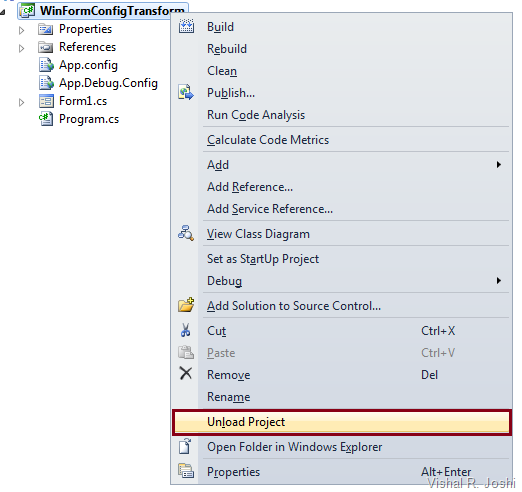
Step 6 Edit the .csproj/.vbproj file to make App.Debug.Config file to be dependent on App.Config file as shown in the syntax below:
The key things to note above are:
Step 7 Change the ProjectConfigFileName property within your .csproj/.vbproj file
WPP has an inbuilt property called ProjectConfigFileName which is by default set to Web.Config, we need to change this to app.Config which will allow projects like WinForm project not expect web.config files to transform… You can add this property right under ProjectGuid property as shown below:
Step 8 Hook up WPP within your WinForms project by importing the WPP targets.
You can search for “Import” node in your project file and then simply copy below one line for WPP targets import
Step 9 Add a target to copy the transformed App.Config file to your output (BIN) directory
You can simply copy paste the below code just before your </project> node closes in the .csproj/.vbproj file
The key things to note above are:
Step 10 Run /T:TransformWebConfig task on your Project from MSBuild
You need to use Visual Studio 2010 Command prompt and type in the below command
msbuild C:\Vishal\WinFormConfigTransform.csproj /t:TransformWebConfig
After running the above command if you now check the BIN folder of your project you should see that the Project.exe.Config file is now modified as shown below:
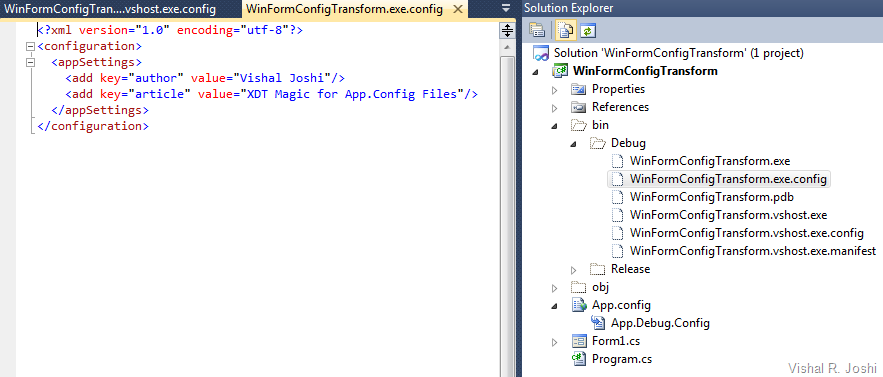
NOTE: If you want the App.Config file to be Transformed after every build in your Visual Studio IDE (this will take some perf away but may not even be noticeable) then you can change Step 9 code to be as below:
The only key difference above is that I made the new target to be called after “Build” and in the new target I made a call to “TransformWebConfig” target to ensure the transform happens before we try to copy the transformed app.config file to their final location…
With the above change now when you build in IDE then the new transformed App.Config will be copied to your output directory…
With the above 10 steps you should now be able to Transform your App.config just like the way you do Web.Config files in VS 2010
-Vishal
PS: Whenever you make changes to your project file (like above) you make your project susceptible to data loss during upgrade to future versions of VS as next versions of VS will not know all the fancy code you put in the files, but such risks are part of the game to get all the fancy toys working :-)
In all honesty there is no official/supported implementation of XDT for any other project type than Web Application Projects but the good news is that the basis of Web.Config Transformation resides in Web Publishing Pipeline (WPP) which are set of extensible tasks and targets hooked up to provide a great deployment story for Web Applications…
Today, Ming (our senior dev on Visual Studio) and I decided to get together to give some love to App.Config file too… The below implementation is a crude way of getting XDT working into other project types within VS 2010… In a way, I would say it is a big solution for a smaller problem but the idea here is to get people unblocked and show the kind of things that WPP is capable of doing…
If by now everything is sounding foreign then please check out the articles:
Goals
- Being able to use XDT syntax for App.Config files similar to what you can use with Web.Debug.Config and Web.Release.Config…
- Being able to use this in an automated fashion in build environments like Team Build…
- Reduce the concept count and make it as simple as possible (without digging deep into optimization & performance)…
Step by Step Instructions
The example I am using below should be hopefully super simple that you can follow along without any prep work… All you need is VS 2010 which has “Visual Web Developer” components installed…
Step 1 Create a new Windows Forms Application in VS 2010
Step 2 Add App.Config file to the project…
Add simple test settings to App.Config file as shown below:
<?xml version="1.0" encoding="utf-8" ?>
<configuration>
  <appSettings>
    <add key="author" value="Vishal Joshi"/>
  </appSettings>
</configuration>

Step 4 Modify the content of App.Debug.Config as shown below:
<?xml version="1.0"?>

<!-- For more information on using App.config transformation visit http://go.microsoft.com/fwlink/?LinkId=125889 -->

<configuration xmlns:xdt="http://schemas.microsoft.com/XML-Document-Transform">
  <appSettings>
    <add key="article" value="XDT Magic for App.Config Files" xdt:Transform="Insert"/>
  </appSettings>
</configuration>
The key things to note above are:
- There is a XDT namespace declaration which allows XDT engine to recognize the Transform/Locator syntax in the file
- There is a new node being inserted into the config file using the syntax xdt:Transform=”Insert”
Step 5 Save the edited files and unload the project frin VS 2010 Solution Explorer using the right click command as shown below:

Step 6 Edit the .csproj/.vbproj file to make App.Debug.Config file to be dependent on App.Config file as shown in the syntax below:
    <Content Include="App.config" />
    <Content Include="App.Debug.Config" >
      <DependentUpon>App.Config</DependentUpon>
    </Content>
The key things to note above are:
- By default the build action of App.Config and App.Debug.Config file will be “ None”… It needs to be changed to “Content”… This is a tiny pre-requisite for WPP but if you encounter any issues because of this then we can dig the work around…
- DependentUpon node will make your App.Debug.Config appear as a node under your App.Config file similar to the way Web.Debug.Config and Web.Release.Config files appear under Web.Config file…
- In VB Projects nested files are hidden so you might need to unhide these by clicking the icon on the solution explorer…
Step 7 Change the ProjectConfigFileName property within your .csproj/.vbproj file
WPP has an inbuilt property called ProjectConfigFileName which is by default set to Web.Config, we need to change this to app.Config which will allow projects like WinForm project not expect web.config files to transform… You can add this property right under ProjectGuid property as shown below:
  <PropertyGroup>
    <Configuration Condition=" '$(Configuration)' == '' ">Debug</Configuration>
    <Platform Condition=" '$(Platform)' == '' ">x86</Platform>
    <ProductVersion>8.0.30703</ProductVersion>
    <SchemaVersion>2.0</SchemaVersion>
    <ProjectGuid>{2D587604-866B-4675-8587-FA9728EC59D8}</ProjectGuid>
    <ProjectConfigFileName>App.Config</ProjectConfigFileName>
Step 8 Hook up WPP within your WinForms project by importing the WPP targets.
You can search for “Import” node in your project file and then simply copy below one line for WPP targets import
<Import Project="$(MSBuildExtensionsPath)\Microsoft\VisualStudio\v10.0\Web\Microsoft.Web.Publishing.targets" />
Step 9 Add a target to copy the transformed App.Config file to your output (BIN) directory
You can simply copy paste the below code just before your </project> node closes in the .csproj/.vbproj file
  <Target Name="PostTransformAppConfig" AfterTargets="TransformWebConfig">
    <Copy Condition="Exists('$(TransformWebConfigIntermediateLocation)\transformed\App.config')"
          SourceFiles="$(TransformWebConfigIntermediateLocation)\transformed\App.config"
          DestinationFiles="$(OutputPath)\WinFormConfigTransform.exe.config" />
    <Copy Condition="Exists('$(TransformWebConfigIntermediateLocation)\transformed\App.config')"
          SourceFiles="$(TransformWebConfigIntermediateLocation)\transformed\App.config"
          DestinationFiles="$(OutputPath)\WinFormConfigTransform.vshost.exe.config" />
  </Target>
The key things to note above are:
- We hooked up the new PostTransformAppConfig target after TransformWebConfig target… The TransformWebConfig target is the native target in WPP which does any XML transform and will do the actual job of transforming App.Config as well..
- The location at which the new App.Config file is getting copied is pretty self explanatory but do note that you do want to change “WinFormConfigTransform” to be the name of your own Project… I just used a project called “WinFormConfigTransform” and hence the DestinationFiles path is named as such…
Step 10 Run /T:TransformWebConfig task on your Project from MSBuild
You need to use Visual Studio 2010 Command prompt and type in the below command
msbuild C:\Vishal\WinFormConfigTransform.csproj /t:TransformWebConfig
After running the above command if you now check the BIN folder of your project you should see that the Project.exe.Config file is now modified as shown below:

NOTE: If you want the App.Config file to be Transformed after every build in your Visual Studio IDE (this will take some perf away but may not even be noticeable) then you can change Step 9 code to be as below:
<Target Name="PostTransformAppConfig" AfterTargets="Build">
    <CallTarget Targets="TransformWebConfig"/>
    <Copy Condition="Exists('$(TransformWebConfigIntermediateLocation)\transformed\App.config')"
          SourceFiles="$(TransformWebConfigIntermediateLocation)\transformed\App.config"
          DestinationFiles="$(OutputPath)\WinFormConfigTransform.exe.config" />
    <Copy Condition="Exists('$(TransformWebConfigIntermediateLocation)\transformed\App.config')"
          SourceFiles="$(TransformWebConfigIntermediateLocation)\transformed\App.config"
          DestinationFiles="$(OutputPath)\WinFormConfigTransform.vshost.exe.config" />
  </Target>
With the above change now when you build in IDE then the new transformed App.Config will be copied to your output directory…
With the above 10 steps you should now be able to Transform your App.config just like the way you do Web.Config files in VS 2010
-Vishal
PS: Whenever you make changes to your project file (like above) you make your project susceptible to data loss during upgrade to future versions of VS as next versions of VS will not know all the fancy code you put in the files, but such risks are part of the game to get all the fancy toys working :-)


55 comments:
hi,
first of all: i did post a similar comment - twice - on another blog post of you but it was never approved. hope this one will be...
we have a web.config that is making use of various other .config files that are referenced within the web.config itself, so we can separate various configurations for various staging/production systems more easy. now we would like to use XDT for these.
for example our web.config currently contains nodes like:
<connectionStrings configSource="connectionStrings.config" />
<roleManager configSource="roleManager.config"/>
and so on. we have several configurations splitted to various files (customErrors.config, smtp.config, roleManager.config myCustom.config, anotherCustom.config and more).
sure there are also several of these files connectionStrings.config.XXXX for staging, production, development and test systems (where XXXX stand for these build configs).
our post build scripts currently copies the correct files to the output dir and removes the .XXXX part.
but now, as there is XDT, we would like to use XDT.
but we would like to keep the various configurations separated in its own files, too (i.e. configurationStrings.config, smtp.config and so on).
can you please make XDT more "generic" so it can be used with other .config files, too? (not only on web.config and app.config!?
thanks, toebens
p.s. i know that XDT uses the format web[.BuildConfig].config and our files currently use web.config[.BuildConfig]. it should NOT be a problem for us to change this format!
why do you NOT approve ANY of my comments i typed in various blog posts???
Toebens,
I did not approve comments coz I was silly :-) Honestly, I did not realize that I had accidentally set my blog to not auto approve comments and now I have several hundreds of comments to weed through... I appreciate your patience while I look through them all...
thanks
Vishal
from your PS "but such risks are part of the game to get all the fancy toys working"
..but they shouldn't be - why would transforms not have been properly implemented and SUPPORTED in all project types for VS 2010 ? This seems like a huge over site; we shouldn't have to resort to these kinds of hacks
thanks for posting this though - works great!
XDT is a brand new technology and we had to try it out properly before we could reach out to everyone within Visual Studio and start asking to support XDT in eveyr project... We heard about Web.Config problems nearly every day so we first got that working and implemented in a very extensible way... By the time it was tried, tested and golden we ran out of runway to get it into every other project...
In a way if you folks love it then let us know then it will probably make sense to push for porting it into other project types too...
thanks for the background info - that's totally understandable
web.config transforms are a great idea! please, please push to have them implemented accross the board for VS v.Next!
The app.config transformation works great in WinForms project but it doesn't with ClickOnce. The app.congif and other configuration files that are used for transformation are copied to publish directory. The app.config files has same name and the projectname.exe.config file is not created. It's because the config files are marked as "Content" type. Can we have a solution that forks with ClickOnce also?
Thank you in advance.
Created a MS Connect suggestion for them to add it. Please vote if you want it to.
https://connect.microsoft.com/VisualStudio/feedback/details/564414
Thanks a lot for posting. I have applied the magic to a Windows Form project and it works. I also have a installer project that takes the output of the Windows Form project for installation package.
App.Config.xml is copied into the installation package, not the transformed one.
Any suggestion or solution? Thank you.
How could someone ever possibly assume that transformable configurations is a feature that is desirable in web projects only???
Just to let you know, I could not get this to work on an x64 machine until I changed the import statement to this:
Import Project="$(MSBuildExtensionsPath32)\Microsoft\VisualStudio\v10.0\WebApplications\Microsoft.WebApplication.targets"
After some wrangling I could not get this to work until I added a reference to system.web, just FYI.
Intead of writing the application name manually ("WinFormConfigTransform" in the example), you could use "$(AssemblyName)".
Write little tool, which can be executed from cmd for any files http://ctt.codeplex.com/ for XDT Transformation.
So now you can set Post Build Event for running this tool.
I'm trying to do this with a Unit Test project and I just can't seem to make it work. I've quadruple checked the steps, changed EXE to DLL where appropriate, etc. I can make a transform happen from MSBuild, but not from within the IDE, even with your steps. Is there any reason this wouldn't work in a project of type class library (Unit Test) with an app.config?
1) can you please advise if XDT will be available on "external"/separated .config files that are referenced by the web.config itself via "configSource" attribute (like described in my first comment above and as seen below in xml)
2) is it possible to completely pre-compile a web application project with the new web deployment package option (including aspx files NOT being updateable - like web deployment projects can)
3) if your answer to 2 is "no" - is it possible to combine both0 by first running web deployment project and then creating a deployment package (with iis settings and so on) on this non-updatedable pre-compiled web?
thanks, toebens
hello? nothing gets approved again - and please answer
If your comments are stuck for whatever reasons feel free to just send me an email at Vishal.Joshi@Microsoft.com and I will try to unblock it. I would keep the comments completely unmoderated on the blog but hate to see viagra type ads in the comments :-), and they flood up so fast that it is difficult to go to each blogpost and delete them after the fact, hope you will understand.
Thanks
Vishal
Q 1) can you please advise if XDT will be available on "external"/separated .config files that are referenced by the web.config itself via "configSource" attribute (like described in my first comment above and as seen below in xml)
A 1) Yes they are and the way to do it is explained at http://vishaljoshi.blogspot.com/2010/05/xml-document-transforms-xdt-for-any-xml.html
Q 2) is it possible to completely pre-compile a web application project with the new web deployment package option (including aspx files NOT being updateable - like web deployment projects can)
A 2) Not out of the box... Custom MSBuild targets and tasks will have to be created to do this... It is on my radar but unfortunately have not been able to find time to get it done...
3) if your answer to 2 is "no" - is it possible to combine both0 by first running web deployment project and then creating a deployment package (with iis settings and so on) on this non-updatedable pre-compiled web?
A.3) I am not 100% sure about the IIS Settings, can you give it a try by adding WDP on top of WAP and then click "Build Deployment Package" on top of WDP... You will have to manually put properties like IncludeIisSettings=True, IncludeAppPool=True, IISUrl=http://localhost/MvcApplication1 etc from your WAP into WDP project file... I totally understand this is a pain and will try to see whether I can abstract it out in some kind of easy fashion for everybody...
Great post! It works great.
By the look of things, it's not that different from Web Deployment in VS 2010. Why Microsoft don't support it in its IDE is beyond me.
I'm having a really hard time getting this working in my build server. Anyone have any ideas? I've used the AfterTargets="Build" option.. it works locally on my machine, but not on the build server where it builds successfully but doesn't transform the app.config.
Same situation as the previous poster...Does someone have a solution for that?
To add more to that: The transform does happen. However, the transformation happens only after the drop is created and pushed to the drop folder.
@Bala and others with issues, can you try this other approach. Instead of importing the Microsoft.Web.Application.targets file just paste the following into your project file (immediately above closing element)
<_TransformFile>@(AppConfigWithTargetPath->'%(Filename).$(Configuration)%(Extension)')
It looks like my last comment didn't come through due to the fact that I have XML there. You guys can grab the XML from http://pastebin.com/PLHt8wPX.
I have a quick question on how to integrate it with Visual Studio Setup Project. Its default output is pointing to App.Config as oppose to the bin/Debug/*.exe.Config. I am wondering if you have any suggestions on how to resolve it? Thank you.
I found an alternative by doing a pre-build copy from bin/Debug/*.exe.Config to App.Config. So, never mind. Thanks.
Thank you so much for this post and others on your site, I'm only just learning about ms deploy/web deploy and must say they're really powerful tools.
Could something similar be done for ApplicationHost.config? I'm looking for an easy way to unblock sections of .config files so that they can be overridden at the site level. I'm also looking for an easy way to add bindings to the deployed site.
>>>I'm looking for an easy way to unblock sections of .config files so that they can be overridden at the site level. I'm also looking for an easy way to add bindings to the deployed site
Hi Anonymous,
You can include all the IIS Configuration of your site in Web Packages, you can simply do that by checking "Include IIS Settings" checkbox on Package/Publish Web tab of your Web Project properties. If you do so you will need admin rights on the server as these properties as IIS core properties which need admin rights to be modified.
If there are certain web.config sections which are not overridable then you will have to go to IIS Manager and select the "Server" node on the left. Then you can click on "Feature Delegation" under Management section of the server properties and allow for the required overwrites (for IIS 7)
Hope this helps.
thanks
Vishal
Thank you so much for your answer!!
It does help in the sense that this is was what I feared. But I wanted to be able to run an automated script that doesn't require the administrator to manually use feature delegation. The point being that we want to get away from including screenshots of checkboxes with our installation instructions (as Scott Hanselman talked about). I'm currently experimenting with PowerShell and AppCmd to do this, but when I use appcmd unlock config /section:system.webserver/security/authentication/anonymousauthentication it doesn't seem to be reflected in the ApplicationHost.config file, which is kind of surprising and confusing.
The thing is, including IIS Settings is a great feature, except I need the settings on the production box to be different than those in our test/development environment, ie. bindings, since these things are not on the same domain. So after having imported the settings from my development IIS box, I would appreciate a way to customize the imported settings in Visual Studio. I'm sure this is something you're planning, so this is me looking forward to that.
Again, thank you for your help, I realise this is not a support site and will get out of your hair now :-).
Hi Anonymous,
Editing appHostconfig is an Admin only task so unfortunately it will require admin rights to make those modifications.
I understand your concern on not having IIS be the same on dev box and production. The ability to pass IIS Settings from a box which does not have IIS Configured as required is unfortunately not supported. We will be looking into that in the future.
Thanks
Vishal
i'm following along all the XDT stuff and blog posts by the team since the beginning, but haven't really used it in real projects/solutions yet. the process is too daunting. the is too much stuff to set up. (sure it isn't that much if you follow along such a tutorial-blog post for some tests, but it is annoying to tweak old/resisting projects and different project types for it to work.)
hopefully XDT will make it in - baked in - the next VS2010 update/service pack so there is no need to "hack" it in different project types:
@vishal:
Q 1) can you please advise if XDT will be available on "external"/separated .config files that are referenced by the web.config itself via "configSource" attribute (like described in my first comment above and as seen below in xml)
A 1) Yes they are and the way to do it is explained at http://vishaljoshi.blogspot.com/2010/05/xml-document-transforms-xdt-for-any-xml.html
Comment 1:
it would be pretty neat to right click a file in VS2010 solution explorer - for example - myxmlfiletogettransformedtoo.xml - to get XDT working with custom files too (the file extension could be various .xml, .config)
Q 2) is it possible to completely pre-compile a web application project with the new web deployment package option (including aspx files NOT being updateable - like web deployment projects can)
A 2) Not out of the box... Custom MSBuild targets and tasks will have to be created to do this... It is on my radar but unfortunately have not been able to find time to get it done...
Comment 2:
any updates on this?
3) if your answer to 2 is "no" - is it possible to combine both0 by first running web deployment project and then creating a deployment package (with iis settings and so on) on this non-updatedable pre-compiled web?
A.3) I am not 100% sure about the IIS Settings, can you give it a try by adding WDP on top of WAP and then click "Build Deployment Package" on top of WDP... You will have to manually put properties like IncludeIisSettings=True, IncludeAppPool=True, IISUrl=http://localhost/MvcApplication1 etc from your WAP into WDP project file... I totally understand this is a pain and will try to see whether I can abstract it out in some kind of easy fashion for everybody...
comment 3:
i could not get this working :(
Thanks! Great post and just what I needed for my Azure project.
Here is a solution that works with the ClickOnce publishing process. You need to override the AfterCompile target and AppConfigWithTargetPath item list.
This is nice tutorial man.Can you arrange coding part in some text part so that we reader can download for our use and test.
Very nice, thanks for the post. It worked great for me until I installed the VS 2010 SP1 beta, then I started getting this build error: 'The target "_CopyBinDeployableAssemblies" does not exist in the project.'
Then I saw jrodman's post above (I'm also running x64) and changed my Import statement to "$(MSBuildExtensionsPath)\Microsoft\VisualStudio\v10.0\WebApplications\Microsoft.WebApplication.targets" After that, it worked great.
How to writting app.config use Visual Studio 2010
toebens, Re: Pre-Compile merge, unfortunately WDP is only straight forward way right now but we will work on improving this story for the next release.
Can you send me an email at Vishal.Joshi@Microsoft.com on what went wrong with trying to create a package from WDP. I will connect you with the team.
Thanks
Vishal
For anyone who has issues getting this code sample to work against Team Build (on a TFS Build Server) try modifying the DestinationFiles property of the Copy task. Use the $(OutDir) instead of $(OutputPath). The latter was not pointing to the right place on my build server and as a result the App.Config was not being included in the build output.
For anyone who has issues getting this code sample to work against Team Build (on a TFS Build Server) try modifying the DestinationFiles property of the Copy task. Use the $(OutDir) instead of $(OutputPath). The latter was not pointing to the right place on my build server and as a result the App.Config was not being included in the build output.
hey vishal,
unfortunately once again i was looking for a better way to precompile our web application project PLUS this in combination with config transformation and deployment and came along here again.
i just saw your last comment and to answer your question what went wrong: its been a long time ago and i can not remember what was wrong. it didn't work + it was too complicated.
i hope you guys will come up with a nice update on webdeploy, config transformation + precompilation very soon.
we are still stuck on WDP, copying over the precompiled web to live server via FTP + manually updating the live server's web.config :( thats really annoying
maybe you come up with some easier solution for this one too: http://vishaljoshi.blogspot.com/2010/05/xml-document-transforms-xdt-for-any-xml.html
it is way too complicated to do all that stuff manually - hacking in project files.
regards, toebens
Toebens,
sorry that you are facing the problem. I hear your pain, we will try to see what we can do.
Thanks
Vishal
Btw, Toebens,
WDP today does support Web.config transformation so you can actually add web.config transforms and they will happen when you use WDP as well.
If you would like to know more about it please send me an email at Vishal.Joshi@Microsoft.com
thanks
Vishal
Worked like a charm. Thanks.
For Step 9 variable $(AssemblyName) can be used instead of hard-coded "WinFormConfigTransform" string.
Very useful article. Exactly what I was looking for.
Vishal,
I have actually written transforms for different environments for my MVC application and they work great with MSBUILD. One of the issue that we have in here is that out configs for now have some sensitive data like passwords present in it even though we are moving away from storing passwords in the web.config files. Because of this, its not so recommended for me to keep web.qa.config, web.prod.config and web.staging.config in the solution itself as all the developers will have the access to each of these files. As a part of the post build step, I want to use config transforms. Is there any utility/tool available or any facility that can help me give default web.config and transform file as the input and get environment specific transformed web.config as the output? As of now, I am not aware whether webdeploy has this capability.
Your response will be greatly appreciated as the issue I am facing will be resolved and I will be able to use config transforms effectively for the organization needs.
Thanks,
Amol
Hi ASN, you can use the TransformXml task to take a web.config as well as a transform file to generate the final web.config. See http://sedodream.com/2010/04/26/ConfigTransformationsOutsideOfWebAppBuilds.aspx.
Vishal,
First of all great stuff !!
I was trying to apply this same mechanism to silverlight ServiceReferences.ClientConfig before I stumbled on this post. I am not able to make this work for silverlight because of two main things. Let me know if I am thinking right...
One thing which I had to do was
ServiceReferences.ClientConfig
I am not sure if this is getting picked up correctly since the extension is not .config
on top of that silverlight is going to (or not) take my intermeditate file and package it in the xap. what event I should transform this so that silverlight compiler actually pick its up. I am not even sure that silverlight compiler looks at any intermediate for the config.
Thanks for your feedback in advance.
Sumeet
Actually I found the answer for the first part of my problem... the naming convenion followed by the internal engine is:
[filename].$(Configuration).[extension]
I was using
$(Configuration).[filename].[extension]
Silverlight xap packaging issue still remains though :(
Hi Vishal,
For second part of the solution
I ended up using this tool at https://github.com/peterbailey/XapFileInjector
Thanks for this great post again !!!
Sumeet
Great post!! Works like a charm! One question though, It works as described on the nodes (<add key=.... etc) is there a way to make it work on the binding definition for the WCF service?
Never mind my previous post. I have figgured it out by reading the posts you've linked to at the top of this one. All I had to do is add the xdt:Locator attribute.
Thanks again, this is a great help to my project!
I wrote nice extension to automate app.config transformation like the one built in Web Application Project http://visualstudiogallery.msdn.microsoft.com/579d3a78-3bdd-497c-bc21-aa6e6abbc859
The biggest advantage of this extension is that you don’t need to install it on all build machines
For those complaining that they have to manually copy web.configs and are using the WDP, then I have to say they really are taking advantage of what WDP can do. You can completely automate the entire web.config replacement. When I publish web sites, I hit a CC.NET project Start. This starts a build of the specified project using MSBuild. In the actualy wdproj, I use after build steps to copy the compiled website out. That website includes the automatically altered web.config. Once its setup, it truly is one click deployment of your website(s).
Post a Comment