My friend is looking for a C# Content Strategist for his team @ MSDN... This person needs to be a developer at the same time needs to understand what content developers need in this space... The selected candidate will have to relocate to Redmond, WA, USA...
For more information about the job Click Here
If interested email me with the subject "Position in MSDN Team"
Wednesday, November 30, 2005


Monday, November 28, 2005
Why MCITP for DB & BI Developer??
Why is "Database Developer" and "Business Intelligence Developer" Tracks PRO credential called "Microsoft Certified IT Professional (MCITP) and not Microsoft Certified Professional Developer (MCPD)?
I have been asked this question n number of times... Let me try to present the rationale:
With the New Generation of Certifications job roles are separated from technical skills... The technology specialization is accredited generically Microsoft Certified Technology Specialist (MCTS), but same cannot be done with the job role skills as professionals in different IT space relate themselves in different ways...
There were lots of surveys, interviews and focus groups conducted around this... Professionals working in the job roles of database developer and BI developer were interviewed to find out the credential that they could relate to... Survey results indicated that MCITP resonated more with SQL Server professionals... After further supporting research, discussions and approvals MCITP was chosen for Database Developer and Business Intelligence Developer...
MCITP and MCPD are both Professional job role focused credentials...
Both the credentials need MCTS credential as pre-requisite...
For IT Pro audience the PRO credential is MCITP and for Developer audience the PRO credential is MCPD...
SQL Server professionals liked MCITP more and so MCITP is the new PRO series credential for the SQL space...
I have been asked this question n number of times... Let me try to present the rationale:
With the New Generation of Certifications job roles are separated from technical skills... The technology specialization is accredited generically Microsoft Certified Technology Specialist (MCTS), but same cannot be done with the job role skills as professionals in different IT space relate themselves in different ways...
There were lots of surveys, interviews and focus groups conducted around this... Professionals working in the job roles of database developer and BI developer were interviewed to find out the credential that they could relate to... Survey results indicated that MCITP resonated more with SQL Server professionals... After further supporting research, discussions and approvals MCITP was chosen for Database Developer and Business Intelligence Developer...
MCITP and MCPD are both Professional job role focused credentials...
Both the credentials need MCTS credential as pre-requisite...
For IT Pro audience the PRO credential is MCITP and for Developer audience the PRO credential is MCPD...
SQL Server professionals liked MCITP more and so MCITP is the new PRO series credential for the SQL space...
SQL 2005 Certification Track
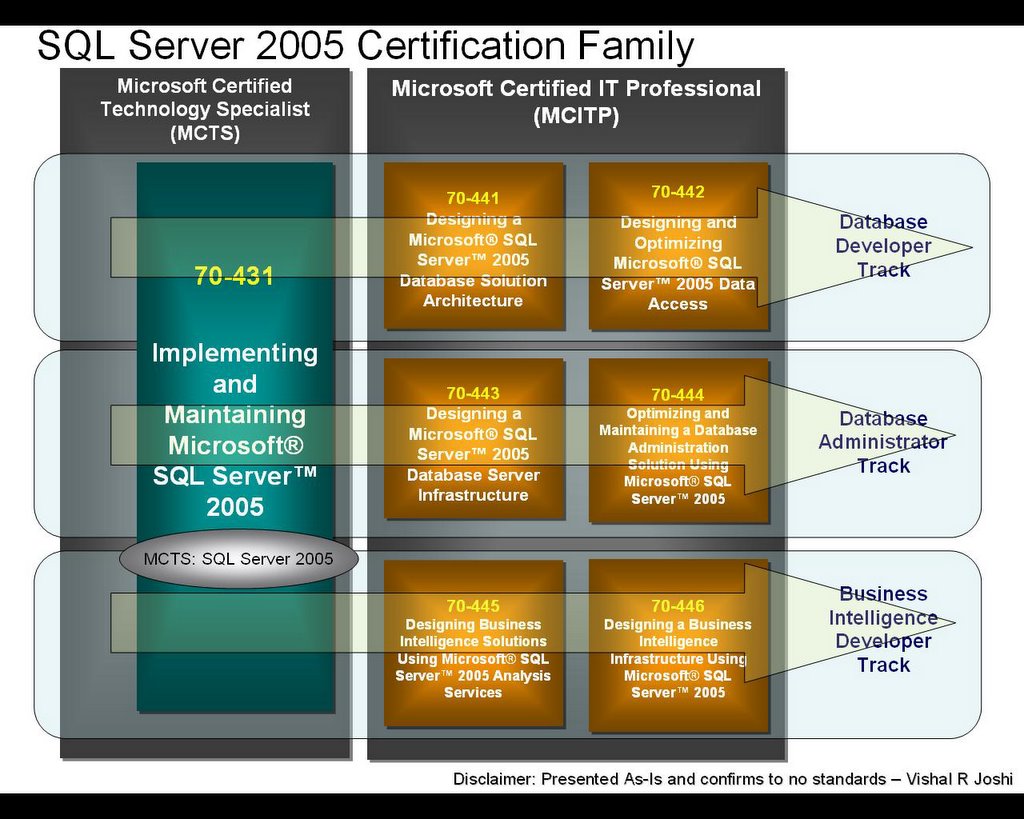
SQL Server 2005 Certification Track - Quick Look
This is the quick and dirty visual representation of SQL Server 2005 Certification Tracks... The three major tracks here will be Database Developer, Database Administrator and Business Intelligence Developer...
This figure does not include upgrade exam details...
VS 2005 Certification Track

Visual Studio 2005 Certification Track - Quick Look
Just a quick and dirty visual representation of VS 2005 certification tracks... The three major tracks are Web Appps, Windows Apps and Distributed Apps...
This diagram gives you a quick understanding on which exams you need take and pass to complete a particular track... Upgrade exams are not included in this diagram...
Wednesday, November 23, 2005
MS Developer Exams Branching
Code Language Branching in Developer Exams
With Visual Studio 2005 Microsoft has taken a step ahead in Developer Certifications... Remember the days when similar topic exams had different numbers based on code language... for e.g. 70-305 and 70-315...
That is going to change now... With new Code Language Branching Technology for Exam Deliveries we will have just one exam with an option to choose the code language at the time of exam delivery...
With Branching in place, developers will be asked to choose the code language of their choice (ofcourse from select set of options) before they begin the exam and all the code snippets within the exam will appear the code language selected. It will not be possible to change the language in the middle of the exam though!!
The advantage of this is that there will be only one exam number to remember... With .Net which code language you use should not matter right (ofcourse with some ifs and buts :-)) so it will not matter which code language you choose while you take the exam too...
Currently most of the new generation exams (MCTS & MCPD) will be available in VB.Net, C# as well as Managed C++ (Yes!! Managed C++ too)... Although Managed C++ might not be an option for exams where there are technology limitations... But overall pretty cool huh!!
Well all this doesn't sound pretty huge to developers right!!... Putting a few radio buttons in the beginning and showing some code based on the choice made, how big deal can it be... Believe me, I have been developer all my life appearance can be deceptive, it was definitely a big deal doing it technically...
Consider changing source code of 3rd party Windows based applications and then deploying it to more than one centers of all the cities, of all the countries in the world (which use IT enough)... Now consider that if you did not have the source code and you had to ask someone else to change it...And then on and on... Well that was not what we actually faced but I was kind of showing you the magnitude of affect such small things can have... Don't ask me what we did, but our team did a great job and you guys will now have branching available in developer exams...
Hurray!!
With Visual Studio 2005 Microsoft has taken a step ahead in Developer Certifications... Remember the days when similar topic exams had different numbers based on code language... for e.g. 70-305 and 70-315...
That is going to change now... With new Code Language Branching Technology for Exam Deliveries we will have just one exam with an option to choose the code language at the time of exam delivery...
With Branching in place, developers will be asked to choose the code language of their choice (ofcourse from select set of options) before they begin the exam and all the code snippets within the exam will appear the code language selected. It will not be possible to change the language in the middle of the exam though!!
The advantage of this is that there will be only one exam number to remember... With .Net which code language you use should not matter right (ofcourse with some ifs and buts :-)) so it will not matter which code language you choose while you take the exam too...
Currently most of the new generation exams (MCTS & MCPD) will be available in VB.Net, C# as well as Managed C++ (Yes!! Managed C++ too)... Although Managed C++ might not be an option for exams where there are technology limitations... But overall pretty cool huh!!
Well all this doesn't sound pretty huge to developers right!!... Putting a few radio buttons in the beginning and showing some code based on the choice made, how big deal can it be... Believe me, I have been developer all my life appearance can be deceptive, it was definitely a big deal doing it technically...
Consider changing source code of 3rd party Windows based applications and then deploying it to more than one centers of all the cities, of all the countries in the world (which use IT enough)... Now consider that if you did not have the source code and you had to ask someone else to change it...And then on and on... Well that was not what we actually faced but I was kind of showing you the magnitude of affect such small things can have... Don't ask me what we did, but our team did a great job and you guys will now have branching available in developer exams...
Hurray!!
Tuesday, November 22, 2005
Microsoft BETA Exams
MCROSOFT BETA EXAMS FAQs in my own words
With launch of Visual Studio 2005 and SQL Server 2005 we will be having a lot of BETA exams rolling out from November 7th 2005 to May-June 2006... I receive a lot of emails asking below questions about BETA Exams... I thought it would be easier to emphasize the significance of BETA Exam to everyone via a single blog post...
BETA Exams provide valuable feedback to MS
BETA Exam are a very good way of providing feedback to Microsoft on the Exam questions, topics, content area etc... We look at every feedback seriously and try to make sure that it is incorporated within the final version of the exam (if the feedback is relevant and applicable)... If you spend time writing all the good things in the exam feedback, be rest assured that someone will read it...
BETA Exam As Good As Released Exam
BETA Exams are free to a candidate and they are Free because Microsoft Values the time a candidate puts in providing feedback about the exams... It is not because they are trial launch and they really mean nothing to MS... BETA EXAMS SHOULD BE TAKEN AS SERIOUSLY AS RELEASED EXAMS... They are not meant to try anyone's passing luck, they are meant to give benefits to early adopters of product and help raise the quality bar of the exam... Passing a BETA exam gives a person equal credit as regular exam... From my personal perspective I would appreciate a person passing BETA exam quite a bit as he/she is probably working on the BETA verion of the product...
Learning Material for Beta Exams
Many a times we do not have a lot of learning material available to support certain Beta exams... Again it is because we believe that people who are taking beta are self motivated folks... They have been making their hands dirty with Beta Product usage... They are ahead of the crowd and have been reading beta documentation... We do try that our learning material is available as early as possible...
We do have some early e-Learning, ILTs and Books available for Whidbey and Yukon... Click here
BETA Exam Invites are not public
BETA Exam invites are not public... BETA Exams are meant for qualified candidates only and qualified candidates should receive Beta invites via direct or proper forwarding channels... Selling of BETA codes is also strictly prohibited...
BETA Exam Registrations
BETA Exams are delivered via our standard Exam Delivery Partners (Thompson Prometric and Pearson VUE)... Candidates will have to schedule the Exam with either Prometric or VUE... BETA Exam invites usually go out approx one month before the Beta Date of the exam... There are fixed slots for a particular BETA Exam and they get filled up within 3-4 days of invites going out... Be prompt in registering for BETA Exams, we usually are not able to help much in case the slots run out...
BETA Exam Results
We go via a very comprehensive process of evaluating Beta Exams, this is the reason why Beta Exam Results do not come out at the same time when you appear the exam... You will not immediately know whether you passed or failed a Beta exam but will most likely know it before the final version of the Beta Exam is released (usually 6-8 weeks after the Beta Exam)...
BETA Exam can be taken once during Beta period
A person can appear a particular Beta exam only once during its Beta period... Although, do note that it is possible for the same person to appear Beta version of more than one unique exams... Also note that there are limited seats in Beta Exams, it is important that as many different people get a chance to take the exam and provide their feedback to us... Please take Beta Exams as seriously as you would take a live exam after paying for it... Do not use them for hit and trial purposes...
BETA Exam Test Taker Issues
If you faced problem at the test center; for e.g. you could not appear an exam due to exam download problems, exam availability at the test center etc you should let us know... We want to make sure that a candidates exam appearance experience is as smooth as it possibly can... Reach your Microsoft regional service center and let them know of the issue... Click here If you see no resolution to your problem you can definitely mail me... (But please do contact the regional service center first... :-))
With launch of Visual Studio 2005 and SQL Server 2005 we will be having a lot of BETA exams rolling out from November 7th 2005 to May-June 2006... I receive a lot of emails asking below questions about BETA Exams... I thought it would be easier to emphasize the significance of BETA Exam to everyone via a single blog post...
BETA Exams provide valuable feedback to MS
BETA Exam are a very good way of providing feedback to Microsoft on the Exam questions, topics, content area etc... We look at every feedback seriously and try to make sure that it is incorporated within the final version of the exam (if the feedback is relevant and applicable)... If you spend time writing all the good things in the exam feedback, be rest assured that someone will read it...
BETA Exam As Good As Released Exam
BETA Exams are free to a candidate and they are Free because Microsoft Values the time a candidate puts in providing feedback about the exams... It is not because they are trial launch and they really mean nothing to MS... BETA EXAMS SHOULD BE TAKEN AS SERIOUSLY AS RELEASED EXAMS... They are not meant to try anyone's passing luck, they are meant to give benefits to early adopters of product and help raise the quality bar of the exam... Passing a BETA exam gives a person equal credit as regular exam... From my personal perspective I would appreciate a person passing BETA exam quite a bit as he/she is probably working on the BETA verion of the product...
Learning Material for Beta Exams
Many a times we do not have a lot of learning material available to support certain Beta exams... Again it is because we believe that people who are taking beta are self motivated folks... They have been making their hands dirty with Beta Product usage... They are ahead of the crowd and have been reading beta documentation... We do try that our learning material is available as early as possible...
We do have some early e-Learning, ILTs and Books available for Whidbey and Yukon... Click here
BETA Exam Invites are not public
BETA Exam invites are not public... BETA Exams are meant for qualified candidates only and qualified candidates should receive Beta invites via direct or proper forwarding channels... Selling of BETA codes is also strictly prohibited...
BETA Exam Registrations
BETA Exams are delivered via our standard Exam Delivery Partners (Thompson Prometric and Pearson VUE)... Candidates will have to schedule the Exam with either Prometric or VUE... BETA Exam invites usually go out approx one month before the Beta Date of the exam... There are fixed slots for a particular BETA Exam and they get filled up within 3-4 days of invites going out... Be prompt in registering for BETA Exams, we usually are not able to help much in case the slots run out...
BETA Exam Results
We go via a very comprehensive process of evaluating Beta Exams, this is the reason why Beta Exam Results do not come out at the same time when you appear the exam... You will not immediately know whether you passed or failed a Beta exam but will most likely know it before the final version of the Beta Exam is released (usually 6-8 weeks after the Beta Exam)...
BETA Exam can be taken once during Beta period
A person can appear a particular Beta exam only once during its Beta period... Although, do note that it is possible for the same person to appear Beta version of more than one unique exams... Also note that there are limited seats in Beta Exams, it is important that as many different people get a chance to take the exam and provide their feedback to us... Please take Beta Exams as seriously as you would take a live exam after paying for it... Do not use them for hit and trial purposes...
BETA Exam Test Taker Issues
If you faced problem at the test center; for e.g. you could not appear an exam due to exam download problems, exam availability at the test center etc you should let us know... We want to make sure that a candidates exam appearance experience is as smooth as it possibly can... Reach your Microsoft regional service center and let them know of the issue... Click here If you see no resolution to your problem you can definitely mail me... (But please do contact the regional service center first... :-))
Where is Vishal Joshi??
It has been a long long time huh!!...
Well I have been busy doing a lot of stuff... Finally "Have been there, did that..."
I joined Microsoft on June 6th 2005...
It made my life gears change so much that I could not find any time to write about anything...
I have joined MS as Technical Product Planner for Developer and Database Certifications... The obvious next question "What do you do there...??" well folks don't ask... I do whatever I feel needs to be done... Jokes apart I take care of planning & designing the next generation of certifications in Developer and Database Space... Just found some time to breathe after Whidbey and Yukon new certification family launch..
Wanna check out some stuff that we did???...go to... Next Generation of Certifications
What am I gonna do next with my blog... I am going to give it a work spin... I am going to start writing about certifications, how to prepare for certifications... Answer questions that people have about Microsoft Certifications... Give news that is worth sharing and so on...
I do not know whether I will be able to come back with VJs Tip of The Day yet (I guess time will not permit)... But still I bet there will be more interesting things on my blog then before...
Revitalizing myself...
Well I have been busy doing a lot of stuff... Finally "Have been there, did that..."
I joined Microsoft on June 6th 2005...
It made my life gears change so much that I could not find any time to write about anything...
I have joined MS as Technical Product Planner for Developer and Database Certifications... The obvious next question "What do you do there...??" well folks don't ask... I do whatever I feel needs to be done... Jokes apart I take care of planning & designing the next generation of certifications in Developer and Database Space... Just found some time to breathe after Whidbey and Yukon new certification family launch..
Wanna check out some stuff that we did???...go to... Next Generation of Certifications
What am I gonna do next with my blog... I am going to give it a work spin... I am going to start writing about certifications, how to prepare for certifications... Answer questions that people have about Microsoft Certifications... Give news that is worth sharing and so on...
I do not know whether I will be able to come back with VJs Tip of The Day yet (I guess time will not permit)... But still I bet there will be more interesting things on my blog then before...
Revitalizing myself...
Wednesday, February 16, 2005
Controlling Serailzation of Arrays
Just a quick note on controlling serialization of Arrays... Arrays' serialization is done in a little different way than any other standard datatypes.. There are special attributes available in System.Xml.Serialization which can be used for Arrays.
Generally we are used to using <XmlElement("tagName")> {VB} or [XmlElement("tagName")]{C#} on properties/members of our class... If these properties/members are arrays then the XmlElement attribute will remove the tree structure and convert it into a flat list...
eg.
<tagName>Value1</tagName>
<tagName>Value2</tagName>
instead of
<tagName>
<itemTag>Value1</itemTag>
<itemTag>Value2</itemTag>
</tagName>
If you would want to get the above structure for your Xml serialization, you would have to use following Attributes
<XmlArray("tagName"), XmlArrayItem("itemTag")> {VB} or [XmlArray("tagName"), XmlArrayItem("itemTag")] {C#}
There are many other small details related to attributes etc which you can find at MSDN... Click Here
Generally we are used to using <XmlElement("tagName")> {VB} or [XmlElement("tagName")]{C#} on properties/members of our class... If these properties/members are arrays then the XmlElement attribute will remove the tree structure and convert it into a flat list...
eg.
<tagName>Value1</tagName>
<tagName>Value2</tagName>
instead of
<tagName>
<itemTag>Value1</itemTag>
<itemTag>Value2</itemTag>
</tagName>
If you would want to get the above structure for your Xml serialization, you would have to use following Attributes
<XmlArray("tagName"), XmlArrayItem("itemTag")> {VB} or [XmlArray("tagName"), XmlArrayItem("itemTag")] {C#}
There are many other small details related to attributes etc which you can find at MSDN... Click Here
Thursday, February 03, 2005
Link Shortcuts for IE address bar
There is a cool discovery (not by me :-)) which I would like to share with you all...
If you modify the registry settings of Internet Explorer then you can achieve the following results...
eg. If you want to search for "Vishal Joshi" on google then simply in the IE address bar you can type
g "Vishal Joshi"
or if you want to search the meaning of smother in dictionary you can do some setting like
d smother
Now have a quick look at the settings that you will have to do in the registry... For ease I am pasing my exported registry... Copy paste the below text in a notepad and save it as "IEQuickLaunch.reg"... After saving it double click on the file which will import the settings to the registry... Do note that you will have to be the admin of your machine to change the registry settings...
Windows Registry Editor Version 5.00
[HKEY_LOCAL_MACHINE\SOFTWARE\Microsoft\Internet Explorer\SearchUrl]
[HKEY_LOCAL_MACHINE\SOFTWARE\Microsoft\Internet Explorer\SearchUrl\d]
@="http://dictionary.reference.com/search?q=%s"
[HKEY_LOCAL_MACHINE\SOFTWARE\Microsoft\Internet Explorer\SearchUrl\g]
@="http://www.google.com/search?hl=en&lr=&q=%s"
[HKEY_LOCAL_MACHINE\SOFTWARE\Microsoft\Internet Explorer\SearchUrl\msdn]
@="http://search.microsoft.com/search/results.aspx?qu=%s"
[HKEY_LOCAL_MACHINE\SOFTWARE\Microsoft\Internet Explorer\SearchUrl\vishal]
@="http://www.google.com/search?q=%s&ie=UTF-8&sitesearch=vishaljoshi.blogspot.com&x=27&y=9"
The above settings will get you the following shortcuts, you can then add your own...
1.) g searchword [will search google with search word]
2.) d searchword [will search dictionary with search word]
3.) msdn searchword [will search msdn with search word]
4.) vishal searchword [will search my blog with search word]
If you modify the registry settings of Internet Explorer then you can achieve the following results...
eg. If you want to search for "Vishal Joshi" on google then simply in the IE address bar you can type
g "Vishal Joshi"
or if you want to search the meaning of smother in dictionary you can do some setting like
d smother
Now have a quick look at the settings that you will have to do in the registry... For ease I am pasing my exported registry... Copy paste the below text in a notepad and save it as "IEQuickLaunch.reg"... After saving it double click on the file which will import the settings to the registry... Do note that you will have to be the admin of your machine to change the registry settings...
Windows Registry Editor Version 5.00
[HKEY_LOCAL_MACHINE\SOFTWARE\Microsoft\Internet Explorer\SearchUrl]
[HKEY_LOCAL_MACHINE\SOFTWARE\Microsoft\Internet Explorer\SearchUrl\d]
@="http://dictionary.reference.com/search?q=%s"
[HKEY_LOCAL_MACHINE\SOFTWARE\Microsoft\Internet Explorer\SearchUrl\g]
@="http://www.google.com/search?hl=en&lr=&q=%s"
[HKEY_LOCAL_MACHINE\SOFTWARE\Microsoft\Internet Explorer\SearchUrl\msdn]
@="http://search.microsoft.com/search/results.aspx?qu=%s"
[HKEY_LOCAL_MACHINE\SOFTWARE\Microsoft\Internet Explorer\SearchUrl\vishal]
@="http://www.google.com/search?q=%s&ie=UTF-8&sitesearch=vishaljoshi.blogspot.com&x=27&y=9"
The above settings will get you the following shortcuts, you can then add your own...
1.) g searchword [will search google with search word]
2.) d searchword [will search dictionary with search word]
3.) msdn searchword [will search msdn with search word]
4.) vishal searchword [will search my blog with search word]
Tuesday, February 01, 2005
AJAX
In our project one of my collegue (Jason Reis) suggested to implement "Google Suggest" kind of feature for our ASP.Net website... It was indeed a very beautiful idea and I am sure this will really add a lot of value to our web site...
I wonder many would like this kind of feature in their sites and below three links should help a lot of people in achieving the same...
Dino Esposito's Article on MSDN mag....
Anders Norås's blog article on DotNet Junkies...
MSDN Webservice Behavior article...
PS: Thanks Jason for bringing this up...
I wonder many would like this kind of feature in their sites and below three links should help a lot of people in achieving the same...
Dino Esposito's Article on MSDN mag....
Anders Norås's blog article on DotNet Junkies...
MSDN Webservice Behavior article...
PS: Thanks Jason for bringing this up...
Wednesday, January 26, 2005
Say "NO" To Dumps
Below is the message which I just sent to our Chennai .Net User Group (CNUG) to stop dumps... Please let us say "NO" to dumps, if we do not do so now, eventually being MCP, MCAD or MCSD will mean nothing to IT industry...
Dear All,
We have been getting a lots of requests from the group to make the group un-moderated... There are delays sometimes from our side to approve the messages and I know how desperately we want our messages to appear on the board as soon as they are sent... We had been observing the message pattern since some days and found that leaving the group un-moderated for a while should not harm... So since last one week we kept the CNUG message boards un-moderated...
We do go through the messages most of the time for their contents even when the moderation is not there and just yesterday we again got a mail asking for dumps for MCP paper... This is not to highlight someone for asking dumps but to spread a general message... You do not steal a VCR or Music system from the shops then why steal MCP papers... Definitely such easy option seems tempting but these are the options which destroy the whole system... Do know that if you are aware about the dumps then so are the people in front of whom you are going to flaunt your MCP certificates... Eventually, the dumps will take away all the glory of being a MCP and it is us who can consciously prevent this from happening...
Friends, I have myself been on this wonderful MS Learning team which creates these MCP papers and it takes more than 6 months for more than 20 people to create a single paper... All the questions are verified by writing code... Each question earns it place into the paper after being reviewed by so many experts... Everyone tries to do their best so that a professional certified by Microsoft really means "an expert" to the IT world... You too should be one of them but rightfully, proudly, in a way that someone can rely on you when it comes to that subject... Please do realize, that it hurts when efforts of those individuals, who have struggled to bring the paper in front of you are compromised... Mark my words - "A person clearing one MCP paper without dumps would probably be much more confident, proud and infact happier than a person being MCAD or MCSD with dumps"...
Do remember that your post goes to approx 3500 other members of our CNUG family, who feel bad about such improper demands... Many in the groups are preparing for MCP papers; such posts bring their morale down... Our group is formed for benevolent cause... We are here to help each other learn, solve each other's queries, train each other, learn from each other's experiences and create a vibrant technical community that we can be proud of and others can take example from...
We do not want to ban our own members from the group so please do not force us do that.... Together let's Say "No" to Dumps...
Thanks for understanding...
warm wishes,
Vishal R Joshi
Vice-President CNUG | Microsoft MVP .Net | MCP ASP.Net
If You Think YOU CAN... You Can...
http://VishalJoshi.Blogspot.com
Dear All,
We have been getting a lots of requests from the group to make the group un-moderated... There are delays sometimes from our side to approve the messages and I know how desperately we want our messages to appear on the board as soon as they are sent... We had been observing the message pattern since some days and found that leaving the group un-moderated for a while should not harm... So since last one week we kept the CNUG message boards un-moderated...
We do go through the messages most of the time for their contents even when the moderation is not there and just yesterday we again got a mail asking for dumps for MCP paper... This is not to highlight someone for asking dumps but to spread a general message... You do not steal a VCR or Music system from the shops then why steal MCP papers... Definitely such easy option seems tempting but these are the options which destroy the whole system... Do know that if you are aware about the dumps then so are the people in front of whom you are going to flaunt your MCP certificates... Eventually, the dumps will take away all the glory of being a MCP and it is us who can consciously prevent this from happening...
Friends, I have myself been on this wonderful MS Learning team which creates these MCP papers and it takes more than 6 months for more than 20 people to create a single paper... All the questions are verified by writing code... Each question earns it place into the paper after being reviewed by so many experts... Everyone tries to do their best so that a professional certified by Microsoft really means "an expert" to the IT world... You too should be one of them but rightfully, proudly, in a way that someone can rely on you when it comes to that subject... Please do realize, that it hurts when efforts of those individuals, who have struggled to bring the paper in front of you are compromised... Mark my words - "A person clearing one MCP paper without dumps would probably be much more confident, proud and infact happier than a person being MCAD or MCSD with dumps"...
Do remember that your post goes to approx 3500 other members of our CNUG family, who feel bad about such improper demands... Many in the groups are preparing for MCP papers; such posts bring their morale down... Our group is formed for benevolent cause... We are here to help each other learn, solve each other's queries, train each other, learn from each other's experiences and create a vibrant technical community that we can be proud of and others can take example from...
We do not want to ban our own members from the group so please do not force us do that.... Together let's Say "No" to Dumps...
Thanks for understanding...
warm wishes,
Vishal R Joshi
Vice-President CNUG | Microsoft MVP .Net | MCP ASP.Net
If You Think YOU CAN... You Can...
http://VishalJoshi.Blogspot.com
Thursday, January 20, 2005
Changing Column Width in Win Forms DG
Programmatically Changing Column Width in Windows Forms Datagrid
I actually spent sometime in getting all the pieces right and so thought I would mention it on the blog so that many will not have to spend the same time...
Do not get bothered by the length of the code... It is pretty simple... I will explain the same in steps below... The exact problem statement is
" There is a windows form datagrid, which needs to get the data dynamically from "where ever you please". For this I will have to have a DataTable and have that set as the DataSource for the datagrid by dynamically binding it...
To fill this datatable after I get the data (say in form of xml or Web service objects; I need to create corresponding columns and add rows one by one to the same after parsing my data. Now as you make the columns programmatically you also wish to set the column width and other properties programatically... You might also want to format the table to look like you wish programatically... Below code snippet will tell you how to do it..."
NOTE: Do not look at the code from coding standards, maintainability, performance tuning etc perspective... It just merely does the job...
STEPS:
1.) Create a DataTable...
2.) Add necessary columns to it...
3.) Create individual rows for the data gathered... [My data is from Google Web Service]
4.) Bind the data to the datasource of the datagrid
5.) Create new DataGridTableStyle
6.) Set the mapping name of of the tablestyle to be same as your tablename
7.) Create the tablestyle as you wish... This can be kindof skin template you get from somewhere
8.) Add the TableStyle to your DataGrid
9.) Now get back the handle to that TableStyle
10.)Now from the GridColumStyle collection of your just obtained TableStyle, access the particular GridColumnStyle via indexs and modify the values...
11.)Call Refresh method on DataGrid from the just obtained TableStyle...
Below code does the above mentioned steps...
Dim resultTable As New Data.DataTable
resultTable.Columns.Add("Sr.No.")
resultTable.Columns.Add("Title")
resultTable.Columns.Add("Description")
resultTable.Columns.Add("URL")
Dim currentCount As Integer = 0
Dim counter As Integer
For counter = 0 To 9
Dim resultRow As DataRow
resultRow = resultTable.NewRow()
resultRow.Item(0) = (currentCount + 1).ToString()
resultRow.Item(1) = result.resultElements(currentCount).title.ToString()
resultRow.Item(2) =result.resultElements(currentCount).snippet.ToString()
resultRow.Item(3) = result.resultElements(currentCount).URL.ToString()
resultTable.Rows.Add(resultRow)
If currentCount >= result.resultElements.Length - 1 Then
Exit For
Else
currentCount += 1
End If
Next
resultTable.TableName = "myTable"
dgdResults.DataSource = resultTable
Dim myGridTableStyle As New DataGridTableStyle
myGridTableStyle.MappingName = "myTable"
myGridTableStyle.HeaderFont = New System.Drawing.Font _
("Tahoma", 8.25F, FontStyle.Regular, System.Drawing.GraphicsUnit.Point, CType(0, System.Byte))
myGridTableStyle.HeaderBackColor = Color.Thistle
myGridTableStyle.HeaderForeColor = Color.Crimson
myGridTableStyle.ReadOnly = True
myGridTableStyle.AllowSorting = False
myGridTableStyle.AlternatingBackColor = Color.Thistle
myGridTableStyle.BackColor = Color.LavenderBlush
myGridTableStyle.ForeColor = Color.DarkBlue
myGridTableStyle.PreferredRowHeight = 20
myGridTableStyle.RowHeaderWidth = 16
dgdResults.TableStyles.Add(myGridTableStyle)
Dim tableStyle As DataGridTableStyle = dgdResults.TableStyles("myTable")
tableStyle.GridColumnStyles(0).Width = 20
tableStyle.GridColumnStyles(1).Width = 120
tableStyle.GridColumnStyles(2).Width = 170
tableStyle.GridColumnStyles(3).Width = 250
tableStyle.DataGrid.Refresh()
I actually spent sometime in getting all the pieces right and so thought I would mention it on the blog so that many will not have to spend the same time...
Do not get bothered by the length of the code... It is pretty simple... I will explain the same in steps below... The exact problem statement is
" There is a windows form datagrid, which needs to get the data dynamically from "where ever you please". For this I will have to have a DataTable and have that set as the DataSource for the datagrid by dynamically binding it...
To fill this datatable after I get the data (say in form of xml or Web service objects; I need to create corresponding columns and add rows one by one to the same after parsing my data. Now as you make the columns programmatically you also wish to set the column width and other properties programatically... You might also want to format the table to look like you wish programatically... Below code snippet will tell you how to do it..."
NOTE: Do not look at the code from coding standards, maintainability, performance tuning etc perspective... It just merely does the job...
STEPS:
1.) Create a DataTable...
2.) Add necessary columns to it...
3.) Create individual rows for the data gathered... [My data is from Google Web Service]
4.) Bind the data to the datasource of the datagrid
5.) Create new DataGridTableStyle
6.) Set the mapping name of of the tablestyle to be same as your tablename
7.) Create the tablestyle as you wish... This can be kindof skin template you get from somewhere
8.) Add the TableStyle to your DataGrid
9.) Now get back the handle to that TableStyle
10.)Now from the GridColumStyle collection of your just obtained TableStyle, access the particular GridColumnStyle via indexs and modify the values...
11.)Call Refresh method on DataGrid from the just obtained TableStyle...
Below code does the above mentioned steps...
Dim resultTable As New Data.DataTable
resultTable.Columns.Add("Sr.No.")
resultTable.Columns.Add("Title")
resultTable.Columns.Add("Description")
resultTable.Columns.Add("URL")
Dim currentCount As Integer = 0
Dim counter As Integer
For counter = 0 To 9
Dim resultRow As DataRow
resultRow = resultTable.NewRow()
resultRow.Item(0) = (currentCount + 1).ToString()
resultRow.Item(1) = result.resultElements(currentCount).title.ToString()
resultRow.Item(2) =result.resultElements(currentCount).snippet.ToString()
resultRow.Item(3) = result.resultElements(currentCount).URL.ToString()
resultTable.Rows.Add(resultRow)
If currentCount >= result.resultElements.Length - 1 Then
Exit For
Else
currentCount += 1
End If
Next
resultTable.TableName = "myTable"
dgdResults.DataSource = resultTable
Dim myGridTableStyle As New DataGridTableStyle
myGridTableStyle.MappingName = "myTable"
myGridTableStyle.HeaderFont = New System.Drawing.Font _
("Tahoma", 8.25F, FontStyle.Regular, System.Drawing.GraphicsUnit.Point, CType(0, System.Byte))
myGridTableStyle.HeaderBackColor = Color.Thistle
myGridTableStyle.HeaderForeColor = Color.Crimson
myGridTableStyle.ReadOnly = True
myGridTableStyle.AllowSorting = False
myGridTableStyle.AlternatingBackColor = Color.Thistle
myGridTableStyle.BackColor = Color.LavenderBlush
myGridTableStyle.ForeColor = Color.DarkBlue
myGridTableStyle.PreferredRowHeight = 20
myGridTableStyle.RowHeaderWidth = 16
dgdResults.TableStyles.Add(myGridTableStyle)
Dim tableStyle As DataGridTableStyle = dgdResults.TableStyles("myTable")
tableStyle.GridColumnStyles(0).Width = 20
tableStyle.GridColumnStyles(1).Width = 120
tableStyle.GridColumnStyles(2).Width = 170
tableStyle.GridColumnStyles(3).Width = 250
tableStyle.DataGrid.Refresh()
Monday, January 10, 2005
TechEd 2005 registrations open today
TechEd 2005, USA is going to be organized from June 5th 2005 to June 10th 2005 at Orlando, FL... The registration for the same open today (Jan 10th 2005) and the early bird registration ends on April 15th 2005...
Please visit the TechEd 2005 site to find more... Click Here
Please visit the TechEd 2005 site to find more... Click Here
Wednesday, January 05, 2005
Milwaukee Nerd Dinner
Finally we are able to fix up Milwaukee Nerd Dinner on Jan 12th 2005 at 6:30 pm...
For more details visit http://nerddinner.com/blogs/milwaukee/
Everone is invited, but do RSVP so that planning can be done accordingly...
For more details visit http://nerddinner.com/blogs/milwaukee/
Everone is invited, but do RSVP so that planning can be done accordingly...
Friday, November 19, 2004
VJs Mega Tip Of The Day - November 19th 2004
Whidbey Days - ASP.Net 2.0 Page Life Cycle
ASP.Net 2.0 Page Life Cycle
Abstract
This article talks about the way ASP.Net 2.0 page life cycle works, it discusses the way ASP.Net page is created and displayed.
More Information
It is important for ASP.Net programmers to understand how their page is created/processed and displayed by ASP.Net framework. Sometimes many unexpected behaviors are seen in case incorrect data is accessed before or after certain page events. Below is the information on how System.Web.UI.Page methods execute. For keeping the article more users friendly and also to avoid incorrect method calls for not-recommended methods, I have discussed only those methods which I felt a user should know about.
Without further delay let us start from the html source that is written for the page. First of all the html source needs to be parsed to process the page. This is done by a method in the Page called AddParsedSubObject(). Unless you override it, this method will automatically add Literal controls to page’s control collection. This is done by first creating a control collection by calling CreateControlCollection() method.
As the child controls are parsed in the page the method AddedControl() is called which is usually triggered when a control is added to another control’s control collection. As ASP.Net pages can be viewed on various devices the method ResolveAdapter() returns the control adapter which is responsible for rendering the control on the specific device or browser requesting the ASP.Net page.
DeterminePostBackMode() is then invoked to find out what is the post back mode used for the request. If the POST method is used for postback the web form information is returned from the Context object. If the GET method is used for postback, the information from query string is returned. If the page is being requested for the first time, null is returned, many of us are used to writing code in which we check the postback property and execute specific logic, this is the method that helps the framework to get our this specific code running correctly.
More granular control on the page life cycle is available in ASP.Net 2.0. Now we have got additional events like “PreX” and “XComplete” to insert our logic before and after the usual “X” events, which we have been working with. The first such event to fire is PreInit(). This is the very beginning of page’s initialization and after the completion of this personalization information is loaded and if there is any page theme then it is initialized. I have talked more about these concepts earlier on the blog. Click Here for more information.
After the PreInit() of the page, ResolveAdapter() for individual child controls is called and then each of the control’s Init event is fired. What is interesting to note is that Init event of the child control is fired before the Init event of the page and many a times in developing complex ASP.Net applications if user plays with these events, without enough information, then unexpected behavior might resulted.
After the Init event of the control, the TrackViewState() method is triggered which will track the view state changes posted to server. It is important to know that when control’s view state data is being tracked with the state bag, page’s Init event and TrackViewState() are not yet fired. This also results into unexpected behavior in case users are writing custom controls or probably their own base page.
After the TrackViewState() of the child controls, the Init event of the page is fired. This event initializes the page and then TrackViewState() of the page is fired which tracks the changes to the page’s state bag
After the TrackViewState() for the page is called InitComplete() event is fired. This is the signal that initialization of the page and its child control is done. Though what a user should know is that ViewState for the page or the controls is not yet restored, if user tries to do anything before this data is restored the required changes in the data from the client which expected may not appear.
The view state is restored in the method LoadViewState() after whose completion ViewState data is available for a user to work on.. There is then EnsureChildControls() method which is invoked which makes sure that the page’s child controls get created.
In ASP.Net 2.0 a PreLoad() event available which would probably be the right place for user to play around with objects before the universally used load event is fired. For people who are writing base page classes and who want to perform certain tasks before standard page load event this is the right place to put their custom logic into.
After PreLoad() event, the Load() event of the page is fired. There is no need to explain what one can do with this event, isn’t it. But what should be known is that page load event is fired before the control load event unlike Init event which is fired first for the child controls and then for the page. This also many times takes custom control writers by surprise as they are expecting the control load to occur before actually the user logic on page load is executed.
So after the page Load() event, control Load() event is triggered and then the custom events like button clicks and others are fired. Many a times users want some specific functionality to be executed in their base pages, just after these postback events but also before PreRender when the pre rendering logic starts. This kind of development methodology has created issues when the derived classes call base methods before or after their custom logic when otherwise was expected. That is the place where LoadComplete() event of the page will come to use. The LoadComplete() will be called after the custom event execution for the child control is over but PreRender is not started.
After the LoadComplete() event PreRender() event of page is triggered followed by the PreRendering of each child controls. PreRender() event has always been the right place to put in the last logic before ViewState is saved. But now there is a PreRenderComplete() event which is fired after all the PreRender events of the child controls are fired, this will now be the last chance to change the data before SaveViewState() of the page is fired.
After the SaveViewState of the page; the control SaveViewState() is fired. SaveViewState() will save the changes that have happened to the data till that point and then the page will be ready to be rendered.
LoadPageStateFromPersistenceMedium() and SavePageStateToPersistenceMedium() are called before LoadViewState() and after SaveViewState() respectively. As the name indicates the ViewState is persisted so that it can be used later in the next call. I will talk in detail about how these methods work later, but as of now it is just good to know what they do.
After the SavePageStateToPersistenceMedium(), SaveStateComplete() is fired, which indicates that saving the state of the page is now complete.
After this the rendering of the page begins. First the CreateHtmlTextWriter() is fired to create the HTML text writer and then page and control Render are called. If the user wishes to change the look and feel of the way their control is rendered this is the event to do it. When the Render method completes Unload() for each child control is called and then each child control’s Dispose() is called. After disposing all the child controls, the page Unload() event is fired and then the Page’s Dispose() is called.
In case of error, the execution directly jumps to the error handling and then to unload and dispose events skipping the events in-between. This thus covers the major execution of ASP.Net page life cycle.
Below is a quick summary of the methods in their invocation order:
System.Web.UI.Page.AddParsedSubObject
System.Web.UI.Page.CreateControlCollection
System.Web.UI.Page.AddedControl
System.Web.UI.Page.ResolveAdapter
System.Web.UI.Page.DeterminePostBackMode
System.Web.UI.Page.PreInit
System.Web.UI.WebControl.ResolveAdapter
System.Web.UI.WebControl.Init
System.Web.UI.WebControl.TrackViewState
System.Web.UI.Page.Init
System.Web.UI.Page.TrackViewState
System.Web.UI.Page.InitComplete
System.Web.UI.Page.LoadPageStateFromPersistenceMedium
System.Web.UI.WebControl.LoadViewState
System.Web.UI.Page.EnsureChildControls
System.Web.UI.Page.LoadViewState
System.Web.UI.Page.PreLoad
System.Web.UI.Page.Load
System.Web.UI.WebControl.Load
System.Web.UI.WebControl.OnClick
System.Web.UI.Page.LoadComplete
System.Web.UI.Page.PreRender
System.Web.UI.WebControl.PreRender
System.Web.UI.Page.PreRenderComplete
System.Web.UI.Page.SaveViewState
System.Web.UI.WebControl.SaveViewState
System.Web.UI.Page.SaveViewState
System.Web.UI.Page.SavePageStateToPersistenceMedium
System.Web.UI.Page.SaveStateComplete
System.Web.UI.Page.CreateHtmlTextWriter
System.Web.UI.Page.Render
System.Web.UI.Page.RenderChildren
System.Web.UI.WebControl.RenderControl
System.Web.UI.Page.CreateHtmlTextWriter
System.Web.UI.WebControl.Unload
System.Web.UI.WebControl.Dispose
System.Web.UI.Page.Unload
System.Web.UI.Page.Dispose
There are many methods which I have skipped and many methods which we discussed are called multiple times on the basis of the existing conditions, I have intentionally not discussed them, though what I have tried is to make the user understand the things that happen in the background for a page to work.
So this is how a single ASP.Net page’s HTML comes on to our browser. Indeed quite a bit amount of work behind the scenes right!! I hope you will be able to unleash the potential of all these additional options available to you in Whidbey timeframe. These are some of the reasons why I am so passionate about Microsoft Technologies; they just keep getting better with every new release.
PS: The above is my understanding of the Whidbey (ASP.Net 2.0) page life cycle, if you think I have missed something or something is incorrectly mentioned then please do drop in a mail at Vishal_Joshi@MVPs.org so that I can make the necessary corrections.
PPS: Today marks the completion of second season of VJs Tip Of The Day series. I shall be back with the thrid season in new year 2005... Till then wish you best luck and a wonderful festive season...
ASP.Net 2.0 Page Life Cycle
Abstract
This article talks about the way ASP.Net 2.0 page life cycle works, it discusses the way ASP.Net page is created and displayed.
More Information
It is important for ASP.Net programmers to understand how their page is created/processed and displayed by ASP.Net framework. Sometimes many unexpected behaviors are seen in case incorrect data is accessed before or after certain page events. Below is the information on how System.Web.UI.Page methods execute. For keeping the article more users friendly and also to avoid incorrect method calls for not-recommended methods, I have discussed only those methods which I felt a user should know about.
Without further delay let us start from the html source that is written for the page. First of all the html source needs to be parsed to process the page. This is done by a method in the Page called AddParsedSubObject(). Unless you override it, this method will automatically add Literal controls to page’s control collection. This is done by first creating a control collection by calling CreateControlCollection() method.
As the child controls are parsed in the page the method AddedControl() is called which is usually triggered when a control is added to another control’s control collection. As ASP.Net pages can be viewed on various devices the method ResolveAdapter() returns the control adapter which is responsible for rendering the control on the specific device or browser requesting the ASP.Net page.
DeterminePostBackMode() is then invoked to find out what is the post back mode used for the request. If the POST method is used for postback the web form information is returned from the Context object. If the GET method is used for postback, the information from query string is returned. If the page is being requested for the first time, null is returned, many of us are used to writing code in which we check the postback property and execute specific logic, this is the method that helps the framework to get our this specific code running correctly.
More granular control on the page life cycle is available in ASP.Net 2.0. Now we have got additional events like “PreX” and “XComplete” to insert our logic before and after the usual “X” events, which we have been working with. The first such event to fire is PreInit(). This is the very beginning of page’s initialization and after the completion of this personalization information is loaded and if there is any page theme then it is initialized. I have talked more about these concepts earlier on the blog. Click Here for more information.
After the PreInit() of the page, ResolveAdapter() for individual child controls is called and then each of the control’s Init event is fired. What is interesting to note is that Init event of the child control is fired before the Init event of the page and many a times in developing complex ASP.Net applications if user plays with these events, without enough information, then unexpected behavior might resulted.
After the Init event of the control, the TrackViewState() method is triggered which will track the view state changes posted to server. It is important to know that when control’s view state data is being tracked with the state bag, page’s Init event and TrackViewState() are not yet fired. This also results into unexpected behavior in case users are writing custom controls or probably their own base page.
After the TrackViewState() of the child controls, the Init event of the page is fired. This event initializes the page and then TrackViewState() of the page is fired which tracks the changes to the page’s state bag
After the TrackViewState() for the page is called InitComplete() event is fired. This is the signal that initialization of the page and its child control is done. Though what a user should know is that ViewState for the page or the controls is not yet restored, if user tries to do anything before this data is restored the required changes in the data from the client which expected may not appear.
The view state is restored in the method LoadViewState() after whose completion ViewState data is available for a user to work on.. There is then EnsureChildControls() method which is invoked which makes sure that the page’s child controls get created.
In ASP.Net 2.0 a PreLoad() event available which would probably be the right place for user to play around with objects before the universally used load event is fired. For people who are writing base page classes and who want to perform certain tasks before standard page load event this is the right place to put their custom logic into.
After PreLoad() event, the Load() event of the page is fired. There is no need to explain what one can do with this event, isn’t it. But what should be known is that page load event is fired before the control load event unlike Init event which is fired first for the child controls and then for the page. This also many times takes custom control writers by surprise as they are expecting the control load to occur before actually the user logic on page load is executed.
So after the page Load() event, control Load() event is triggered and then the custom events like button clicks and others are fired. Many a times users want some specific functionality to be executed in their base pages, just after these postback events but also before PreRender when the pre rendering logic starts. This kind of development methodology has created issues when the derived classes call base methods before or after their custom logic when otherwise was expected. That is the place where LoadComplete() event of the page will come to use. The LoadComplete() will be called after the custom event execution for the child control is over but PreRender is not started.
After the LoadComplete() event PreRender() event of page is triggered followed by the PreRendering of each child controls. PreRender() event has always been the right place to put in the last logic before ViewState is saved. But now there is a PreRenderComplete() event which is fired after all the PreRender events of the child controls are fired, this will now be the last chance to change the data before SaveViewState() of the page is fired.
After the SaveViewState of the page; the control SaveViewState() is fired. SaveViewState() will save the changes that have happened to the data till that point and then the page will be ready to be rendered.
LoadPageStateFromPersistenceMedium() and SavePageStateToPersistenceMedium() are called before LoadViewState() and after SaveViewState() respectively. As the name indicates the ViewState is persisted so that it can be used later in the next call. I will talk in detail about how these methods work later, but as of now it is just good to know what they do.
After the SavePageStateToPersistenceMedium(), SaveStateComplete() is fired, which indicates that saving the state of the page is now complete.
After this the rendering of the page begins. First the CreateHtmlTextWriter() is fired to create the HTML text writer and then page and control Render are called. If the user wishes to change the look and feel of the way their control is rendered this is the event to do it. When the Render method completes Unload() for each child control is called and then each child control’s Dispose() is called. After disposing all the child controls, the page Unload() event is fired and then the Page’s Dispose() is called.
In case of error, the execution directly jumps to the error handling and then to unload and dispose events skipping the events in-between. This thus covers the major execution of ASP.Net page life cycle.
Below is a quick summary of the methods in their invocation order:
System.Web.UI.Page.AddParsedSubObject
System.Web.UI.Page.CreateControlCollection
System.Web.UI.Page.AddedControl
System.Web.UI.Page.ResolveAdapter
System.Web.UI.Page.DeterminePostBackMode
System.Web.UI.Page.PreInit
System.Web.UI.WebControl.ResolveAdapter
System.Web.UI.WebControl.Init
System.Web.UI.WebControl.TrackViewState
System.Web.UI.Page.Init
System.Web.UI.Page.TrackViewState
System.Web.UI.Page.InitComplete
System.Web.UI.Page.LoadPageStateFromPersistenceMedium
System.Web.UI.WebControl.LoadViewState
System.Web.UI.Page.EnsureChildControls
System.Web.UI.Page.LoadViewState
System.Web.UI.Page.PreLoad
System.Web.UI.Page.Load
System.Web.UI.WebControl.Load
System.Web.UI.WebControl.OnClick
System.Web.UI.Page.LoadComplete
System.Web.UI.Page.PreRender
System.Web.UI.WebControl.PreRender
System.Web.UI.Page.PreRenderComplete
System.Web.UI.Page.SaveViewState
System.Web.UI.WebControl.SaveViewState
System.Web.UI.Page.SaveViewState
System.Web.UI.Page.SavePageStateToPersistenceMedium
System.Web.UI.Page.SaveStateComplete
System.Web.UI.Page.CreateHtmlTextWriter
System.Web.UI.Page.Render
System.Web.UI.Page.RenderChildren
System.Web.UI.WebControl.RenderControl
System.Web.UI.Page.CreateHtmlTextWriter
System.Web.UI.WebControl.Unload
System.Web.UI.WebControl.Dispose
System.Web.UI.Page.Unload
System.Web.UI.Page.Dispose
There are many methods which I have skipped and many methods which we discussed are called multiple times on the basis of the existing conditions, I have intentionally not discussed them, though what I have tried is to make the user understand the things that happen in the background for a page to work.
So this is how a single ASP.Net page’s HTML comes on to our browser. Indeed quite a bit amount of work behind the scenes right!! I hope you will be able to unleash the potential of all these additional options available to you in Whidbey timeframe. These are some of the reasons why I am so passionate about Microsoft Technologies; they just keep getting better with every new release.
PS: The above is my understanding of the Whidbey (ASP.Net 2.0) page life cycle, if you think I have missed something or something is incorrectly mentioned then please do drop in a mail at Vishal_Joshi@MVPs.org so that I can make the necessary corrections.
PPS: Today marks the completion of second season of VJs Tip Of The Day series. I shall be back with the thrid season in new year 2005... Till then wish you best luck and a wonderful festive season...
Thursday, November 18, 2004
VJs Tip Of The Day - November 18th 2004
Whidbey Days - Sharing Types Across Web Service Proxies
I do not know how many of you have faced this problem but I have always had a complain that about not being able to share types across different web service proxies... Take this scenario... I have a business application which exposes many different web services... These web services might be sharing some common object across themselves... For example Lets say I have a Auto Insurance application... I build one web service to do Policy related jobs and the other to do Premium related jobs but then in both the condition my Automobile object goes along... Now, as my proxy generator will generate service proxy for each of the service individually so I will get two Automobile classes and if I have a single client application dealing with it I will have to either create different namespaces or do some manual editing...
Although the editing might not be much the problem is that regeneration causes those changes to go away... Also there needs to be some documentation around this problem etc... Well enough of problem statement, I think you must have got it by now... :-) Anyways, in Whidbey the problem is resolved...
The WSDL exe has a switch called /sharetypes and you can give the services for which you want to share the types and it will do it for you... The syntax will be something like...
Wsdl.exe /sharetypes http:(doubleSlash)AutoInsuranceServics/PolicyService.asmx?wsdl http:(doubleSlash)AutoInsuranceServics/PremiumService.asmx?wsdl
PS: A quick observation, I see many posts and queries on our UserGroups and Newsgroup which are so simple that typing just the first word in the google (also MSDN sometimes... Just kidding!!.. :-)) will result into sufficient information to answer the query... The point which I want to make is that it is also important to develop a good habit to try resolve to our own queries, ourselves... No one knows everything, but each one of us learn over a period of time right!!... Asking our own usergroup peers is not wrong but then at times its spoon feeding, it just makes us develop a bad habit... All I am saying is let us just try to make sure that we have exhausted all the resources at our end either time or material before we ask it out; might be trying for another 10 minutes will give us the answer we want!!...
Please do not get me wrong, do not stop asking me questions whenever you feel like, I do try answering as many as I can and I continue doing that!! (but now after the vacation.. :-))
I do not know how many of you have faced this problem but I have always had a complain that about not being able to share types across different web service proxies... Take this scenario... I have a business application which exposes many different web services... These web services might be sharing some common object across themselves... For example Lets say I have a Auto Insurance application... I build one web service to do Policy related jobs and the other to do Premium related jobs but then in both the condition my Automobile object goes along... Now, as my proxy generator will generate service proxy for each of the service individually so I will get two Automobile classes and if I have a single client application dealing with it I will have to either create different namespaces or do some manual editing...
Although the editing might not be much the problem is that regeneration causes those changes to go away... Also there needs to be some documentation around this problem etc... Well enough of problem statement, I think you must have got it by now... :-) Anyways, in Whidbey the problem is resolved...
The WSDL exe has a switch called /sharetypes and you can give the services for which you want to share the types and it will do it for you... The syntax will be something like...
Wsdl.exe /sharetypes http:(doubleSlash)AutoInsuranceServics/PolicyService.asmx?wsdl http:(doubleSlash)AutoInsuranceServics/PremiumService.asmx?wsdl
PS: A quick observation, I see many posts and queries on our UserGroups and Newsgroup which are so simple that typing just the first word in the google (also MSDN sometimes... Just kidding!!.. :-)) will result into sufficient information to answer the query... The point which I want to make is that it is also important to develop a good habit to try resolve to our own queries, ourselves... No one knows everything, but each one of us learn over a period of time right!!... Asking our own usergroup peers is not wrong but then at times its spoon feeding, it just makes us develop a bad habit... All I am saying is let us just try to make sure that we have exhausted all the resources at our end either time or material before we ask it out; might be trying for another 10 minutes will give us the answer we want!!...
Please do not get me wrong, do not stop asking me questions whenever you feel like, I do try answering as many as I can and I continue doing that!! (but now after the vacation.. :-))
Wednesday, November 17, 2004
VJs Tip Of The Day - November 17th 2004
Whidbey Days - Page.GetValidators method
Yesterday we talked about ValidationGroups now here is an application of the same... System.Web.UI.Page has now got GetValidators method... The signature of the method looks like below...
public ValidatorCollection GetValidators(string validationGroup)
Basically System.Web.UI.Page has got a property called "Validators"... This property was always there and it use to return back all the validators of a page... This property will ofcourse exist for Whidbey too but now this special method adds extra value...
As the signature indicates the GetValidators method will accept a string which will be validationGroup name which you have given to your validation controls and give you back a strongly typed collection of Validator Controls... If you do not pass the string name of validation group here it will return back the default validation group... This would be the same group which will be given by the Validators property...
I would recommend using this method as you would have a generic way of accessing the validators and if the group name is passed dynamically your page logic will work in both the cases...
PS: An easy way to find out how important you are to someone is to find out whether your contact number is stored in the phone book of that person... If someone does not care to store your number with them somewhere then PROBABLY he/she is not dependant on you in anyways...
Yesterday we talked about ValidationGroups now here is an application of the same... System.Web.UI.Page has now got GetValidators method... The signature of the method looks like below...
public ValidatorCollection GetValidators(string validationGroup)
Basically System.Web.UI.Page has got a property called "Validators"... This property was always there and it use to return back all the validators of a page... This property will ofcourse exist for Whidbey too but now this special method adds extra value...
As the signature indicates the GetValidators method will accept a string which will be validationGroup name which you have given to your validation controls and give you back a strongly typed collection of Validator Controls... If you do not pass the string name of validation group here it will return back the default validation group... This would be the same group which will be given by the Validators property...
I would recommend using this method as you would have a generic way of accessing the validators and if the group name is passed dynamically your page logic will work in both the cases...
PS: An easy way to find out how important you are to someone is to find out whether your contact number is stored in the phone book of that person... If someone does not care to store your number with them somewhere then PROBABLY he/she is not dependant on you in anyways...
Tuesday, November 16, 2004
VJs Tip Of The Day - November 16th 2004
Whidbey Days - BaseValidator.ValidationGroup property
I am not sure how many of you have thought about this but many a times there use to be scenarios when you wanted that not all the validation controls on the page behave and validate in the same set... So here is the option for you... There is a property in Whidbey BaseValidator which is called ValidationGroup...
This property takes a string value and is a easy way to group your different validation controls in a group...
As this is a property of BaseValidator it is automatically inherited in all the rest of the validation controls...
How to visualize the use of it... Say for example I have a text box and I have a range validator, required field validator, regular expression validator all associated with it... I want to group all of these validators together then I set all of their ValidationGroup property to a fixed value and then they get grouped... Easy isn't it...
PS: "Tangential Theory" - This a new word coined by me... What does a tangential theory means? Well tangential theory is a philosophical theory of special kind... It is a theory or a thought which might touch you but will probably not effect you or intersect you often... It is a theory which will give you a chance to think about and conclude whether it does interset your mind waves just at a tangent or will eventually somewhere intersect to create a larger impact... In nutshell, Tangential Theory gives you the point from which you can start analyzing... I would refer many of the PS: that come along the technical tips as tangents of the tangential theory... Enough for now right!!
I am not sure how many of you have thought about this but many a times there use to be scenarios when you wanted that not all the validation controls on the page behave and validate in the same set... So here is the option for you... There is a property in Whidbey BaseValidator which is called ValidationGroup...
This property takes a string value and is a easy way to group your different validation controls in a group...
As this is a property of BaseValidator it is automatically inherited in all the rest of the validation controls...
How to visualize the use of it... Say for example I have a text box and I have a range validator, required field validator, regular expression validator all associated with it... I want to group all of these validators together then I set all of their ValidationGroup property to a fixed value and then they get grouped... Easy isn't it...
PS: "Tangential Theory" - This a new word coined by me... What does a tangential theory means? Well tangential theory is a philosophical theory of special kind... It is a theory or a thought which might touch you but will probably not effect you or intersect you often... It is a theory which will give you a chance to think about and conclude whether it does interset your mind waves just at a tangent or will eventually somewhere intersect to create a larger impact... In nutshell, Tangential Theory gives you the point from which you can start analyzing... I would refer many of the PS: that come along the technical tips as tangents of the tangential theory... Enough for now right!!
Monday, November 15, 2004
VJs Tip Of The Day - November 15th 2004
Whidbey Days - Page.SetFocus method in ASP.Net
Many have struggled to do simple thing like setting up focus in ASP.Net page... Well not anymore... There is a simple method called Page.SetFocus in System.Web.UI.Page class in Whidbey...
Look at the signature of the method
public void SetFocus(Control) where the parameter is the control on which the focus needs to be set...
There is also an overload for the method available which takes string
public void SetFocus(String) where the parameter is the clientID of the control to set focus on...
There are two exceptions which this method can throw; they are ArgumentNullException in case the clientID or control to set focus on are null... The method also throws an InvalidOperationException in case the method is called after PreRender event of the page as after that the setting the focus is not possible...
Simple and Nice way isn't it... :-)
PS: November 19th will be temperory end of "Second Season" for tip of the day... I will be off for a one month long vacation and will catch up with you guys again in new year 2005 in the "Third Season"...
Many have struggled to do simple thing like setting up focus in ASP.Net page... Well not anymore... There is a simple method called Page.SetFocus in System.Web.UI.Page class in Whidbey...
Look at the signature of the method
public void SetFocus(Control) where the parameter is the control on which the focus needs to be set...
There is also an overload for the method available which takes string
public void SetFocus(String) where the parameter is the clientID of the control to set focus on...
There are two exceptions which this method can throw; they are ArgumentNullException in case the clientID or control to set focus on are null... The method also throws an InvalidOperationException in case the method is called after PreRender event of the page as after that the setting the focus is not possible...
Simple and Nice way isn't it... :-)
PS: November 19th will be temperory end of "Second Season" for tip of the day... I will be off for a one month long vacation and will catch up with you guys again in new year 2005 in the "Third Season"...
Wednesday, November 10, 2004
VJs Tip Of The Day - November 10th 2004
Debugging mess due to Whidbey Beta 1
My first gift from Whidbey... I had installed Whidbey alpha on my machine which had VS.Net 2002... After installing alpha my VS.Net 2002 ASP.Net applications could not be debugged... I tried all possible things but could not get it working again... Finally when I had to work on my previous apps and had no option I thought it was alpha version issue and so uninstalled alpha and started carrying on...
Now I have installed Whidbey beta 1 refresh and just to add to my worst fears again my older VS.Net web apps could not be debugged... Interestingly this time I installed Whidbey on virtual pc still the problem comes...
Just for your information if I get debugging issues with VS.Net I first do all the below possible things:
-I make myself a member of Debugger Users and VS Developers...
-I registered ASP.Net of appropriate framework version by aspnet_regiis -I (found in ...\WINDOWS\Microsoft.NET\Framework\VERSION FOLDERS (e.g v1.1.4322) -I have my ASP.Net debug property set to be true in the project properties...
-I check my web config file settings too....
- I also try to manually attach the apnet_wp.exe to debug the app...
-I check my machine.config file and see if the processModel tag is enabled... (found in ...\WINDOWS\Microsoft.NET\Framework\VERSION FOLDERS\CONFIG) -I use the world famous ASP.Net version switcher utility made by Denis (http://www.vishaljoshi.blogspot.com/2004_04_01_vishaljoshi_archive.html)...
-I do the same stuff which ASP.Net version switcher does manually also...
-I also run dotnetfx.exe once again just to be sure...
If none of the above solves my problem, I try to assume that something else is wrong... Btw, finally for the above issue I was informed by Dr Colin Brown, MVP that this is a reported bug for Whidbey and probably next version (beta 2) should solve it...
But then these are the problems which you embrace when you embrace a new technology... :-)
PS: Even after all these things... Whidbey is a cool thing to start working on ASAP... :-)
My first gift from Whidbey... I had installed Whidbey alpha on my machine which had VS.Net 2002... After installing alpha my VS.Net 2002 ASP.Net applications could not be debugged... I tried all possible things but could not get it working again... Finally when I had to work on my previous apps and had no option I thought it was alpha version issue and so uninstalled alpha and started carrying on...
Now I have installed Whidbey beta 1 refresh and just to add to my worst fears again my older VS.Net web apps could not be debugged... Interestingly this time I installed Whidbey on virtual pc still the problem comes...
Just for your information if I get debugging issues with VS.Net I first do all the below possible things:
-I make myself a member of Debugger Users and VS Developers...
-I registered ASP.Net of appropriate framework version by aspnet_regiis -I (found in ...\WINDOWS\Microsoft.NET\Framework\VERSION FOLDERS (e.g v1.1.4322) -I have my ASP.Net debug property set to be true in the project properties...
-I check my web config file settings too....
- I also try to manually attach the apnet_wp.exe to debug the app...
-I check my machine.config file and see if the processModel tag is enabled... (found in ...\WINDOWS\Microsoft.NET\Framework\VERSION FOLDERS\CONFIG) -I use the world famous ASP.Net version switcher utility made by Denis (http://www.vishaljoshi.blogspot.com/2004_04_01_vishaljoshi_archive.html)...
-I do the same stuff which ASP.Net version switcher does manually also...
-I also run dotnetfx.exe once again just to be sure...
If none of the above solves my problem, I try to assume that something else is wrong... Btw, finally for the above issue I was informed by Dr Colin Brown, MVP that this is a reported bug for Whidbey and probably next version (beta 2) should solve it...
But then these are the problems which you embrace when you embrace a new technology... :-)
PS: Even after all these things... Whidbey is a cool thing to start working on ASAP... :-)
Subscribe to:
Posts (Atom)