Business Today declared Microsoft India to be the best company to work for in India... You can read the complete story here
Business Today declared Microsoft India to be the best company to work for in India... You can read the complete story here
If you remove an existing Web Deployment Project from the solution by mistake and then try adding it to the solution back again (or to new solution) then WDProj won't show up in the "Add Existing Project" dialog box...
As wdproj is an out of band addition to the Visual Studio, it is not by default recognized as a project when you try to add a project to the solution... The easy way to work around this is by putting *.* in the File Name box and clicking Open, this will display wdproj file which can then be loaded into the VS in same way if it showed up at the first place...
The current limitation is by-design but we will looking at integrating deployment solution to VS in future releases... Hope this work around will help in the meantime...
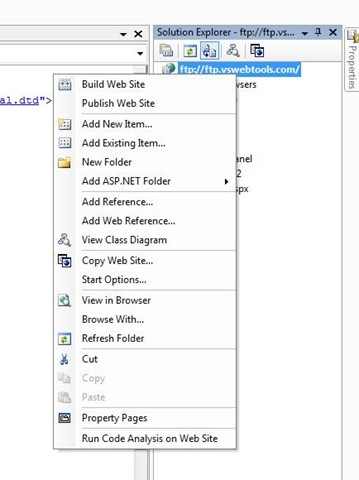
WDP is not designed to work on a remote web site so it you are using FTP to connect to a remote location and are trying to use WDP for pre-compiling your web site then you will realize that you will see no WDP command in either the build or the solution explorer. Some times users are confused whether their WDP installation or Visual Studio installation has some issues hence thought it would be worth clarifying...
The work around for the same is to copy the web site locally pre-compile it using WDP and then publish it using "Copy Web Site" to the remote location.
Fig1. WDP available on local web site in both solution explorer and Build command


Fig 2. WDP not available on remote web site in both solution explorer and Build command

.Net Framework libraries source will be released along with .Net 3.5 and VS 2008... It will supported to be debugged with VS 2008 as well which will take Debugging your application to entirely new level...
You should check out Scott Guthrie's blog for the complete story... Click here
Thought this would be interesting... I opened up a new hosting account on GoDaddy.com last week and this week I received a call (actually voice mail coz I was not in my office) from a REAL HUMAN BEING from godaddy.com thanking me for my business with them and also asking me if they could do anything which could make my experience better... Am I really living in 2007?... Does everyone who opens an account with godaddy gets a call like this?
Hat's Off to their customer service... Now I need to figure out if they will support IIS7, ASP.NET Ajax and .Net 3.5... If they give me that too I will sing praises for them like everywhere... :-)
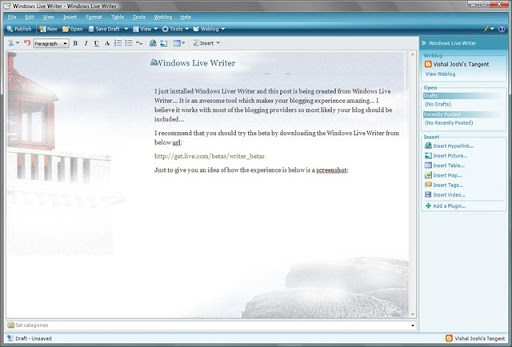
I just installed Windows Liver Writer and this post is being created from Windows Live Writer... It is an awesome tool which makes your blogging experience amazing... I believe it works with most of the blogging providers so most likely your blog should be included...
I recommend that you should try the beta by downloading the Windows Live Writer from below url:
http://get.live.com/betas/writer_betas
Just to give you an idea of how the experience is below is a screenshot of the screen while I am writing this post: