Web Deployment Projects (WDP) allows you to pre-compile your web into binaries and further also allows you to merge the assemblies produced in the format that you like.
In my earlier posts I had talked about various WDP features and the latest release of WDP for VS 2008. You can read more about this at:
http://vishaljoshi.blogspot.com/2008/01/visual-studio-2008-web-deployment.html
By default in the WDP output you will find project files (.csproj/.vbproj), user files (.user), .PDB, obj folders and other artifacts which are not required for web to run. It is pretty easy to get rid of these files by following these simple steps:
Step 1 - Open WDP project file for editing
Open WDP project file by right clicking on the WDP project and clicking "Open Project File"

Step 2 - Exclude .pdb, .user, .csproj/.vbproj files from Build
In the ItemGroup section of WDP project which looks like below:
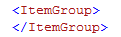
Add the files which you would like to exclude from the SourceWebPhysicalPath like below

ExcludeFromBuild will allow you to remove these files even though they are present as part of the parent project. After this step your item group should look as below:

In the similar fashion above you can remove other items which you do not need in the output
Step 3 - Removing items after Build
As you know folders like OBJ are produced during build process hence if you do not want them to appear in the output then they need to be removed after build. to do this we need to add one more item to the above ItemGroup as below

Do note that this time we are using the property $(OutputPath) instead of the property $(SourceWebPhysicalPath)
Now the last step is actually use the itemgroup value as part of the AfterBuild target. Your WDP project file by default has these commented section as shown below
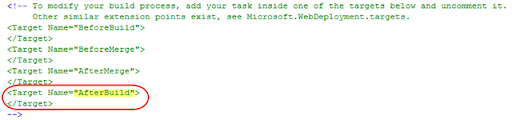
We need to uncomment the call to Target "AfterBuild" and call "RemoveDir" on the OBJ folder Item we declared in the ItemGroup above... This can be done as shown below:

Finally at the end your WDP project file will look as below:
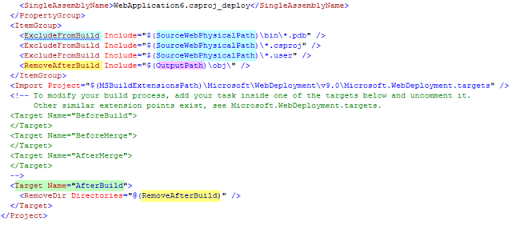
Step 4 - Save WDP project file, and rebuild WDP
After the above changes to the WDP project file when you rebuild your WDP project you should have your output folder without PDB, Project file, user file or OBJ folder in it.
Hope this helps!!

