Monday, February 18, 2008

ASP.NET MVC Test Framework Integration

Previously I gave an overview  of new tooling features for ASP.NET MVC Framework that we are hoping to make available during MIX 2008 timeframe.  You can read more about Overview of MVC Tooling Features for MIX 2008 here

Goals: ASP.NET MVC Framework is Microsoft's implementation of MVC framework which is hugely popular in the industry for best practices and conventions.  In lines with best practices one of the goals of this new ASP.NET framework is to enable easy unit testable web applications.  To ease unit testing and to make it part of our regular application development workflow Visual Studio is introducing integration of unit test projects with ASP.NET MVC Application.  Many in the community are already familiar with and are using test frameworks liked Visual Studio Unit Test, NUnit, MBUnit etc.  If you have Visual Studio Unit Test framework on your machine (i.e. in Visual Studio 2008 SKUs Professional and Above) then on creation of ASP.NET MVC Web Application you will automatically be prompted to create a test project.   Not only that, due to the popular community request Visual Studio will now also provide a mechanism to extend this test framework system to integrate external unit testing frameworks like NUnit, MBUnit, xUnit etc.

Today I will be walking you through this new Test Framework integration for MVC Projects. Our goal today is:

  • To understand how to create test project templates
  • To understand how registration works for test project framework and how to register a custom test project template

At the end we want to get to a point where your test framework of choice shows up in the drop down when you try to create a MVC Application (like 'NUnit' does in the figure below):

(Fig 1: Create Test Project Dialog Box)

Applies To:  This article applies to Visual Studio 2008 with ASP.NET MVC Framework Mix 2008 CTP installed.  This documentation is pre-release documentation intended to provide insights to the community on the work being done by MS on ASP.NET MVC Framework, we are still in development phase so please do note that this is subject to change, but we believe this is very close to what you can see during MIX timeframe.

Video:  I have also created a screen cast (approx 30 mins in length) which covers the concepts of this post in detail, we will be making it available here soon...

Step 1: Creating Test Project Templates : There is a very succinct article on MSDN on how to create Project Templates.    You can find this article at http://msdn2.microsoft.com/en-us/library/s365byhx.aspx.  Although the process may vary depending on the type of unit test framework and mock objects you choose, I am summarizing the process in context of MVC Test Project Template which I created using NUnit framework and Rhino Mocks library.

  • Create a new class library project with the Code Language of your choice, give it a good reusable name which will apply to your test project template.
  • Add reference to "System.Web.MVC", "System.Web.Abstractions" and "System.Web.Routing" dlls in your class library project.  These DLLs will ship along with ASP.NET MVC Framework in the MIX 2008 CTP.
  • Download required Test frameworks (NUnit, MBUnit etc)
  • Download required Mock object libraries (Rhino mocks, Type mocks etc)
  • In the class library project add the right references to to the test framework and mock objects which you want to use.
  • Make sure that you make all of the above references dll's  "Copy Local" property to "True" (Select the referenced DLL and hit F4 to access the property in the Property Grid)
  • Add required folders and classes to test an MVC Application.  You can pre-populate whatever tests you like, but at the minimum if you would recommend matching the default MVC Application template that ASP.NET MVC Framework will ship with.  In order to match the default application template use the following structure:
    1. Create a "Controller" folder under the project root and add "HomeControllerTests" class to it.  Add unit tests to cover "About" and "Index" actions
    2. Create a "Routes" folder under the project root and add "RouteTests" class to it.  Add unit tests to cover the two default routes that will come with ASP.NET MVC Framework.
  • Build your project so that the required binaries are present in the bin (note: my screen cast has this step missing and hence I get some unresolved references when I instantiate the template)
  • Go to File-->Export Template wizard and follow its easy directions.  The project template is usually created in the user's VS directory (the wizard will point you to the location).
  • Remove the template.zip from the user specific directory and move it to %Program Files%\Microsoft Visual Studio 9.0\Common7\IDE\ProjectTemplates\Language\Test\Locale
  • Close all the instances of Visual Studio and open the command prompt (Start --> Run type cmd)
  • Navigate to the IDE folder on the command prompt (cd %Program Files%\Microsoft Visual Studio 9.0\Common7\IDE) and type devenv /setup, hit enter
  • This will take some time but should setup your newly created project template within Visual Studio .  If you now open VS 08, then in New Project dialog box you should be able to see your template show up under C#/VB-->Test directory.

Step 2: Understanding Test Project Registration: We are introducing a very easy registry based registration model for your test project templates.  Please refer the registry structure below:

image

(Fig 2: Test Framework Registry Info)

We have a new MVC key under Visual Studio 9.0 registry location as highlighted above.  As you can see above I have NUnit and VisualStudio as my available test frameworks.  This is what is showing up in the  screen shot of "Create Test Project" dialog box in Fig 1 above.  If you would like to add more test frameworks please go ahead and create one more key under 'TestProjectTemplates' key.

On the right side you see various string values, let me go ahead and explain what each one of these mean:

  • AdditionalInfo:  You can enter a URL for more information on the Test Framework here.  It is hopefully going to be used by 3rd parties who will be creating Test Project Templates.  This link shows in the Fig 1 as "AdditionalInfo" link
  • Package:  This is a pointer to the VS package that you may want to use in case you are adding UI elements or doing advanced functionality with your Test Project.  Visual Studio will be using this information to pull out localized resources when we localize MVC Test Project Template for Visual Studio
  • Path:  The Test Framework selection of VS expects that your test templates are registered with Visual Studio and are located some place under standard VS Project Templates location (i.e. %Program Files%\Microsoft Visual Studio 9.0\Common7\IDE\ProjectTemplates\. The Path value mentioned here is actually the location under this standard VS Project Templates path. 
  • Template:  This is the actual zip file name which was created in the Step1 above.
  • TestFrameworkName: This is the name that will show up in the drop down of Fig1: above.  In order to localize the URL of AdditionalInfo or name of TestFrameworkName we will provide a special syntax like "#1209:NUnit".  This will indicate to Visual Studio to use resource # 1209 from the Package above for the localized string but if nothing is available then use the default "NUnit".

Also one point to note over here is that VS Test Framework selection system will create a test project for the same language as your primary MVC Application Project. The same registry strings that we just discussed above can be replicated at the top node (e.g. 'VisualStudio') that I have highlighted in the Fig 2 above.  I would recommend having that replicated as it allows Visual Studio to fall back on this template in case your primary MVC Application is of languages  like 'IronPython' etc.  In nutshell that is the default template for that particular test framework within VS.

Summary: On completing the steps above, when you go to File--> New Project --> Language --> Web and try to create a new "ASP.NET MVC Web Application" project then the dialog box presented in Fig1: will show up with your newly registered Test Framework in the drop down. 

Hope this will get you unit testing your projects more and more...!!

Vishal R. Joshi | Program Manager | Visual Studio Web Developer

Sunday, February 17, 2008

Tooling Features Overview of ASP.NET MVC Framework for MIX 2008

There has been a tremendous positive response on ASP.NET MVC Framework from the community since we released the December 2007 CTP of ASP.NET Extensions.  With MIX 2008 coming closer our teams have been super busy in trying to bring out value additions to ASP.NET MVC Framework.  ScottGu, in his ASP.NET MVC Road-map post, recently introduced the new MVC features coming up with MIX preview.  He had mentioned that with this MIX release ASP.NET MVC will get much better Visual Studio 2008 integration and support.  My post today is to outline these integration points and support within Visual Studio.

Features:  During December 2007 preview of MVC we just had project templates to support MVC development within Visual Studio, since then there have been some improvements which are as below:

Project Template Filtering and Naming: MVC Project templates will now be filtered based on .NET Framework version and will be available only when you select Framework version 3.5.  You can now also name your projects and solutions as per your choice which was not possible in the Dec 2007 CTP.

Test Framework Options: In Dec 2007 CTP we had 'MVC Application' project template and also had 'MVC Application and Test' project template.  We now do not expose the 'MVC Application and Test' project template instead we have a cool new Test Framework options dialog which shows up as soon as you click okay on you MVC Application creation.  This test framework dialog assumes that you want to create your test project in the same language as your primary MVC Application and so it does not show you that option.  TheTest Framework dialog box will look like below:

image

When you select your Test framework and click okay Visual Studio will create a multi-Project template with the Test Project already having reference to your primary MVC Application.  In my follow up post on this topic will learn about the way 'Test Framework Options' dialog box works behind the scenes and understand the way by which we can extend it to use external 3rd party testing frameworks.

'Add New Items' Dialog Box:   The new 'Add New Item' dialog box for MVC Applications will show a "MVC" node under the "Web" node as shown below.  This will allow you to locate your MVC item templates pretty easily:

image

ASP.NET MVC framework (without any extensibility customizations) requires you to suffix your controller names with "Controller".  Visual Studio will now help you achieve this mundane task by reminding you about it and 'by default' naming it correctly in your project.

Making Routes more Testable:    We have also gone ahead and changed global.asax to make your routes much more testable by default.  The new global.asax will look something similar to below:

image

You can very easily now call RegisterRoutes externally to test your routes.

Getting Designer.cs/.vb Files Back:  In December 2007 CTP our view pages did not have the .designer.vb and .designer.cs files attached to them, many of you asked us to get that in so that server control useage would become easier.  In the MIX 2008 CTP every View Page, Master Page and Content Page associated with MVC development will come with a pre-created designer.cs/vb file.

image

Debugging Settings:   We have now made some default debugging settings so that your MVC application will debug no matter where you hit F5 in your solution explorer.  You will definitely have option to modify this behavior in the property pages of your MVC Application.

Removing 'View in Browser' & 'Add a Content Page' Commands:  If you right click on .aspx pages within an MVC Application you will not see 'View in Browser' command.  This command has been intentionally disabled as in case of MVC application we want that the calls made are not handled directly to .aspx pages but rather get routed via a controller, which in turn will produce ViewData and redirect to the right View Page.  "Add a content Page' command was also removed from Master Pages in MVC application as creation of View Pages is expected to be location specific depending on the controller and 'Add a Content Page' was not directly applicable in such scenarios.

New Look And Feel:  MVC Application right off the shelf will now also have a much more CSS friendly  and pretty UI which you can start customizing and converting into your real world application.  I am attaching a screenshot of how ASP.NET MVC Application will possibly look like as soon as you hit F5 on this new template.

image

Hope these features help you with using ASP.NET MVC Framework.  In follow up posts on the ASP.NET MVC topic, I will write back about customization of Test Framework dialog box.  In the meantime hope this gets you up to speed with our efforts around ASP.NET MVC Framework.

Thursday, February 14, 2008

Web Deployment Projects (WDP) 2008 Japanese Released

Our Japanese & Redmond team have been working together and just released the Japanese version of Web Deployment Projects for Visual Studio 2008... Our Japanese friends have been patiently waiting for this release since the December 2007 CTP of WDP 2008 was released, so finally this RTW will help unblock a lot of people...

You can read more about the ENU release at http://blogs.msdn.com/webdevtools/archive/2008/01/25/announcing-rtw-of-visual-studio-2008-web-deployment-projects-wdp.aspx

You can download the JPN release from:
http://blogs.msdn.com/webdevtools/archive/2008/02/14/announcing-japanese-release-of-web-deployment-projects-2008.aspx

The announcement in Japanese:
http://blogs.msdn.com/dd_jpn/archive/2008/02/14/7688137.aspx

Hope our friends from Japan will enjoy it...

Friday, February 08, 2008

New Hot-Fix Visual Studio Web Developer now available


We just released a hot-fix for VS 2008 which includes a ton of value added features...  We would had loved to have many of these covered within VS 2008 itself but as you can imagine it is not always possible to delay release to get everything in...

The key idea over here is  to be able to provide incremental value over the product frequently and be agile in responding to customer suggestions... With all these value added releases coming out many have said that there are manageability concerns, but I would recommend looking at this as ala carte service, everyone does not need to constantly upgrade if you are not facing any of these issues daily, with VS 2008 SP1 all of this will be rolled up any ways...

The key issues that this hot-fix will address:

HTML Source view performance

  • Source editor freezes for a few seconds when typing in a page with a custom control that has more than two levels of sub-properties.
  • “View Code” right-click context menu command takes a long time to appear with web application projects.
  • Visual Studio has very slow behavior when opening large HTML documents.
  • Visual Studio has responsiveness issues when working with big HTML files with certain markup.
  • The Tab/Shift-Tab (Indent/Un-indent) operation is slow with large HTML selections.

Design view performance

  • Slow typing in design view with certain page markup configurations.

HTML editing

  • Quotes are inserted after Class or CssClass attribute even when the option is disabled..
  • Visual Studio crashes when ServiceReference element points back to the current web page.

JavaScript editing

  • When opening a JavaScript file, colorization of the client script is sometimes delayed several seconds.
  • JavaScript IntelliSense does not work if an empty string property is encountered before the current line of editing.
  • JavaScript IntelliSense does not work when jQuery is used.

Web Site build performance

  • Build is very slow when Bin folder contains large number of assemblies and .refresh files with web-site projects.

Know more and download this hot-fix

You can read more and download the release from our team blog here

Friday, February 01, 2008

MS Web Deployment Tool - Technical Preview Released

We recently released MS Web Deployment tool (msdeploy.exe)... This is really a very handy tool to manage migration and deployment for your IIS based applications and web servers...

At a very high level this tool can do one of the following things:

  1. Migrate IIS 6 applications & servers to IIS 7....
  2. Synchronize & take a snapshot you II6 or IIS7 web
  3. Analysis of installed IIS6 features
  4. Do whatif analysis of your product...

This tool can traverse through and take a snapshot of your IIS web or web server. While traversing this tool takes snapshots of following:

  • Registry settings
  • Directory & Files
  • GAC Assemblies
  • COM Objects
  • Web, root web, app host & machine config
  • Certificates

This information is then used to synchronize between servers... Interestingly I feel it is a great way to create a test or dev box snapshot... Well you can download and read lot more about the tool at the below email:

http://www.iis.net/downloads/default.aspx?tabid=34&g=6&i=1602

Friday, January 25, 2008

Visual Studio 2008 Web Deployment Projects (WDP) Releases to Web

Just some time ago I made an announcement on our team blog about release of WDP 2008... It has been a very exciting journey to reach at this point...

We had received an enormous participation for December 2007 CTP and community had provided us with a lot of interesting feedback... We had to balance out between features and timeline as usual... There are many customers who were not able to move ahead with Visual Studio 2008 installations because of unavailability of WDP 2008 and we did not hold so many folks from using VS 2008 hence releasing early was definitely important...

That said, I think the current version of WDP 2008 is a fine balance of speed to market and features... In fact I think this release has quite a few value added features:

  • New Features of Visual Studio 2008 Web Deployment Projects are as below... You can read in detail about these features on the post which announced December 2007 CTP of VS 2008 WDP (Click here to go to the December 2007 CTP post)
    • Migration from WDP for VS 2005 to WDP for VS 2008
    • Replacing WDP output only if Pre-Compilation succeeds
    • Creating IIS Applications
    • Using aspnet_merge.exe version which is installed with Visual Studio 2008
  • Core WDP Features

To find out more about the release visit the link below:

http://blogs.msdn.com/webdevtools/archive/2008/01/25/announcing-rtw-of-visual-studio-2008-web-deployment-projects-wdp.aspx

At the end I feel really proud to to call out the efforts of the heros behind WDP, my team members... Alison Lu has done a great job of testing WDP and reproducing every possible scenario that we heard from blogs, forums or connect system... Wendy Wei our dev on WDP got to the bottom of multiple issues that were raised... Bill Hiebert is our Architect and is always the support mechanism of the team... Anna Lidman is our Release Manager and makes our release process so smooth that we practically have forgotten the pains of going to the web... Tim McBride is our Dev lead and John Dundon is our test lead on WDP and have always been great partners to work with...

I hope you enjoy this release of WDP as much as we have enjoyed releasing it and hope it makes your pre-compilation and deployment challenges easier to deal with...

Happy Deploying!!

Thursday, January 24, 2008

Register for Beta Exam 71-571: Microsoft Windows Embedded CE 6.0, Developing

You are invited to take beta exam 71-571: Microsoft Windows Embedded CE 6.0, Developing if you have experience using Windows Embedded CE. If you pass the beta exam, the exam credit will be added to your transcript and you will not need to take the exam in its released form. The 71-xxx identifier is used for registering for beta versions of MCP exams, when the exam is released in its final form the 70-xxx identifier is used for registration.
By participating in beta exams, you have the opportunity to provide the Microsoft Certification program with feedback about exam content, which is integral to development of exams in their released version. We depend on the contributions of experienced IT professionals and developers as we continually improve exam content and maintain the value of Microsoft certifications.

71-571 : Microsoft Windows Embedded CE 6.0, Developing counts as credit towards the following certification(s).

· MCTS: Windows Embedded CE 6.0 Developer


Availability

Registration begins: January 24, 2008

Beta exam period runs: January 29, 2008– February 18, 2008

Receiving this invitation does not guarantee you a seat in the beta; we recommend that you register immediately. Beta exams have limited availability and are operated under a first-come-first-served basis. Once all beta slots are filled, no additional seats will be offered.

Testing is held at Prometric testing centers worldwide, although this exam may not be available in all countries (see Regional Restrictions). All testing centers will have the capability to offer this exam in its live version.

Regional Restrictions: India, Pakistan, China


Registration Information

You must register at least 24 hours prior to taking the exam.
Please use the following promotional code when registering for the exam: EMBCE
Receiving this invitation does not guarantee you a seat in the beta; we recommend that you register immediately.

To register in North America, please call:•

Prometric: (800) 755-EXAM (800-755-3926)

Outside the U.S./Canada, please contact:•

Prometric: http://www.register.prometric.com/ClientInformation.asp


Test Information and Support

You are invited to take this beta exam at no charge.
You will be given four hours to complete the beta exam. Please plan accordingly.
Find exam preparation information: http://www.microsoft.com/learning/exams/70-571.mspx


Frequently Asked Questions

For Microsoft Certified Professional (MCP) help and information, you may log in to the MCP Web site at http://www.microsoft.com/learning/mcp/or contact your Regional Service Center: http://www.microsoft.com/learning/support/worldsites.asp.

What is a beta exam?

Where can I learn more about the registration process?

Where can I learn more about the beta exam invitation process?

Where can I learn more about the new structure of Microsoft Certification?

Who do I contact for help with this beta exam or other MCP questions?

Saturday, January 19, 2008

Tips & Tricks: Web Server Settings for Web Application Projects now can be stored per user as well as per project

Web server settings, which are accessible inside Web Application Projects (WAPs) property pages (Web section)  allow you to specify settings associated to to Visual Studio Development Server or IIS.  Many a times in a team development environment it is preferred that these settings are shared across the teams providing consistency; at the same time many other teams prefer that these settings be developer specific.

To support both of these scenarios in Visual Studio 2008 the web server settings now has an additional checkbox as highlighted below:

image

By default this check box comes checked and it implies that these settings will be stored in the project file (i.e. .csproj or .vbproj) and when opened in an XML editor will look as below :

image

When the check box above is unchecked then the settings are transferred to .csproj.user / .vbproj.user file located in the project folder and "SaveServerSettingsInUserFile" node value is changed to True in the project file...  This setting is especially useful when a team wants to allow per developer settings while checking in the project files in a source control system like TFS or VSS.

If you are using Visual Studio 2005 then we have created a hotfix to support this model. The explanation above still holds true for VS 2005, although in VS 2005 you will not have the property pages checkbox to make the change to "SaveServerSettingsInUserFile" property.  You will still be able to make the change manually in .csproj and .vbproj file.  You can read more about this in the KB Article 942844.   Hope this will help...

Technorati Tags: Web Development,VWD,Visual Studio,tips and tricks,Development Server,ASP.NET

Thursday, December 20, 2007

Tips & Tricks: Start-Up Options and Instances of ASP.Net Development Server in a Multi-project Solution

If you have more than one project in your solution you can use following options of solution properties to set your start up actions...  You can get the below dialog by right clicking your solution and going to its properties:

image 

If you have more than one Web project (either Web Site, WAPs or both) in your solution and choose to start only one of it, you can do so by setting "Single startup project" above (or also via  Project context menu "Set as StartUp Project" in solution explorer)...  Although, even after doing so when you start debugging your application using ASP.Net Development Server you will see multiple instances of ASP.Net Development Servers in your system tray as shown below:

image

There is an important point to note here that a single instance of ASP.NET Development Server cannot handle more than one Web Application/Site...  Ideally if you need this kind of functionality you should be using IIS for your debugging instead of ASP.NET Development server...

There are instances when you might have many web applications or web sites in the same solution and you may be actually debugging only one of them...  In such scenario it might not be desirable to have multiple instances of ASP.NET Development Server running...  VS provides an explicit setting in the property grid of web application/site called Development Web Server - "Always Start When Debugging" which is set to True by default...  If you set this Property to be False only one web server instance will be created for the start up web project...

You might want note that in that same debug run, you will not be able to debug any other non-IIS based Web Application/Site in the solution who has this property set to "False"; but if you really want to debug just one application at a time you may not have to worry about it anyway...

Wednesday, December 12, 2007

Edit & Continue feature for Web Application Projects (WAPs)


There is Edit & Continue functionality available for WAPs... Although we have disabled it by default as it may potentially have debug performance impact due to the fact that we have to recycle the ASP.NEt Web Server process every time for this functionality to work...


Although I think the performance hit is not as big to let go of not using the feature...  I would recommend that you go and try it out by checking the Edit & Continue checkbox in your Web section of Property Pages as below:

image

But also do note that this property in addition to your tools options Edit & Continue should be checked otherwise the feature won't work...

image

Also note that if you are in web development profile you will have to check "Show all settings" in the bottom of the Tools--> Options windows within Visual Studio...

Workaround: Debugging Global.aspx.cs with ASP.Net Web Server within Visual Studio


When you add a global.asax file to your "Web Application Projects (WAPs like below:

image

and then write code in Application_Start event and try to debug it like below using Visual Studio inbuilt Web Server

image 

Then during your first debug the breakpoint is hit but during your subsequent debug runs the breakpoint is not hit.

The reason behind this is that we do not kill the ASP.Net Web Server process after your every debug run and hence Application_Start() is not fired every time.  There is a good reason why we do so...  Starting ASP.Net Web Server process is an expensive task and in most of the scenarios recycling this process after every debug would adversely impact your performance...  If you do not want to debug your Application_Start() method then probably you do not need to have the process restart and save performance most of the time... 

However if you would like to have the breakpoint hit you have few easy workarounds... One of the workaround is that you stop the web server from your system tray as in the figure below:

image

Alternatively you can go to your property pages of your web application and enable Edit & Continue like shown below:

image

When you choose Edit and Continue then we recycle the ASP.Net Web Server process on every debug run (it is needed for the Edit & Continue functionality to work)...  This way although you will see very marginal degrade in your performance you will still be able to debug your Application_Start() methods...

Hope this helps...

Our team Visual Web Developer is hiring...

The Visual Web Developer team is looking for a few talented and experienced invididuals to join our team.  We have opportunities in development, testing, and program management.  Our team builds Visual Studio features that enable creating applications for ASP.NET, IIS, Silverlight and Sharepoint.

Here are links to our current openings:

To submit your interest in any of these positions, please email -- vijoshi-at-microsoft-dot-com -- with an attached resume.

Sunday, December 09, 2007

ASP.Net 3.5 Extensions just released


We just released ASP.Net 3.5 Extensions on Microsoft Download Center... This release includes preview of following technologies:

  • ASP.NET MVC
  • ASP.NET Dynamic Data
  • Silverlight controls for ASP.NET
  • ADO.NET Data Services
  • Entity Framework runtime, and
  • New features for ASP.NET AJAX.

You can download ASP.Net 3.5 Extensions from below:

http://www.microsoft.com/downloads/details.aspx?FamilyId=A9C6BC06-B894-4B11-8300-35BD2F8FC908&displaylang=en


I will blog about many of these technologies in time to come...
you can also find more interesting links on the release on Brad Abrams blog @ http://blogs.msdn.com/brada/archive/2007/12/09/the-wait-is-over-asp-net-3-5-extensions-preview-posted.aspx

Thursday, December 06, 2007

PDC 2008 is announced

PDC which was earlier slotted for Oct 2007 was moved to Oct 2008 and is planned in LA Convention Center from Oct 27th to Oct 30th 2008... More information can be found below:

http://msdn2.microsoft.com/en-us/events/bb288534.aspx

Saturday, December 01, 2007

Web Deployment Projects for VS 2008 Dec 07 CTP Released

Today after more than two months of effort our team released the Dec 07 CTP of Web Deployment Projects (WDP)... We were receiving one or more requests nearly every week since last few months to have WDP out for Orcas so I am sure that this release will enable a tons of web developers to adopt VS 2008 and use the latest and greatest features that come along with...

I have created a blog post on our team blog which talks more about this release... You can click here to view the post (http://blogs.msdn.com/webdevtools/archive/2007/12/01/web-deployment-projects-wdp-for-visual-studio-2008-december-2007-ctp-released.aspx)...

I want to mention that we have a great team in Visual Studio Web Developer... Honestly, the team rocks, often time we never know who make these technologies happen and so to name a few those people are Wendy Wei, Alison Lu, John Dundon, Tim McBride, Bill Hiebert, Anna Lidman, Bradley Millington, Bradley Bartz, Omar Khan and others...  Hope you enjoy the release...

I will keep posting other tips and tricks around WDP on this blog in the weeks to come so do visit once in a while...

Wednesday, November 14, 2007

WDP does not publish empty folders


If you have an empty folder in your website then WDP will not publish it, this is by design... If you add any files to this folder then you can see it in the pre-compiled web folder that WDP produces...

Monday, November 12, 2007

Active Directory users of Seattle Area - Invited!!


Microsoft Learning is looking for Puget Sound based volunteers who know Active Directory to participate in a pilot of our new, innovative MCP emulation lab exam technology. During this pilot, you will take an exam in which you will perform a variety of tasks using Active Directory, answer multiple choice questions, and provide feedback about your experience with this new technology. The purposes of this pilot are to: 1) understand how emulation lab-based items function in relation to multiple choice items, 2) determine how much time is needed to complete each lab, and 3) evaluate our scoring strategy.

As an incentive, all participants will receive a thank you gift after completing the exam as well as breakfast or lunch. To encourage you to do your best on the exam, the top 5 highest scorers on the exam will receive a 100 GB USB 2.0 external hard drive.

We will be conducting this pilot project through November 16 on Microsoft’s main Redmond campus. To ensure that all participants have sufficient time to complete both sections of the exam and provide feedback, each slot is scheduled for 4 hours. However, most participants have finished in less than 2 hours. Two time slots are available per weekday (Monday – Friday from 8:30am-12:30pm and 1:00pm-5:00pm). To register:

1) Go to: https://www.pickatime.com/client?ven=11601148

2) Create a ‘pickatime.com’ account if you do not have one. This information is used solely to send you a confirmation and reminder email.

3) Select the location where you want to take the exam.

a. Microsoft employees should register for sessions at Building 25 unless all slots for your desired date and time are filled.

b. Non-Microsoft employees must register for sessions in Building 40.

4) Select a day and time for your appointment.

5) Click “Confirm.” A confirmation message containing specific details about the location of the exam and other relevant information will be sent to the email provided when you created your account.

Walk-ins are welcome as long as we have available testing machines. To ensure a seat, we encourage you to register prior to the session that you would like to attend.

Your participation is critical to the successful implementation of our emulation lab exam technology. Thank you, in advance, for your assistance with this project.

Microsoft’s MCP Emulation Exam Team

Monday, November 05, 2007

Microsoft declared to be "Best Employer to work for" in India


Business Today declared Microsoft India to be the best company to work for in India... You can read the complete story here

Friday, October 19, 2007

WDP Project does not show in "Add Existing Project" Dialog

If you remove an existing Web Deployment Project from the solution by mistake and then try adding it to the solution back again (or to new solution) then WDProj won't show up in the "Add Existing Project" dialog box...

As wdproj is an out of band addition to the Visual Studio, it is not by default recognized as a project when you try to add a project to the solution... The easy way to work around this is by putting *.* in the File Name box and clicking Open, this will display wdproj file which can then be loaded into the VS in same way if it showed up at the first place...

The current limitation is by-design but we will looking at integrating deployment solution to VS in future releases... Hope this work around will help in the meantime...

Friday, October 12, 2007

Web Deployment Project (WDP) do not support Remote web

WDP is not designed to work on a remote web site so it you are using FTP to connect to a remote location and are trying to use WDP for pre-compiling your web site then you will realize that you will see no WDP command in either the build or the solution explorer.   Some times users are confused whether their WDP installation or Visual Studio installation has some issues hence thought it would be worth clarifying...

The work around for the same is to copy the web site locally pre-compile it using WDP and then publish it using "Copy Web Site" to the remote location.

Fig1. WDP available on local web site in both solution explorer and Build command

WDP-SolutionExplorer WDP-BuildMenu

Fig 2. WDP not  available on remote web site in both solution explorer and Build command

FTP-WebSite-noWDP FTP-WebSite-Build-noWDP

Friday, October 05, 2007

.Net Framework Libraries Source Code will be released...


.Net Framework libraries source will be released along with .Net 3.5 and VS 2008... It will supported to be debugged with VS 2008 as well which will take Debugging your application to entirely new level...

You should check out Scott Guthrie's blog for the complete story... Click here

Wednesday, October 03, 2007

Go Daddy customer service


Thought this would be interesting... I opened up a new hosting account on GoDaddy.com last week and this week I received a call (actually voice mail coz I was not in my office) from a REAL HUMAN BEING from godaddy.com thanking me for my business with them and also asking me if they could do anything which could make my experience better... Am I really living in 2007?... Does everyone who opens an account with godaddy gets a call like this?

Hat's Off to their customer service... Now I need to figure out if they will support IIS7, ASP.NET Ajax and .Net 3.5... If they give me that too I will sing praises for them like everywhere... :-)

My Learning is cool


Go visit http://learning.microsoft.com/Manager/Catalog.aspx

Wednesday, September 12, 2007

Windows Live Writer


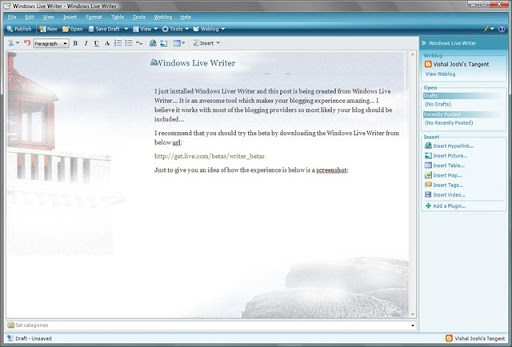
I just installed Windows Liver Writer and this post is being created from Windows Live Writer... It is an awesome tool which makes your blogging experience amazing... I believe it works with most of the blogging providers so most likely your blog should be included...

I recommend that you should try the beta by downloading the Windows Live Writer from below url:

http://get.live.com/betas/writer_betas

Just to give you an idea of how the experience is below is a screenshot of the screen while I am writing this post:

WindowsLiveWriter

Saturday, September 08, 2007

Joining Visual Studio Web Team

It has been a while since I wrote and hence it is a little strange to write... It seems like past 1.5 years of my work life has been hidden somewhere and that is kind of true as well... Hopefully I will be able to write about it in next 2-3 months, but anyways the reason for today's post is a little different...

I wanted to let you folks know that I am joining Visual Studio Web Developer team from Sept 10th 2007 (Monday) onwards... It is an exciting move for me coz I have always loved the web world and working on the team which help shapes the future of the web is super exciting to me... Hopefully in time to come I will be able to write a lot more and provide some useful info to you all...

Q. So what will I be doing in Visual Studio Web Developer team...?
A. I will be the Program Manager for Visual Studio Project System for Web... Ofcouse that is very vague right!! So let me give some more details... Visual Studio Project System for Web comprises of creation, compilation and deployment of Web based XXX from Visual Studio...
The reason I said XXX is coz XXX can include Web Site, Web Applications and any other web properties that you may want to create from Visual Studio...

Q. So what can you expect from me?
A. Well, as usual feel free to contact me whenever and however way you want... If you have any thoughts, issues, suggestions, concerns or feedback about Web Development with Visual Studio then do not think twice before writing... I promise I will conciously spend time and energy in taking the feedback in the most positive way in the most positive direction...

Q. So what kind of things can you reach out to me for?
A. Practically anything to do with Visual Studio Web Development... If it falls under the area that I am responsible for I will work on it myself, if it is beyond my area then I will send it across to the right people...

Some Random thoughts:
I feel, lot of time we take Visual Studio for granted... Many times we think that whatever is available within Visual Studio or via available add-ins is what you can do with the technology !! But Visual Studio is a product for us developers and you can say out loud the things that you love or hate about it... At Microsoft we will love to take your thoughts and suggestions and try to turn them into reality... It does not mean everything that everyone hopes will become Visual Studio feature, honestly not everything that I will hope will also become Visual Studio feature but the laundry list will be something which can become the base for discussion for the Visual Studio team... Your thoughts and suggestions will be something that will be debated and then probably the top requests will be taken up...

I am intending to talk to as many developers as possible and try to find out what features would they expect in the next version of Visual Studio that would make their life easier, their experience enjoyable and their productivity higher and higher... I will be more than willing to have a phone calls set up with you to talk about your expectations and feedbacks so if you are interested in doing so do not hesitate to let me know... If you think you would like to join the discussion along with your team then that is great too...

In anycase, to know more about the area that my team is responsible for visit our team blog below... It will provide you a lot of context on the things that we can talk about more...

http://blogs.msdn.com/webdevtools/

I will internalize our team motto and end by saying "Your websites will be my passion!!"

Looking forward to writing more often in the future...

Friday, July 06, 2007

Numbers of Bloggers in Microsoft

From a recent Wired magazine article about Microsoft:"In fact, the 71,000-employee company now has more than 4,800 bloggers posting on every imaginable tech topic, from startups to SQL." http://www.wired.com/wired/archive/15.04/wired40_microsoft_pr.html

PS: Thanks to my colleague Gus who provided the pointer to this article...


Disclaimer: This is probably a very conservative estimate coz there might be many many more employees who might have blogs on other private blog site and also on live spaces etc... I guess the above number is TechNet and MSDN blogs (exludes me too :-))...

Thursday, December 28, 2006

Upgrade News For MCSD .Net

MCSD.Nets can upgrade to all three MCPD (i.e. Web Dev, Windows Dev and Enterprise Apps Dev) using only 3 Upgrade Exams instead of 4... So here is the quick FAQ...

Q: Can exam 554 be taken without 553 having already being taken and passed?
A: YES, 554 CAN BE TAKEN WITHOUT 553 (BUT ONLY MCSDs WILL GET CREDIT FOR 553 OR 554).
Q: If so would that mean that an MCSD.NET can obtain all MCTS and MCPD certs by passing just three exams 551, 552 & 554?
A: YES, AFTER AN MCSD EARNS THE MCPD: WEB AND MCPD: WINDOWS WITH EXAMS 551 AND 552 (AND IN DOING SO, BOTH MCTS WEB AND WINDOWS), HE OR SHE CAN TAKE 554 TO EARN MCPD: ENTERPRISE APPLICATIONS (AND MCTS: DISTRIBUTED).

You can also see the rationale behind this on one of my previous posts... Click Here

We will upgrade the microsoft.com pages soon for more updates on this thread check Trika's blog too...

Tuesday, December 12, 2006

PDC 2007 Announced

Professional Developers Conference (PDC) is announced and is planned to be in Los Angeles from Oct 2-5 2007

Click Here for updates... You can also subscribe to RSS feeds here...

Registrations will open in first half of 2007...

Wednesday, November 29, 2006

News about Vista, Exchange and Office Exams

With release of Vista, Exchange and Office new certifications associated with them are also announced... Check out few of the press releases for details...

Vista, Office, Exchange Certs on Track

Upcoming releases spur new certification exams

New Exchange exams likely to emphasize roles, security

Microsoft certification program to get a makeover

Also I would encourage interested people to attend the live meeting planned on December 6th 2007... To register Click Here

Microsoft Official Distance Learning (MODL) Announced

A cool new way of learning Microsoft Technologies has been announced recently... I have personally seen the experience and it is pretty exciting... A real world environment is created remotely and a student is tought as if he/she was working on that problem in his/her office...
All of this is done remotely so you do not need to travel far away to learn from the best Microsoft Certified Trainers (MCTs) in the world...

Check out these links

Lutz Ziob's video on MODL

Europe Annoucement

On IT News Online

On Playful's.com

On ManufactingTalk.com

Wednesday, November 15, 2006

VS 2005 Upgrade Questions V1

A Colleague sent a few interesting questions on VS 2005 Upgrades am answering them here for everyone...

Q. Can exam 554 be taken without 553 having already being taken and passed?
A. Yes, it can be… Order of taking the exam is recommended not enforced... Although you will not get the complete credential till you pass all the required exams...

Q. After 551 and 552 an MCAD requries the Distributed TS (529) and the Enterprise PRO certification (549) but these two are obtained when passing 554 are they not?
A.Yes they are covered in 554 but 554 is built considering MCSD curriculum so MCAD will not receive any credit for 554…

Friday, October 20, 2006

Microsoft announces certification for Project 2007

Long awaited certification on "Microsoft Project" is announced... We have heard multiple times from Project Managers using Project as their primary tool that there needs to be a certification on this topic so finally it has been announced...

Check out some of the press releases when you find time...

Microsoft to Unveil New Certification Program for Office Project 2007

Microsoft Adds New Certification for Project Managers


Microsoft to Release New Certification

Introducing Howard Dierking's Blog

Howard Dierking has succeded me as a Technical Product Planner for Database and Developer certifications... He too will be bring Certification News to you along with me... Hope you enjoy his blog too...

Wednesday, October 11, 2006

Cost of New Generation Exams

The cost of new generation exams is the same as earlier MCP exams... So basically whether you are appearing any of the below categories of exams you should be paying the same amount (ofcouse if you have some promotions then you may be paying a different amount)

MCSD, MCSE or MCDBA exams
Upgrade to New Gen exams
New Gen exams

Monday, October 09, 2006

The DLL Hell Song

Really funny and catchy composition on DLL Hell by Spike Xavier & Dan Wahlin...

Click Here

Saturday, September 30, 2006

Keep Checking Certification NewsGroups

If you are preparing for certifications, you should keep an eye on the respective news groups where people have pretty interesting discussions...

Click here to check out Microsoft News Groups for Certifications

Also check out the newsgroup rules and explore many other newsgroups on specific technologies by Clicking Here

Use Outlook Express to browse through the newsgroups with ease... Below are some articles that may help you in getting acquainted with Outlook Express and subscriptions...
Outlook Express newsgroups 101

Got a tough problem? Become a newsgroupie

Thursday, September 07, 2006

Mobility Exams - Beta Notification

We recently launched Developer as well as ITPRO Mobility Exams in Beta format... The live exam will be released within the next couple of months but till then you can start preping...:-)

Mobility Exams for ITPROs
Exam 70-500

Mobility Exams for Developers
Exam 70-540

Monday, June 19, 2006

Preparation Guide for Exam 70-536 - UPDATED

Based on MCP feedbacks MS has updated the preparation guides for exams. The pilot updated prep-guide is for 70-536 & can be checked out at http://www.microsoft.com/learning/exams/70-536.asp

So what's new??
1.) Notice the "Exam Topics Covered" section... This section now tells you how the major areas of the exams are distributed across the exam. It will give you an opportunity to understand the coverage of the exam content and will guide you how to focus while you prepare.

2.) Also notice the "Practice questions" link... This gives you some of the sample questions to warm you up for the exam preparation. You can find more such questions in Microsoft Training Kits for the exam...

Btw, Microsoft Official Training Kit (MSPRESS Book) and E-Learning course on 70-536 will be available soon...

We would love to hear your feedback about the Prep Guide changes that our team has introduced... Do write back if you like it or even if you have any further feedback that we can take and implement... :-)

MSDN Resources for 70-536

Michael composes cool resources for 70-536 exam at the below location. A very useful compilation check it out...

http://www.dotnetfun.com/articles/certifications/Passing70536Certification.aspx

Saturday, June 03, 2006

Case Study in SQL 2005 PRO Exams

I would like to get feedback from people who have appeared SQL Server 2005 Case Study Exams...

Case Study exams for SQL Server 2005 PRO level certs were introduced to test a professionals ability to synthesize a given situation and make educated judgment on the correct choice... These kind of PRO Case Study exams may not have a clear choice to make and might seem like having more than one correct answers or probably no correct answers... Although, a person who very carefully reads through will realize that there is infact distinct correct answer to the questions...

Many a times when you find multiple correct answer - take a moment and read through the case study carefully, there will be something in the case study which will drive you to the correct answer. If you find nothing to be correct try to go through again and you might find something that will tell you the correct answer...

Many may argue that such questions are trick questions and more of word mangling than actual problem OR why can't MS people be frank, precise and ask what you want? But folks that is the definition of a Technology Specialist (TS) exam... The exams focusing on How To? areas will have a clear cut answer, they will be to the point, there will be not much confusion over there BUT in case of PRO exams they are suppose to get you closer to the REAL WORLD PROBLEM... In real world you do not resolve bugs by someone telling you what the problem is... You also troubleshoot, there are various different factors that play while you trouble shoot but finally you find the problem and resolve the bug... When you design a solution there is never a clear cut best design, there are trade-offs like performance, maintainability, security, extensibility etc... You would try to design with all these factors in consideration but when you are asked that security is a higher priority over performance then your choices change; that is how PRO exams work...

In PRO exams you have to make those hard choices and those become even more reflective in CASE STUDY EXAMS, hence be prepared for Case Study Exams... I am positive that if you go with this kind of expectation, you will not be confused or frustrated, you will probably look at the exam from the right perspective and perhaps apply your professional experience to the situation and do much better than you may expect...

If you have experiences with SQL Server 2005 Case Study Exams write a comment, let us know what you feel, let me know what can be made better and I will passionately take your advise and work on it...

Friday, May 05, 2006

New Electives for MCAD, MCSD & MCDBA Certs

To encourage candidates to finish their MCADs, MCSDs and MCDBAs Microsoft has now included some of the new MCTS exams to be electives for MCAD, MCSD .Net and MCDBA certs...

Summary
Technology Specialist Exam 70-431 will now be accepted as an elective towards your MCAD or MCSD .Net credential...

Technology Specialist Exam 70-526 OR Exam 70-528 OR Exam 70-529 will now be accepted as an elective towards your MCDBA credential...


References
You can check the updates to MCAD requirements @ MCAD Requirements Page

You can check the updates to MCSD .Net requirements @ MCSD .Net Requirements Page

You can check the updates to MCDBA requirements @... MCDBA Requirements Page

What happens to MCAD, MCSD, MCDBA?

Again this is one of the common queries which I keep getting... Please DO NOT be worried about MCAD, MCSD, MCDBA going away or their exams not being available... They are not going away...

If you are working on .Net 1.X or SQL 2000 you should still plan on pursuing MCAD, MCSD and/or MCDBA... Microsoft does not plan on retiring these certifications anytime soon... I mean to say that the certifications will not only be supported but also be available to take in parallel to MCTS, MCPD and MCITP...

Both these series of certifications will co-exist till .Net 1.X or SQL 2000 product's premium support is retired and as you all know MS will not retire the support for this products for years to come...

Although there is a likely possibility that our industry itself would start demanding more MCTS, MCPD and MCITP in time to come but then if your company works on .Net 1.X and SQL 2000 then MCAD, MCSD and MCDBA is still the right thing for you right!!...

Again boils down to your choice and reasons for taking cert but MS will support, value and keep both the series for now...

Thursday, May 04, 2006

MCPD options for MCSD .Net

I was asked by one of our MCTs on what are the options for a MCSD .Net to become MCPD:Web Developer & MCPD:Windows Developer IF he/she has already taken 553 & 554 to get MCPD: Enterprise Application Developer

The answer is:
1.) Either take 551 & 552 to become MCPD in Web and Windows Development respectively
OR
2.)Take 547 & 548 to achieve the same...

551 & 552 will cover TS as well as PRO contents of their respective track, where as 547 & 548 will cover only PRO content...

Which option to select depends upon your choice... Make a choice after looking at the Prep Guides of the exams on Exam Prep Guides

Wednesday, May 03, 2006

Dynamics of VS 2005 Upgrade Exams - Simplified

My good colleague suggested me to put the Upgrade exams story in simple words rather than my complex math, so if you do not care about all the complexity around the last post here is a simplified version:

MCPD:Web Dev = MCTS:Web + 547 = 551
MCPD:Win Dev = MCTS:Win + 548 = 552
MCPD:EA Dev = MCTS:Web + MCTS:Win + MCTS:DA + 549 = 553 + 554
(subset 1) MCTS: Web + MCTS: Win = 553
(subset 2) 529 + 549 = 554

Saturday, April 15, 2006

Dynamics of VS 2005 Upgrade Exams

Upgrade exams for VS 2005 are very useful but may be confusing at times... Check these equations below and that will help you understand the dynamics of VS 2005 Upgrade exams:

Folks who are MCAD can take 551 and/or 552 upgrade exams... MCADs have an opportunity to choose which of the above upgrade exam to take based on their inclination towards Web Dev or Windows Dev... MCADs also have the liberty to take both 551 & 552 incase they are inclined towards both Web and Windows area... Although, do note that MCADs CANNOT take 553 & 554 as they are meant only for MCSDs... Truthfully, nothing stops MCADs from taking 553 & 554 but unfortunately taking these exams will not yeild into any certification for MCADs unless they later complete their MCSD .Net certification...

Folks who have MCSD .Net have got all the options that MCAD folks have plus have an opportunity take 553 & 554 upgrade exams, which are specifically designed for MCSD .Net folks...

First let us quickly take a look at equation of the NON-UPGRADE exams with certifications:
MCTS:Web = 536 + 528
MCTS:Win = 536 + 526
MCTS:DA = 536 + 529
MCPD:Web Dev = MCTS:Web + 547
MCPD:Win Dev = MCTS:Win + 548
MCPD:EA Dev = MCTS:Web + MCTS:Win + MCTS:DA + 549

Now let us look at each upgrade exam to understand what kind of credits do each one of them offer (if you PASS them :-)):
551 = 536 + 528 + 547 = MCTS:Web + MCPD:Web Dev
552 = 536 + 526 + 548 = MCTS:Windows + MCPD:Win Dev
553 = 536 + 526 + 528 = MCTS:Web + MCTS:Windows
554 = 529 + 549 = NO certification by itself

ANALYSIS FOR MCTS

Now here is how the dynamics start coming into play, let us look at what options do MCAD or MCSD folks have to become MCTS... I am intentionally leaving out MCPD right now as we will talk about it after we are done with MCTS...

Case 1: MCAD can become MCTS:Web by using any of the following options:
Option 1.) 536 + 528 (Regular Option)
Option 2.) 551
Option 3.) 552 + 528
Case 2: MCAD can become MCTS:Win by using any of the following options:
Option 1.) 536 + 526 (Regular Option)
Option 2.) 552
Option 3.) 551 + 526
Case 3: MCAD can become MCTS:DA by using any of the following options:
Option 1.) 536 + 529 (Regular Option)
Option 2.) 551 + 529
Option 3.) 552 + 529
Case 4: MCSD can become MCTS:Web by using any of the following options:
Option 1.) Any option that MCAD folks have (plus)
Option 2.) 553
Case 5: MCSD can become MCTS:Win by using any of the following options:
Option 1.) Any option that MCAD folks have (plus)
Option 2.) 553
Case 6: MCSD can become MCTS:DA by using any of the following options:
Option 1.) Any option that MCAD folks have (plus)
Option 2.) 536 + 554
Option 3.) 553 + 554
Option 4.) 553 + 529

ANALYSIS FOR MCPD

Now as we have already talked about MCTS let us talk about MCPD... I am going to list down certain important points and then let you figure out the combinations yourself...

So the First important thing to remember in Upgrade Dynamics for MCPD certs are the equations which we talked about earlier:
MCPD:Web Dev = MCTS:Web + 547
MCPD:Win Dev = MCTS:Win + 548
MCPD:EA Dev = MCTS:Web + MCTS:Win + MCTS:DA + 549

Second important thing to remember is the exam credit equations for upgrade exams which we talked about earlier:
551 = 536 + 528 + 547
552 = 536 + 526 + 548
553 = 536 + 526 + 528
554 = 529 + 549

Third important thing to remember is that MCADs cannot take 553 & 554 but MCSDs can...

Now using the above three important things and also the Analysis for MCTS, MCADs and MCSDs should be able to figure out what exams they need to take to earn their MCPDs...

I hope this dynamics of VS 2005 Upgrade Exams help... Feel free to write back if you have more questions...

Saturday, March 18, 2006

Good Morning America - India Rising

Check this video out... Seems to be a good potrayal of India after a long time...

Click Here

Wednesday, March 15, 2006

All links for SQL 2005 Certs

Due to repeated requests, here is a consolidated list for SQL 2005 Exams...

All Info on New Generation of Certifications...
http://www.microsoft.com/learning/mcp/newgen/


All info on MCTS SQL Server 2005
http://www.microsoft.com/learning/mcp/mcts/sql/
Exams required for MCTS SQL Server 2005
SQL 2005 Technology Exam http://www.microsoft.com/learning/exams/70-431.asp


All info on MCITP Database Developer (Requires MCTS SQL Server 2005)
http://www.microsoft.com/learning/mcp/mcitp/dbdev/
Exams required for MCITP Database Developer
DB Design PRO http://www.microsoft.com/learning/exams/70-441.asp
DB Data Access PRO http://www.microsoft.com/learning/exams/70-442.asp


All info on MCITP Database Administrator (Requires MCTS SQL Server 2005)
http://www.microsoft.com/learning/mcp/mcitp/dbadmin/
Exams required for MCTS DA
Designing DB Infrastructure PRO http://www.microsoft.com/learning/exams/70-443.asp
Optimizing and Maintaining DB PRO http://www.microsoft.com/learning/exams/70-444.asp


All info on MCITP Business Intelligence Developer (Requires MCTS SQL Server 2005)
http://www.microsoft.com/learning/mcp/mcitp/bid/
NOTE: Exams for this credential are under development and any info available will be updated on Microsoft site...


UPGRADES
MCDBA to MCITP Database Administrator http://www.microsoft.com/learning/exams/70-447.asp


Disclaimer: Do note that the credentials mentioned here are not official credentials they are just quick reference credentials for the reasons of a quick post..

Tuesday, March 14, 2006

VS 2005 Certifications: TS Vs PRO

What to expect when you prepare for new Visual Studio 2005 Certifications??

By this time we all know that new certification strategy is divided into two major categories...
1.) Technology Specialization Series (TS)
2.) Professional Series (PRO)

Today I will dive deeper to give you an idea on what to expect in the exams and why such a strategy...

We always had enough technical weightage in the exams but there were still complains that certifications do not take care of everything needed to do a job... So we went further to understand what was missing in developer certifications... We got lot of intersting feedbacks...

The first result of those feedbacks was division of the certifications into TS and PRO... So what exactly does that division mean??... Here is the answer -
We tried to break our MS Technology Developer's skills into two major chunks; the first being pure technical skills and second being skills gathered from in job experiences...
So how are those different? The concept is easy to understand if you observe carefully... Technical knowledge about a particular technology can be gained by multiple ways, one of the ways can be experience in a job but that is not the only way... A person might know a lot about .Net Framework by reading books, MSDN, articles, taking e-Learning course, writing sample apps, technical presentations etc etc... These are some of the ways to learn more and start getting expertise in a technology... But many a times technical knowledge gained outside of practical experience may not have yet resulted into production code... Anyone who has written production code knows the difference between reading an article, writing sample code and writing actual production code... We also wanted to test that aspect of developers...

That is when we divided TS & PRO aspects of developers and finally MCTS and MCPD came into being... Well I am sure you got some idea but still I feel the concept can be made clearer so let us understand some more...
When you go to take TS exams, you should note that they will be based on a technology; When you go to take a PRO exam it will be based on a job role...
e.g. 70-528 .Net 2.0 web applications is a TS exam which focuses on ASP.Net 2.0 technologies whereas 70-547 Web Developer exam focuses on the industry job role of Web Developer...
A TS exam focues on "HOW TO?" do stuff with a technology where as a PRO exam tries to probe into "WHY? WHEN? and WHERE?" to do stuff with technology/s... Let's take an example to clarify:
"How to implement IDisposable interface in your class?" - This would be a TS question... but on the other hand "Why to implement or When to implement IDisposable interface in your type?" will be a PRO level question?


Now if you think about it you will realize that you can very easily read from a book how to implement IDisposable and probably follow and remember the steps to do so, but when it comes to finding out why your class really needs that implementation or are you going to break older versions by implementing IDisposable etc are the things that would be covered in the PRO exams...

So basically Why?, When? and Where? kind of scenarios whose answers are learnt from experience will be covered in PRO level developer exams... When you appear PRO exams you will probably see longer questions, you will probably have to synthesize like the way you would do while writing production worthy code, you might proably see lots of conditions and comapany policy rules which exist in real world, at times you might feel there are multiple correct answers (but read the question once more), you might find that the questions are tricky (but they probably would not be) etc etc... When you appear a TS exams things will be clear and simple, there will be definitive answers which you can predict and this is because of the very nature of these exams...

With this let us talk about how would you prepare for the TS and PRO Exams.. Before you go to appear TS exams you should know the technologies covered in the Exam in and out, there will be lot of prep material available for these exams... Before you go to appear PRO Exams you should have experience in developing applications with those technologies... There might not be a lot of prep material for these exams but then from the very nature of them there doesn't need to be a lot of material... You are expected to gain that knowledge with your expeirence and you proabably do not need to prepare that hard...

So do not get frustrated with the differences, understand them and go in prepared... In PRO exams you might have to understand all the moving parts of the scenario and only then you should answer a question... In TS you need to understand the technology well enough to answer...

Well, anyways I think this post is becoming too long and it is getting too late... We will talk about the rest later... In the meantime you can share your experiences of appearing PRO/TS exams here...

Tuesday, March 07, 2006

Wiki Books on MCPD Certs

Help Create Wiki Books on MCPD Certifications

There has been a noble effort started to create Wiki Books for MCPD Certifications... Click Here to go to the site...

While you study for the new MCPD certifications, help create online resources for the same too and help other professionals prepare for the new exams...

Do write back here if you see the Wiki Books being mis-used...

Thursday, February 23, 2006

.Net Framework 2.0 Certifications - Beta Offer

Visual Studio 2005/.Net Framework 2.0 Certifications - Beta Offer

You can be a step closer to becoming “Microsoft Certified Professional Developer (MCPD)” with specialization in any of the below three tracks by taking a FREE Beta Exam…

MCPD Web Developer
MCPD Windows Developer
MCPD Enterprise Application Developer

And Also Win a Mobile Smartphone or a Wireless Keyboard!!
Help us create great Microsoft Certification exams. Take the Beta version of Exams 70-547, 70-548, and/or 70-549 and you’ll be automatically entered to win* one of two Windows Mobile Smartphones and one of 10 Microsoft Laser Desktop 6000 Keyboards.

Only one entry per Beta exam, but if you take 2 different Betas you’ll be entered 2 times, and if you take all 3 Betas you’ll be entered 3 times. Microsoft employees and customers are eligible with a few restrictions – see below for all of the contest rules and regulations. Like the Beta Exams, this offer is not available in China, India, or Pakistan.

And Also Earn a Free Exam Voucher
In addition, everyone who takes and achieves passing score in the beta exam will receive a free exam voucher** for any Microsoft Certification Exam. Vouchers will be sent after exam scores are tabulated. This offer is also not available in China, India, or Pakistan.

Exams Available Early
Take the Betas starting February 21, 2006 at Pearson VUE locations, and starting February 27, 2006 at Thomson Prometric testing centers.

Schedule your Beta exams today
To register for this exam or for information about testing centers in your area, please visit the following Web sites for registration information:

Thomson Prometric: http://securereg3.prometric.com/
Pearson VUE: http://www.vue.com/ms/

In the U.S./Canada you may also call to register for this exam or to find information about testing centers in your area:

Thomson Prometric: (800) 755-EXAM (800-755-3926)
Pearson VUE: 800 TEST Registration (800-837-8734)

Use the following promotional codes to register:
71-547 PRO: Designing and Developing Web-based Applications by Using the Microsoft® .NET Framework. Promo Code: PRO547
71-548 PRO: Designing and Developing Windows®-based Applications by Using the Microsoft® .NET Framework. Promo Code: BTA548
71-549 PRO: Designing and Developing Enterprise Applications by Using the Microsoft® .NET Framework. Promo Code: 549BTA

* This sweepstakes invitation is for the Microsoft customers and employees, with some restrictions (see Official Rules below). Please forward to your colleagues, partners, and customers.

** Free exam voucher offer good only for people who pre-register for, and pass, Exams 71-547, 71-548, and 71-549. Limit one gift per person. This offer is non-transferable. This offer expires on March 12 2006, or when registration closes for this Beta exam. Beta exam registration has limited availability. This offer is not redeemable for cash. Taxes, if any, are the sole responsibility of the recipient. Any gift returned as non-deliverable will not be re-sent.

PS: We are looking for more and more technical feedback on the exams so feel free to reach out to your user groups and communities and let developers know of this opportunity. Although do note that each exam caps at 750 Beta participants so there is an official upper limit…

+++++++++++++++++++++++++++++++++++++++++++++++++++++++++++++++++++++++++++++++++++++

The Microsoft Certification Beta Exam Sweepstakes

Official Rules
Please Note: It is your sole responsibility to review and understand your employer’s policies regarding your eligibility to participate in trade promotions such as this one. If you are participating in violation of your employer’s policies, you may be disqualified from entering this sweepstakes or receiving prizes. Microsoft disclaims any and all liability or responsibility for disputes arising between an employee and their employer related to this matter, and prizes will only be awarded in compliance with the employer’s policies.

Government Customer: This campaign is available to Public Sector customers (government and education customers), however, any prize won by a public sector employee will be awarded in the form of Microsoft certification exam vouchers. Microsoft intends that use of this training voucher offered as part of this promotion comply with applicable federal, state, and local government gift and ethics rules. If you are a government employee (including an employee of a public education institution), this voucher may be used solely for the benefit of your agency/institution, and not for the personal use or benefit of any individual. You should consult with your agency/institution counsel or ethics officer prior to use or acceptance of this voucher.

1. Eligibility / Entry Period:
Open only to persons employed in the field of software development who have agreed to participate in the Microsoft beta exam program.

This offer is not transferable and is not open to the general public. This offer is void in the following regions: Cuba, Iran, Libya, North Korea, Sudan and Syria. This offer is not available in China, Pakistan and India. Employees of Microsoft, their affiliates, subsidiaries, and anyone working on this product, project, or promotion, and the advertising and promotional agencies and the immediate family members of each are not eligible. The sweepstakes opens at 12:01 AM PT on February 21, 2006 and ends at 11:59 PM PT on March 12, 2006. Void where prohibited by law.

2. How To Enter:
No purchase Necessary. Enter by completing the free beta exams 71-547, 71-548, and 71-549 at a participating testing center and opt-in to enter this sweepstakes. To be eligible for the prize drawing, exams must be completed by 11:59 PM PT on March 12, 2006. A passing score is not required to receive a sweepstakes entry; however the beta exam must be completed in full to be eligible for the drawing.

Limit one (1) entry per person per beta exam, for a total of 3 possible entries. Subsequent entries from the same individual will be automatically disqualified. No responsibility is assumed by Microsoft for lost, late, misdirected, illegible, postage due or mutilated entries or any computer, online telephone, or technical malfunctions that may occur. All entries become the property of Microsoft and will not be returned.

3. Winner Selection/Deadline Dates:
On or around April 15, 2006, 12 winners will be chosen in a random drawing from among all eligible entries received to win one of the following prizes:

Two winners: One (1) Windows Mobile Smartphone device. Estimated Retail Value US$500.
Ten winners: One (1) Wireless Laser Desktop 6000 keyboard. Estimated Retail Value US$65.

Actual retail value will vary based on the region where the winner resides, and any difference between estimated and actual value will not be awarded. Any prize won by a public sector employee will be awarded to their agency/institution in the form of Microsoft certification exam vouchers; the value not to exceed the estimated retail value of the alternate prizes. Random drawing will be conducted under the supervision of Microsoft, whose decisions are final. Odds of winning depend on the number of eligible entries received. All other expenses relating to the acceptance of the prize, which are not explicitly listed, are the responsibility of the winner. Prizes are not redeemable for cash. No substitution, transfer, or assignment of prize permitted, except that Sponsor reserves the right to substitute a prize of equal or greater value in the event an offered prize is unavailable. Taxes on the prizes are solely the responsibility of the winner.

5. General Conditions:
Sweepstakes entrants agree to abide by the terms of these official rules and by the decisions of Microsoft which are final and binding on all matters pertaining to this Sweepstakes. This sweepstakes is governed by the laws of the State of Washington in the United States of America, and participants in the Sweepstakes hereby consent to the exclusive jurisdiction and venue of Washington courts (state and federal) for any causes or controversies arising out of the Sweepstakes.

Winner will be notified within seven (7) days after the drawing date. Winner will be required to execute an affidavit of eligibility and liability/publicity release within seven (7) days following the date of attempted notification. Non compliance within this time period may result in disqualification and selection of an alternate winner. Return of any prize/ prize notification as undeliverable may result in disqualification and selection of an alternate winner. Entrants further grant to Microsoft the right to use and publish their proper name and state online and in print in any other media in connection with the Sweepstakes. Acceptance of a prize constitutes permission for Microsoft to use winner's names and likenesses for advertising and promotional purposes without additional compensation unless prohibited by law. By entering, participants release and hold harmless Microsoft, their respective parents, subsidiaries, affiliates, directors, officers, employees and agents from any and all liability or any injuries, loss or damage of any kind arising from or in connection with this Sweepstakes or any prize won.

6. Winners List:
The names of the winners will be available after April 15, 2006, by sending email to mcphelp@microsoft.com.

8. Sponsor:
This Sweepstakes is sponsored by Microsoft Corporation, One Microsoft Way, Redmond, WA 98052.

Monday, February 20, 2006

All Links for VS 2005 Certs

I have been asked many of these questions repeatedly again and so I am creating a consolidated post for the links required for current VS 2005 Certifications...

All Info on New Generation of Certifications...
http://www.microsoft.com/learning/mcp/newgen/


All info on MCTS Web
http://www.microsoft.com/learning/mcp/mcts/webapps/
Exams required for MCTS Web
Foundation http://www.microsoft.com/learning/exams/70-536.asp
Web TS http://www.microsoft.com/learning/exams/70-528.asp


All info on MCTS Windows
http://www.microsoft.com/learning/mcp/mcts/winapps/
Exams required for MCTS Windows
Foundation http://www.microsoft.com/learning/exams/70-536.asp
Windows TS http://www.microsoft.com/learning/exams/70-526.asp


All info on MCTS Distributed Apps
http://www.microsoft.com/learning/mcp/mcts/distapps/
Exams required for MCTS DA
Foundation http://www.microsoft.com/learning/exams/70-536.asp
DA TS http://www.microsoft.com/learning/exams/70-529.asp


All info on MCPD Web Developer (Requires MCTS in Web)
http://www.microsoft.com/learning/mcp/mcpd/webdev/
Exam required for MCPD Web Dev
PRO Web http://www.microsoft.com/learning/exams/70-547.asp


All info on MCPD Windows Developer (Requires MCTS in Windows)
http://www.microsoft.com/learning/mcp/mcpd/windev/
Exam required for MCPD Windows Dev
PRO Windows http://www.microsoft.com/learning/exams/70-548.asp


All info on MCPD Enterprise App Developer (Requires MCTS in Web, Windows and DA)
http://www.microsoft.com/learning/mcp/mcpd/entapp/
Exam required for MCPD EA Dev
PRO Web http://www.microsoft.com/learning/exams/70-549.asp


UPGRADES
MCAD to MCPD Web http://www.microsoft.com/learning/exams/70-551.asp
MCAD to MCPD Windows http://www.microsoft.com/learning/exams/70-552.asp
MCSD .Net to MCPD EA – Exam 1 http://www.microsoft.com/learning/exams/70-553.asp
MCSD .Net to MCPD EA – Exam 2 http://www.microsoft.com/learning/exams/70-554.asp


Disclaimer: Do note that the credentials mentioned here are not official credentials they are just quick reference credentials for the reasons of a quick post..