Wednesday, August 06, 2008

Can't Go to Beijing? - Enjoy some cool Olympic Games with MS Popfly

clip_image001

clip_image003

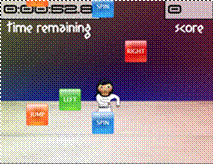
Spin, jump and twirl through the air without ever leaving your chair!

To Play:

http://www.popfly.com/users/Team/Gymnastics


clip_image005

clip_image007

Dive through the water and hit the target – harder than it looks!

To Play:

http://www.popfly.com/users/Team/Diving


clip_image009

clip_image011

Mirror your teammates movements with this synchronized swimming game!

To Play:

http://www.popfly.com/users/Team/Synchronized%20Swimming

clip_image013

clip_image014

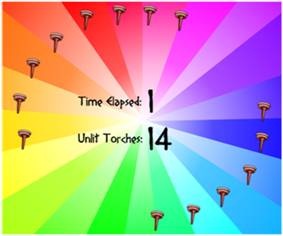
Try to light all 14 torches by clicking on them!  Watch out, they’re fast!

To Play:

http://popfly.com/users/team/light%20the%20torches


clip_image016

clip_image017

GOOAAAL!!!

Pick countries to go head-to-head in this game of Foosball Soccer!

To Play:

http://popfly.com/users/team/soccer

clip_image019

clip_image020

Ready… Set… Go!  It’s the 100-meter dash, pick your country and hurdle across the Finish Line to Victory!

To Play:

http://popfly.com/users/team/track%20and%20field

clip_image022

clip_image023

Pick your targets carefully, aim, and fire your arrows in this addicting game of Archery!

To Play:

http://popfly.com/users/team/archery

clip_image025

clip_image026

Help Rocket Chicken score his longest Long Jump and win a Gold Medal!

To Play:

http://popfly.com/users/team/long%20jump

clip_image028

clip_image029

Test your ‘Strength’ by keeping the barbell off the floor and trying not to turn red in the face!

To Play:

http://popfly.com/users/team/weightlifting

clip_image031

clip_image032

Forget Tyson vs. Holyfield, this is the real Boxing match of the century: my Xbox versus your Playstation.  It’s Battle of the Game Consoles!

To Play:

http://popfly.com/users/team/boxing

Hope this will be fun!!

-Vishal

Saturday, August 02, 2008

Web Deployment with VS 2008

On July 21st 2006, during ASP.NET Insider summit I had a chance to do a podcast with Wally McClure...  We discussed a bunch of items around Web Deployment with .NET 3.5 and VS 2008...  Some of the topics covered in the podcast are:

  • General Web Deployment Scenarios
  • Web Application Projects vs. Websites
  • Pre-compiling Web Projects (aspnet_compiler.exe)
  • Merging Web Projects (aspnet_merge.exe)
  • Web Setup Projects (MSI files)
  • Web Deployment Projects (WDP)
  • Microsoft Deployment Tool (MSDeploy.exe) 
  • Sql Publising Wizard
  •  

    You can view the podcast at: http://aspnetpodcast.com/CS11/blogs/asp.net_podcast/archive/2008/07/25/asp-net-podcast-show-120-deploying-web-applications-with-vishal-joshi.aspx

    Friday, July 11, 2008

    MSDeploy - Beta 1/Go Live Released


    We recently released Beta1/Go Live version of "Microsoft Web Deployment Tool (aka MSDeploy.exe) ".  MSDeploy is a very useful tool for creating web packages which can be used to move your web application from developer boxes to servers.  It can be used to replicate servers in web farm environments too.

    Download Location:  You can download MSDeploy.exe from the below location:

    http://iis.net/downloads/default.aspx?tabid=34&g=6&i=1602

    Earlier I had written about the Technical Preview release of MSDeploy here.  Apart from the features I had mentioned in the above post following are other key features worth noting are:

    MSDeploy Remote Agent: MSDeploy comes with a remote agent service.  This service can be optionally installed with MSDeploy and usually is intended to be installed on the server side.  MSDeploy on your Dev/Test box can talk directly to the remote agent on the server and help move your IIS6/IIS7 web to equal or higher version of the webs on the server.

    Below is an example of how you can move an IIS 6 site from one machine to another.

      MSDeploy.exe -verb:sync -source:metakey=lm/w3svc/1,computerName=VJWin2k3 -dest:metakey=lm/w3svc/2

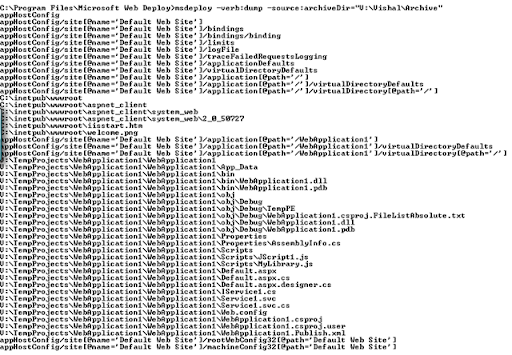
    Web Archive/Package:  MSDeploy can actually take a snapshot of your app from the local machine and move it to what we call as Archive Directory.  This will allow you to eventually take the Archive Directory on a different machine and use MSDeploy command line with elevated privileges to install your web on the server.  This can potentially solve a very common problem of developers not having admin rights on the server.   Developers in this scenario can run MSDeploy on your local IIS and create archive dir for their web.  This can be done from command line in the following way:

    image

    (command: msdeploy -verb:sync -source:appHostConfig="Default Web Site" -dest:archiveDir="V:\Vishal\Archive")

    This Archive dir can then be shared with the server Admins who can examine the content of the archive dir by executing the following command:

    msdeploy -verb:dump -source:archiveDir="V:\Vishal\Archive"

    image

    Now the admins can actually install the website from this archive package on to the production server.  This can be done by executing a command like below:

    msdeploy -verb:sync -source:archiveDir="V:\Vishal\Archive" -dest:appHostConfig="Production Web Site"

    image

    On executing this command the "Production Web Site" will get installed (as shown below) and will be stopped by default.  Admin can then turn it ON as appropriate.

    image

    I thought that apart from talking about the above feature referencing the New Features of this release from the "Read Me" file would be useful, so here are the extracts from the Read Me file...

    "What's New in this Release

    • PowerShell Support. PowerShell cmdlets are included, allowing you to use the Microsoft Web Deployment Tool conveniently with PowerShell. For more information about how the PowerShell cmdlets work, see the Help file as well as the Microsoft Web Deployment Tool Walkthroughs.

    • Enhanced Dependency Support. The dependencies that are checked for a web site or server can now be viewed on IIS 7.0 as well as IIS 6.0. They can be turned off on a granular level, such as disabling the drive space dependency check while still running the other dependency checks, or disabling the check for a single ISAPI script map. Additionally, when you view dependencies, you will be able to see the “trigger” for the dependency (what location(s) in configuration caused the Microsoft Web Deployment Tool to say that the module/component is a potential dependency).

    • Help file included in Setup. You can now see the full list of verbs, parameters and other detailed information about the Microsoft Web Deployment Tool in our .chm Help file, which will be included when you install the tool."

    In the future posts on this topic I will write more about various other features of MSDeploy and how they can serve some of your web deployment needs.

    Hope this was useful!!

    Thursday, June 26, 2008

    Seattle/Redmond/Bellevue Nerd Dinner - July 22nd, 2008


    Event details

    Seattle/Redmond/Bellevue Nerd Dinner - July 22nd, 2008

    Date and time:
    Tuesday, July 22, 2008
    6:30 PM - 9:00 PM

    Hosted by:
    ScottHa

    Are you in the King County? Are you a huge nerd? Perhaps a geek? No? Maybe a spaz, dork, dweeb or wonk. Maybe you're in town for an SDR (Software Design Review) or the ASPInsiders meeting. Quite possibly you're just a normal person.

    Regardless, why not join us for some Mall Food at the Crossroads Bellevue Mall Food Court on July 22nd around 6:30pm?

    If you want to come and share something with the group, please do! We're language and technology agnostic and always eager to learn about new stuff.


    Location:
    Crossroads Bellevue Food Court (http://www.crossroadsbellevue.com/restaurants/index.htm)
    15600 NE 8th St, Bellevue, WA 98008-3927, United States

    Get driving directions


    Add to your calendar

    Friday, May 30, 2008

    TechEd 2008, Orlando, FL & Web Development Features


    Simon and myself are doing a talk at TechEd 2008... The primary agenda of the talk is going to be as below:

    • Visual Studio 2008 & .NET FX 3.5
      •    Web Application Project, Website & Multi-targeting
      •     The design Surface & CSS
      •     ListView server control and ASP.NET AJAX
      •     JavaScript Intellisense enhancements
    • Visual Studio 2008 SP1 & .NET FX 3.5 SP1 (Beta)
      •     JavaScript Formatting  & 3rd Party Frameworks
      •     ASP.NET Dynamic Data
      •     ASP.NET AJAX enhancements
    • Out of Band Previews (OOBs)
      •     ASP.NET MVC Preview 3 (Model View Controller)
      •     Visual Studio Web Deployment Projects

    The session details are:

    Session code: WUX306: A Lap Around the Newest Features in ASP.NET and Microsoft Visual Studio 2008 for Web Developers

    Session Day/Time: 6/3/2008 10:30AM-11:45AM


    If you are coming to TechEd then we will look forward to seeing you there...

    Thursday, May 22, 2008

    ReSharper v 4.0 beta for VS2008 is out

    I just now receieved an email from Jet Brains team informing that ReSharper v 4.0 beta for VS 2008 is out... Below is the verbatim email in case anyone of you was interested...

    "I just wanted to let you know that ReSharper 4.0 beta for Visual Studio 2008 is now available for a test drive at:
    http://www.jetbrains.com/resharper/beta.html?nlrs

    In addition to enhanced productivity features, ReSharper 4.0 beta offers several new features for C# 3.0 including:

    - New code analysis, context actions and quick-fixes;
    - New refactorings (such as Convert to Extension Method, Convert to Automatic Property, Convert Anonymous Type to Named);
    - Updated IntelliSense.

    Final release of ReSharper 4.0 is coming soon! If you would like to learn more about upgrade availability, please contact me directly."


    Some of you had reported some bugs in VS that ReSharper was causing some failures for you... Please go ahead and try this version, I am guessing those issues must be resolved here...

    Monday, May 12, 2008

    Visual Studio 2008 SP1 Beta Released


    Just today we released Visual Studio 2008 SP1 beta...  VS 2008 SP1 beta is truly a feature packed release for Web Developers...  From enhancements in WCF space to including WAP (Silverlight and MVC with download) in VWD Express there are tons of things you can do with VS 2008 SP1...

    John Dundon has written a very detailed post about the release on our team blog below:

    http://blogs.msdn.com/webdevtools/archive/2008/05/12/visual-studio-2008-sp1-beta.aspx

    Also ScottGu has put forward a much more broader blog post about SP1 beta on his blog below... Do take time and read through the these two posts...

    http://weblogs.asp.net/scottgu/archive/2008/05/12/visual-studio-2008-and-net-framework-3-5-service-pack-1-beta.aspx 

    If you have question, queries or feedback do not hesitate to write to me at Vishal.Joshi@Microsoft.com

    Dynamic Data's new Code Gallery SP1 Version Released


    Our team just released new version of ASP.NET Dynamic Data in Code Gallery.  This version of Dynamic Data release works on VS 2008 SP1 and also contains the new Blinq wizard for Dynamic Data.  You can read more about it at: http://code.msdn.microsoft.com/dynamicdata.

    Code Gallery is a new model that our team is using to share early previews of our work in Dynamic Data.  This allows our team to share the latest developments with the community as soon as they meet the minimum quality bar.  Usually we would release something only after it goes through rigorous quality bar but this model allows community to view and provide feedback while we are still completing our work on the feature...  Hope you will enjoy looking at this more transparent model of technology releases from Microsoft...

    Tuesday, May 06, 2008

    Computer World survey ranks MS Web Development higher than Google, Yahoo & Facebook

    Web 2.0 developers rank MSN/Live higher than Google, Yahoo and Facebook

    http://www.computerworld.com/action/article.do?command=viewArticleBasic&articleId=9082558

    The top 7 web-based developer programs ranked:

    1. Microsoft
    2. Google
    3. Yahoo
    4. eBay
    5. Amazon
    6. Facebook
    7. PayPal

    Monday, March 24, 2008

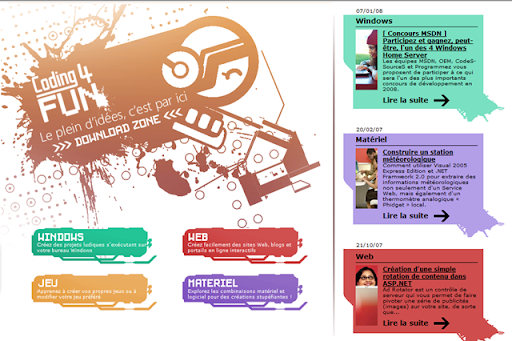
    New French Coding4Fun site released

    image

    New and exciting fun place to learn coding for French speaking friends...  Click here to go to Coding4Fun...

    Tuesday, March 11, 2008

    Upgrading Projects from ASP.NET MVC Preview 1 to Preview 2 (MIX 2008)


    If you previously had ASP.NET MVC Preview 1 (CTP 1) and had already created a few projects on it then you might have to take this additional step to convert your project to ASP.NET MVC Preview 2 (MIX 2008) [After installing MVC Preview 2 (Resources here)].

    In ASP.NET MVC Preview 2 we introduced a special MVC Project flavor GUID for MVC Projects.  Some of the special MVC project behaviors described in my previous post "Tooling Features Overview"  may not function as expected e.g. new 'MVC' node under the 'Web' node for 'Add new Items Dialog Box' may not show...

    image


    To make the project features to function as expected in Preview 2, open the MVC project file (.csproj/.vbproj) of the project you created using MVC Preview 1.  Look for 'ProjectTypeGuids'... You will find the below piece of code...

           <ProjectTypeGuids>{349c5851-65df-11da-9384-00065b846f21};{fae04ec0-301f-11d3-bf4b-00c04f79efbc}</ProjectTypeGuids>

    Replace the above with:

    <ProjectTypeGuids>{603c0e0b-db56-11dc-be95-000d561079b0};{349c5851-65df-11da-9384-00065b846f21};{fae04ec0-301f-11d3-bf4b-00c04f79efbc}</ProjectTypeGuids>

    When you reload/reopen your project your MVC Preview 2 functionality will be available in the projects you created MVC Preview 1.  Do note this in addition to other steps mentioned in the Readme Document for ASP.NET MVC Preview 2 which goes into greater details of upgrade scenario.

    Google's 9 Principles of Innovation


    This is worth a read:

    http://www.fastcompany.com/fast50_08/google_marissa-mayers-9-principles-of-innovation.html

    Friday, March 07, 2008

    ASP.NET MVC Framework Preview 2 (Mix 2008) Resources

    I am attempting to compile the relevant resources for ASP.NET MVC Framework Preview 2 at one place so that you will not have to keep searching around...


    ASP.NET MVC Preview 2 Download Location:
    Preview 2 Download (English-US) - Microsoft.com download location to get the latest MVC bits...

    ASP.NET MVC Documentation:
    Home Page - Asp.Net home page where you can find latest updates on ASP.NET MVC Framework in general...
    User Documentation - The official Microsoft user documentation on ASP.NET MVC Framework...
    Readme File - Contains a ton of information on how to install the preview 2 and how can it play well if you already have MVC Framework Preview 1, Silverlight etc...

    ASP.NET MVC Learning
    Forums - There is a ton of activity on ASP.NET MVC Framework forums, this is a great way of getting your questions answered...
    Videos - There are some great quick start videos on ASP.NET MVC Framework available here, we will be adding more videos here going forward to do keep checking

    ASP.NET MVC Blogs
    Scottgu's Tutorials Root - Scottgu has a bunch of very walk-through on ASP.NET MVC Framework here...
    ASP.NET Tooling Overview - In this post I have explained the tooling features for ASP.NET MVC Framework...
    MVC Unit Test Framework Integration - In this post I have explained how you can integrate a new test framework like NUnit, MBUnit, xUnit etc into your MVC Application.
    NUnit & Rhino Mocks Integration - In this post Joe has taken a NUnit and Rhino Mocks framework as an example and he has created a Test Project Template for you to download... I will highly encourage you to check this out...
    Phil Haack's Blog - Phil keeps writing interesting posts about ASP.NET MVC Framework... It would be nice to routinely check his blog too...
    My Blog - I also intend to keep posting ASP.NET MVC Framework articles on my blog regularly so you might want to check that out too...
    Scott Hanselman's Blog - Scott has some ASP.NET MVC Zen stuff on his blog too, do find time to check that out...

    ASP.NET MVC CodePlex Source Code
    http://www.codeplex.com/aspnet - CodePlex Home Page for ASP.NET
    MVC Preview 2 Source Code - CodePlex location to download MVC Preview 2 Source Code


    Hope this helps...

    Monday, March 03, 2008

    On Demand Webcast : Visual Studio 2008 for Web Developers

    VS 2008 brings a great deal of features for Web Developers...  As a part of VS 2008 launch I did a web cast on MSDN on Feb 26th 2008.  Below are few of the features that I did demos on, hope you will enjoy it:

    1. Multi-Targeting
    2. Split View & Nested Master pages
    3. CSS Features (Manage Styles, Apply Styles, CSS Properties & Summary)
    4. ASP.NET List View Control and Ajax
    5. Javascript Intellisense and Type inferencing
    6. Javascript Referencing & Commenting
    7. Calling Services (.asmx & .svc )from Javascript
    8. Javascript Debugging
    9. Web Deployment Projects (WDP) for VS 2008

    REPLAY URL : https://www.livemeeting.com/cc/mseventsbmo/view?id=1032369517&role=attend&pw=A6176DF3

    Sunday, February 24, 2008

    Webcast: New Enhancements for Web Developers in VS 2008


    Wanted to update you on a upcoming web cast that I am doing in support of Visual Studio 2008 launch event...

    Title: New Enhancements for Web Developers in VS 2008

    Date/Day: Tuesday, February 26th 2008

    Time: 11am to 12:30pm Pacific Standard Time (PST)

    Description :Get an overview of how Visual Studio 2008 takes web development to the next level. See highlights of the key new Web tools experiences in the Visual Studio 2008 product including support for multi-Targeting,  JavaScript enhancements, rich support for CSS standards, rapid development of data-bound web pages using LINQ To SQL, and more. Also learn about the new Web Application Project and Web Deployment Project enhancements to Visual Studio which adds an alternative Web application development, build and deployment models to the Visual Studio project system.  Also have a sneak preview of the work being done for Web Developers in out of band releases like ASP.NET MVC Framework.

    Registration URL:

    http://msevents.microsoft.com/CUI/EventDetail.aspx?EventID=1032369517&Culture=en-US

    Hoping you will be able to join!!

    Tuesday, February 19, 2008

    Free Microsoft Software for Students

    Microsoft announced an unparallel program called "Microsoft Dreamspark which will offer free Microsoft Visual Studio 2008, Microsoft Expression Studio and Windows Server 2008 free to students...

    You can read more about this announcement at http://channel8.msdn.com/Posts/2047/

    Enjoy!!

    Monday, February 18, 2008

    ASP.NET MVC Test Framework Integration

    Previously I gave an overview  of new tooling features for ASP.NET MVC Framework that we are hoping to make available during MIX 2008 timeframe.  You can read more about Overview of MVC Tooling Features for MIX 2008 here

    Goals: ASP.NET MVC Framework is Microsoft's implementation of MVC framework which is hugely popular in the industry for best practices and conventions.  In lines with best practices one of the goals of this new ASP.NET framework is to enable easy unit testable web applications.  To ease unit testing and to make it part of our regular application development workflow Visual Studio is introducing integration of unit test projects with ASP.NET MVC Application.  Many in the community are already familiar with and are using test frameworks liked Visual Studio Unit Test, NUnit, MBUnit etc.  If you have Visual Studio Unit Test framework on your machine (i.e. in Visual Studio 2008 SKUs Professional and Above) then on creation of ASP.NET MVC Web Application you will automatically be prompted to create a test project.   Not only that, due to the popular community request Visual Studio will now also provide a mechanism to extend this test framework system to integrate external unit testing frameworks like NUnit, MBUnit, xUnit etc.

    Today I will be walking you through this new Test Framework integration for MVC Projects. Our goal today is:

    • To understand how to create test project templates
    • To understand how registration works for test project framework and how to register a custom test project template

    At the end we want to get to a point where your test framework of choice shows up in the drop down when you try to create a MVC Application (like 'NUnit' does in the figure below):

    (Fig 1: Create Test Project Dialog Box)

    Applies To:  This article applies to Visual Studio 2008 with ASP.NET MVC Framework Mix 2008 CTP installed.  This documentation is pre-release documentation intended to provide insights to the community on the work being done by MS on ASP.NET MVC Framework, we are still in development phase so please do note that this is subject to change, but we believe this is very close to what you can see during MIX timeframe.

    Video:  I have also created a screen cast (approx 30 mins in length) which covers the concepts of this post in detail, we will be making it available here soon...

    Step 1: Creating Test Project Templates : There is a very succinct article on MSDN on how to create Project Templates.    You can find this article at http://msdn2.microsoft.com/en-us/library/s365byhx.aspx.  Although the process may vary depending on the type of unit test framework and mock objects you choose, I am summarizing the process in context of MVC Test Project Template which I created using NUnit framework and Rhino Mocks library.

    • Create a new class library project with the Code Language of your choice, give it a good reusable name which will apply to your test project template.
    • Add reference to "System.Web.MVC", "System.Web.Abstractions" and "System.Web.Routing" dlls in your class library project.  These DLLs will ship along with ASP.NET MVC Framework in the MIX 2008 CTP.
    • Download required Test frameworks (NUnit, MBUnit etc)
    • Download required Mock object libraries (Rhino mocks, Type mocks etc)
    • In the class library project add the right references to to the test framework and mock objects which you want to use.
    • Make sure that you make all of the above references dll's  "Copy Local" property to "True" (Select the referenced DLL and hit F4 to access the property in the Property Grid)
    • Add required folders and classes to test an MVC Application.  You can pre-populate whatever tests you like, but at the minimum if you would recommend matching the default MVC Application template that ASP.NET MVC Framework will ship with.  In order to match the default application template use the following structure:
      1. Create a "Controller" folder under the project root and add "HomeControllerTests" class to it.  Add unit tests to cover "About" and "Index" actions
      2. Create a "Routes" folder under the project root and add "RouteTests" class to it.  Add unit tests to cover the two default routes that will come with ASP.NET MVC Framework.
    • Build your project so that the required binaries are present in the bin (note: my screen cast has this step missing and hence I get some unresolved references when I instantiate the template)
    • Go to File-->Export Template wizard and follow its easy directions.  The project template is usually created in the user's VS directory (the wizard will point you to the location).
    • Remove the template.zip from the user specific directory and move it to %Program Files%\Microsoft Visual Studio 9.0\Common7\IDE\ProjectTemplates\Language\Test\Locale
    • Close all the instances of Visual Studio and open the command prompt (Start --> Run type cmd)
    • Navigate to the IDE folder on the command prompt (cd %Program Files%\Microsoft Visual Studio 9.0\Common7\IDE) and type devenv /setup, hit enter
    • This will take some time but should setup your newly created project template within Visual Studio .  If you now open VS 08, then in New Project dialog box you should be able to see your template show up under C#/VB-->Test directory.

    Step 2: Understanding Test Project Registration: We are introducing a very easy registry based registration model for your test project templates.  Please refer the registry structure below:
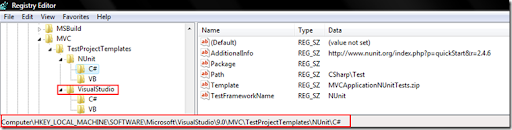
    image

    (Fig 2: Test Framework Registry Info)

    We have a new MVC key under Visual Studio 9.0 registry location as highlighted above.  As you can see above I have NUnit and VisualStudio as my available test frameworks.  This is what is showing up in the  screen shot of "Create Test Project" dialog box in Fig 1 above.  If you would like to add more test frameworks please go ahead and create one more key under 'TestProjectTemplates' key.

    On the right side you see various string values, let me go ahead and explain what each one of these mean:

    • AdditionalInfo:  You can enter a URL for more information on the Test Framework here.  It is hopefully going to be used by 3rd parties who will be creating Test Project Templates.  This link shows in the Fig 1 as "AdditionalInfo" link
    • Package:  This is a pointer to the VS package that you may want to use in case you are adding UI elements or doing advanced functionality with your Test Project.  Visual Studio will be using this information to pull out localized resources when we localize MVC Test Project Template for Visual Studio
    • Path:  The Test Framework selection of VS expects that your test templates are registered with Visual Studio and are located some place under standard VS Project Templates location (i.e. %Program Files%\Microsoft Visual Studio 9.0\Common7\IDE\ProjectTemplates\. The Path value mentioned here is actually the location under this standard VS Project Templates path. 
    • Template:  This is the actual zip file name which was created in the Step1 above.
    • TestFrameworkName: This is the name that will show up in the drop down of Fig1: above.  In order to localize the URL of AdditionalInfo or name of TestFrameworkName we will provide a special syntax like "#1209:NUnit".  This will indicate to Visual Studio to use resource # 1209 from the Package above for the localized string but if nothing is available then use the default "NUnit".

    Also one point to note over here is that VS Test Framework selection system will create a test project for the same language as your primary MVC Application Project. The same registry strings that we just discussed above can be replicated at the top node (e.g. 'VisualStudio') that I have highlighted in the Fig 2 above.  I would recommend having that replicated as it allows Visual Studio to fall back on this template in case your primary MVC Application is of languages  like 'IronPython' etc.  In nutshell that is the default template for that particular test framework within VS.

    Summary: On completing the steps above, when you go to File--> New Project --> Language --> Web and try to create a new "ASP.NET MVC Web Application" project then the dialog box presented in Fig1: will show up with your newly registered Test Framework in the drop down. 

    Hope this will get you unit testing your projects more and more...!!

    Vishal R. Joshi | Program Manager | Visual Studio Web Developer

    Sunday, February 17, 2008

    Tooling Features Overview of ASP.NET MVC Framework for MIX 2008

    There has been a tremendous positive response on ASP.NET MVC Framework from the community since we released the December 2007 CTP of ASP.NET Extensions.  With MIX 2008 coming closer our teams have been super busy in trying to bring out value additions to ASP.NET MVC Framework.  ScottGu, in his ASP.NET MVC Road-map post, recently introduced the new MVC features coming up with MIX preview.  He had mentioned that with this MIX release ASP.NET MVC will get much better Visual Studio 2008 integration and support.  My post today is to outline these integration points and support within Visual Studio.

    Features:  During December 2007 preview of MVC we just had project templates to support MVC development within Visual Studio, since then there have been some improvements which are as below:

    Project Template Filtering and Naming: MVC Project templates will now be filtered based on .NET Framework version and will be available only when you select Framework version 3.5.  You can now also name your projects and solutions as per your choice which was not possible in the Dec 2007 CTP.

    Test Framework Options: In Dec 2007 CTP we had 'MVC Application' project template and also had 'MVC Application and Test' project template.  We now do not expose the 'MVC Application and Test' project template instead we have a cool new Test Framework options dialog which shows up as soon as you click okay on you MVC Application creation.  This test framework dialog assumes that you want to create your test project in the same language as your primary MVC Application and so it does not show you that option.  TheTest Framework dialog box will look like below:

    image

    When you select your Test framework and click okay Visual Studio will create a multi-Project template with the Test Project already having reference to your primary MVC Application.  In my follow up post on this topic will learn about the way 'Test Framework Options' dialog box works behind the scenes and understand the way by which we can extend it to use external 3rd party testing frameworks.

    'Add New Items' Dialog Box:   The new 'Add New Item' dialog box for MVC Applications will show a "MVC" node under the "Web" node as shown below.  This will allow you to locate your MVC item templates pretty easily:

    image

    ASP.NET MVC framework (without any extensibility customizations) requires you to suffix your controller names with "Controller".  Visual Studio will now help you achieve this mundane task by reminding you about it and 'by default' naming it correctly in your project.

    Making Routes more Testable:    We have also gone ahead and changed global.asax to make your routes much more testable by default.  The new global.asax will look something similar to below:

    image

    You can very easily now call RegisterRoutes externally to test your routes.

    Getting Designer.cs/.vb Files Back:  In December 2007 CTP our view pages did not have the .designer.vb and .designer.cs files attached to them, many of you asked us to get that in so that server control useage would become easier.  In the MIX 2008 CTP every View Page, Master Page and Content Page associated with MVC development will come with a pre-created designer.cs/vb file.

    image

    Debugging Settings:   We have now made some default debugging settings so that your MVC application will debug no matter where you hit F5 in your solution explorer.  You will definitely have option to modify this behavior in the property pages of your MVC Application.

    Removing 'View in Browser' & 'Add a Content Page' Commands:  If you right click on .aspx pages within an MVC Application you will not see 'View in Browser' command.  This command has been intentionally disabled as in case of MVC application we want that the calls made are not handled directly to .aspx pages but rather get routed via a controller, which in turn will produce ViewData and redirect to the right View Page.  "Add a content Page' command was also removed from Master Pages in MVC application as creation of View Pages is expected to be location specific depending on the controller and 'Add a Content Page' was not directly applicable in such scenarios.

    New Look And Feel:  MVC Application right off the shelf will now also have a much more CSS friendly  and pretty UI which you can start customizing and converting into your real world application.  I am attaching a screenshot of how ASP.NET MVC Application will possibly look like as soon as you hit F5 on this new template.

    image

    Hope these features help you with using ASP.NET MVC Framework.  In follow up posts on the ASP.NET MVC topic, I will write back about customization of Test Framework dialog box.  In the meantime hope this gets you up to speed with our efforts around ASP.NET MVC Framework.

    Thursday, February 14, 2008

    Web Deployment Projects (WDP) 2008 Japanese Released

    Our Japanese & Redmond team have been working together and just released the Japanese version of Web Deployment Projects for Visual Studio 2008... Our Japanese friends have been patiently waiting for this release since the December 2007 CTP of WDP 2008 was released, so finally this RTW will help unblock a lot of people...

    You can read more about the ENU release at http://blogs.msdn.com/webdevtools/archive/2008/01/25/announcing-rtw-of-visual-studio-2008-web-deployment-projects-wdp.aspx

    You can download the JPN release from:
    http://blogs.msdn.com/webdevtools/archive/2008/02/14/announcing-japanese-release-of-web-deployment-projects-2008.aspx

    The announcement in Japanese:
    http://blogs.msdn.com/dd_jpn/archive/2008/02/14/7688137.aspx

    Hope our friends from Japan will enjoy it...

    Friday, February 08, 2008

    New Hot-Fix Visual Studio Web Developer now available

     

    We just released a hot-fix for VS 2008 which includes a ton of value added features...  We would had loved to have many of these covered within VS 2008 itself but as you can imagine it is not always possible to delay release to get everything in...

    The key idea over here is  to be able to provide incremental value over the product frequently and be agile in responding to customer suggestions... With all these value added releases coming out many have said that there are manageability concerns, but I would recommend looking at this as ala carte service, everyone does not need to constantly upgrade if you are not facing any of these issues daily, with VS 2008 SP1 all of this will be rolled up any ways...

    The key issues that this hot-fix will address:

    HTML Source view performance

    • Source editor freezes for a few seconds when typing in a page with a custom control that has more than two levels of sub-properties.
    • “View Code” right-click context menu command takes a long time to appear with web application projects.
    • Visual Studio has very slow behavior when opening large HTML documents.
    • Visual Studio has responsiveness issues when working with big HTML files with certain markup.
    • The Tab/Shift-Tab (Indent/Un-indent) operation is slow with large HTML selections.

    Design view performance

    • Slow typing in design view with certain page markup configurations.

    HTML editing

    • Quotes are inserted after Class or CssClass attribute even when the option is disabled..
    • Visual Studio crashes when ServiceReference element points back to the current web page.

    JavaScript editing

    • When opening a JavaScript file, colorization of the client script is sometimes delayed several seconds.
    • JavaScript IntelliSense does not work if an empty string property is encountered before the current line of editing.
    • JavaScript IntelliSense does not work when jQuery is used.

    Web Site build performance

    • Build is very slow when Bin folder contains large number of assemblies and .refresh files with web-site projects.

    Know more and download this hot-fix

    You can read more and download the release from our team blog here

    Friday, February 01, 2008

    MS Web Deployment Tool - Technical Preview Released

    We recently released MS Web Deployment tool (msdeploy.exe)... This is really a very handy tool to manage migration and deployment for your IIS based applications and web servers...

    At a very high level this tool can do one of the following things:

    1. Migrate IIS 6 applications & servers to IIS 7....
    2. Synchronize & take a snapshot you II6 or IIS7 web
    3. Analysis of installed IIS6 features
    4. Do whatif analysis of your product...

    This tool can traverse through and take a snapshot of your IIS web or web server. While traversing this tool takes snapshots of following:

    • Registry settings
    • Directory & Files
    • GAC Assemblies
    • COM Objects
    • Web, root web, app host & machine config
    • Certificates

    This information is then used to synchronize between servers... Interestingly I feel it is a great way to create a test or dev box snapshot... Well you can download and read lot more about the tool at the below email:

    http://www.iis.net/downloads/default.aspx?tabid=34&g=6&i=1602

    Friday, January 25, 2008

    Visual Studio 2008 Web Deployment Projects (WDP) Releases to Web

    Just some time ago I made an announcement on our team blog about release of WDP 2008... It has been a very exciting journey to reach at this point...

    We had received an enormous participation for December 2007 CTP and community had provided us with a lot of interesting feedback... We had to balance out between features and timeline as usual... There are many customers who were not able to move ahead with Visual Studio 2008 installations because of unavailability of WDP 2008 and we did not hold so many folks from using VS 2008 hence releasing early was definitely important...

    That said, I think the current version of WDP 2008 is a fine balance of speed to market and features... In fact I think this release has quite a few value added features:

    • New Features of Visual Studio 2008 Web Deployment Projects are as below... You can read in detail about these features on the post which announced December 2007 CTP of VS 2008 WDP (Click here to go to the December 2007 CTP post)
      • Migration from WDP for VS 2005 to WDP for VS 2008
      • Replacing WDP output only if Pre-Compilation succeeds
      • Creating IIS Applications
      • Using aspnet_merge.exe version which is installed with Visual Studio 2008
    • Core WDP Features

    To find out more about the release visit the link below:

    http://blogs.msdn.com/webdevtools/archive/2008/01/25/announcing-rtw-of-visual-studio-2008-web-deployment-projects-wdp.aspx

    At the end I feel really proud to to call out the efforts of the heros behind WDP, my team members... Alison Lu has done a great job of testing WDP and reproducing every possible scenario that we heard from blogs, forums or connect system... Wendy Wei our dev on WDP got to the bottom of multiple issues that were raised... Bill Hiebert is our Architect and is always the support mechanism of the team... Anna Lidman is our Release Manager and makes our release process so smooth that we practically have forgotten the pains of going to the web... Tim McBride is our Dev lead and John Dundon is our test lead on WDP and have always been great partners to work with...

    I hope you enjoy this release of WDP as much as we have enjoyed releasing it and hope it makes your pre-compilation and deployment challenges easier to deal with...

    Happy Deploying!!

    Thursday, January 24, 2008

    Register for Beta Exam 71-571: Microsoft Windows Embedded CE 6.0, Developing

    You are invited to take beta exam 71-571: Microsoft Windows Embedded CE 6.0, Developing if you have experience using Windows Embedded CE. If you pass the beta exam, the exam credit will be added to your transcript and you will not need to take the exam in its released form. The 71-xxx identifier is used for registering for beta versions of MCP exams, when the exam is released in its final form the 70-xxx identifier is used for registration.
    By participating in beta exams, you have the opportunity to provide the Microsoft Certification program with feedback about exam content, which is integral to development of exams in their released version. We depend on the contributions of experienced IT professionals and developers as we continually improve exam content and maintain the value of Microsoft certifications.

    71-571 : Microsoft Windows Embedded CE 6.0, Developing counts as credit towards the following certification(s).

    · MCTS: Windows Embedded CE 6.0 Developer


    Availability

    Registration begins: January 24, 2008

    Beta exam period runs: January 29, 2008– February 18, 2008

    Receiving this invitation does not guarantee you a seat in the beta; we recommend that you register immediately. Beta exams have limited availability and are operated under a first-come-first-served basis. Once all beta slots are filled, no additional seats will be offered.

    Testing is held at Prometric testing centers worldwide, although this exam may not be available in all countries (see Regional Restrictions). All testing centers will have the capability to offer this exam in its live version.

    Regional Restrictions: India, Pakistan, China


    Registration Information

    You must register at least 24 hours prior to taking the exam.
    Please use the following promotional code when registering for the exam: EMBCE
    Receiving this invitation does not guarantee you a seat in the beta; we recommend that you register immediately.

    To register in North America, please call:•

    Prometric: (800) 755-EXAM (800-755-3926)

    Outside the U.S./Canada, please contact:•

    Prometric: http://www.register.prometric.com/ClientInformation.asp


    Test Information and Support

    You are invited to take this beta exam at no charge.
    You will be given four hours to complete the beta exam. Please plan accordingly.
    Find exam preparation information: http://www.microsoft.com/learning/exams/70-571.mspx


    Frequently Asked Questions

    For Microsoft Certified Professional (MCP) help and information, you may log in to the MCP Web site at http://www.microsoft.com/learning/mcp/or contact your Regional Service Center: http://www.microsoft.com/learning/support/worldsites.asp.

    What is a beta exam?

    Where can I learn more about the registration process?

    Where can I learn more about the beta exam invitation process?

    Where can I learn more about the new structure of Microsoft Certification?

    Who do I contact for help with this beta exam or other MCP questions?

    Saturday, January 19, 2008

    Tips & Tricks: Web Server Settings for Web Application Projects now can be stored per user as well as per project

    Web server settings, which are accessible inside Web Application Projects (WAPs) property pages (Web section)  allow you to specify settings associated to to Visual Studio Development Server or IIS.  Many a times in a team development environment it is preferred that these settings are shared across the teams providing consistency; at the same time many other teams prefer that these settings be developer specific.

    To support both of these scenarios in Visual Studio 2008 the web server settings now has an additional checkbox as highlighted below:

    image

    By default this check box comes checked and it implies that these settings will be stored in the project file (i.e. .csproj or .vbproj) and when opened in an XML editor will look as below :

    image

    When the check box above is unchecked then the settings are transferred to .csproj.user / .vbproj.user file located in the project folder and "SaveServerSettingsInUserFile" node value is changed to True in the project file...  This setting is especially useful when a team wants to allow per developer settings while checking in the project files in a source control system like TFS or VSS.

    If you are using Visual Studio 2005 then we have created a hotfix to support this model. The explanation above still holds true for VS 2005, although in VS 2005 you will not have the property pages checkbox to make the change to "SaveServerSettingsInUserFile" property.  You will still be able to make the change manually in .csproj and .vbproj file.  You can read more about this in the KB Article 942844.   Hope this will help...

    Technorati Tags: Web Development,VWD,Visual Studio,tips and tricks,Development Server,ASP.NET

    Thursday, December 20, 2007

    Tips & Tricks: Start-Up Options and Instances of ASP.Net Development Server in a Multi-project Solution

    If you have more than one project in your solution you can use following options of solution properties to set your start up actions...  You can get the below dialog by right clicking your solution and going to its properties:

    image 

    If you have more than one Web project (either Web Site, WAPs or both) in your solution and choose to start only one of it, you can do so by setting "Single startup project" above (or also via  Project context menu "Set as StartUp Project" in solution explorer)...  Although, even after doing so when you start debugging your application using ASP.Net Development Server you will see multiple instances of ASP.Net Development Servers in your system tray as shown below:

    image

    There is an important point to note here that a single instance of ASP.NET Development Server cannot handle more than one Web Application/Site...  Ideally if you need this kind of functionality you should be using IIS for your debugging instead of ASP.NET Development server...

    There are instances when you might have many web applications or web sites in the same solution and you may be actually debugging only one of them...  In such scenario it might not be desirable to have multiple instances of ASP.NET Development Server running...  VS provides an explicit setting in the property grid of web application/site called Development Web Server - "Always Start When Debugging" which is set to True by default...  If you set this Property to be False only one web server instance will be created for the start up web project...

    You might want note that in that same debug run, you will not be able to debug any other non-IIS based Web Application/Site in the solution who has this property set to "False"; but if you really want to debug just one application at a time you may not have to worry about it anyway...

    Wednesday, December 12, 2007

    Edit & Continue feature for Web Application Projects (WAPs)


    There is Edit & Continue functionality available for WAPs... Although we have disabled it by default as it may potentially have debug performance impact due to the fact that we have to recycle the ASP.NEt Web Server process every time for this functionality to work...


    Although I think the performance hit is not as big to let go of not using the feature...  I would recommend that you go and try it out by checking the Edit & Continue checkbox in your Web section of Property Pages as below:

    image

    But also do note that this property in addition to your tools options Edit & Continue should be checked otherwise the feature won't work...

    image

    Also note that if you are in web development profile you will have to check "Show all settings" in the bottom of the Tools--> Options windows within Visual Studio...

    Workaround: Debugging Global.aspx.cs with ASP.Net Web Server within Visual Studio


    When you add a global.asax file to your "Web Application Projects (WAPs like below:

    image

    and then write code in Application_Start event and try to debug it like below using Visual Studio inbuilt Web Server

    image 

    Then during your first debug the breakpoint is hit but during your subsequent debug runs the breakpoint is not hit.

    The reason behind this is that we do not kill the ASP.Net Web Server process after your every debug run and hence Application_Start() is not fired every time.  There is a good reason why we do so...  Starting ASP.Net Web Server process is an expensive task and in most of the scenarios recycling this process after every debug would adversely impact your performance...  If you do not want to debug your Application_Start() method then probably you do not need to have the process restart and save performance most of the time... 

    However if you would like to have the breakpoint hit you have few easy workarounds... One of the workaround is that you stop the web server from your system tray as in the figure below:

    image

    Alternatively you can go to your property pages of your web application and enable Edit & Continue like shown below:

    image

    When you choose Edit and Continue then we recycle the ASP.Net Web Server process on every debug run (it is needed for the Edit & Continue functionality to work)...  This way although you will see very marginal degrade in your performance you will still be able to debug your Application_Start() methods...

    Hope this helps...

    Our team Visual Web Developer is hiring...

    The Visual Web Developer team is looking for a few talented and experienced invididuals to join our team.  We have opportunities in development, testing, and program management.  Our team builds Visual Studio features that enable creating applications for ASP.NET, IIS, Silverlight and Sharepoint.

    Here are links to our current openings:

    To submit your interest in any of these positions, please email -- vijoshi-at-microsoft-dot-com -- with an attached resume.

    Sunday, December 09, 2007

    ASP.Net 3.5 Extensions just released


    We just released ASP.Net 3.5 Extensions on Microsoft Download Center... This release includes preview of following technologies:

    • ASP.NET MVC
    • ASP.NET Dynamic Data
    • Silverlight controls for ASP.NET
    • ADO.NET Data Services
    • Entity Framework runtime, and
    • New features for ASP.NET AJAX.

    You can download ASP.Net 3.5 Extensions from below:

    http://www.microsoft.com/downloads/details.aspx?FamilyId=A9C6BC06-B894-4B11-8300-35BD2F8FC908&displaylang=en


    I will blog about many of these technologies in time to come...
    you can also find more interesting links on the release on Brad Abrams blog @ http://blogs.msdn.com/brada/archive/2007/12/09/the-wait-is-over-asp-net-3-5-extensions-preview-posted.aspx

    Thursday, December 06, 2007

    PDC 2008 is announced

    PDC which was earlier slotted for Oct 2007 was moved to Oct 2008 and is planned in LA Convention Center from Oct 27th to Oct 30th 2008... More information can be found below:

    http://msdn2.microsoft.com/en-us/events/bb288534.aspx

    Saturday, December 01, 2007

    Web Deployment Projects for VS 2008 Dec 07 CTP Released

    Today after more than two months of effort our team released the Dec 07 CTP of Web Deployment Projects (WDP)... We were receiving one or more requests nearly every week since last few months to have WDP out for Orcas so I am sure that this release will enable a tons of web developers to adopt VS 2008 and use the latest and greatest features that come along with...

    I have created a blog post on our team blog which talks more about this release... You can click here to view the post (http://blogs.msdn.com/webdevtools/archive/2007/12/01/web-deployment-projects-wdp-for-visual-studio-2008-december-2007-ctp-released.aspx)...

    I want to mention that we have a great team in Visual Studio Web Developer... Honestly, the team rocks, often time we never know who make these technologies happen and so to name a few those people are Wendy Wei, Alison Lu, John Dundon, Tim McBride, Bill Hiebert, Anna Lidman, Bradley Millington, Bradley Bartz, Omar Khan and others...  Hope you enjoy the release...

    I will keep posting other tips and tricks around WDP on this blog in the weeks to come so do visit once in a while...

    Wednesday, November 14, 2007

    WDP does not publish empty folders


    If you have an empty folder in your website then WDP will not publish it, this is by design... If you add any files to this folder then you can see it in the pre-compiled web folder that WDP produces...

    Monday, November 12, 2007

    Active Directory users of Seattle Area - Invited!!


    Microsoft Learning is looking for Puget Sound based volunteers who know Active Directory to participate in a pilot of our new, innovative MCP emulation lab exam technology. During this pilot, you will take an exam in which you will perform a variety of tasks using Active Directory, answer multiple choice questions, and provide feedback about your experience with this new technology. The purposes of this pilot are to: 1) understand how emulation lab-based items function in relation to multiple choice items, 2) determine how much time is needed to complete each lab, and 3) evaluate our scoring strategy.

    As an incentive, all participants will receive a thank you gift after completing the exam as well as breakfast or lunch. To encourage you to do your best on the exam, the top 5 highest scorers on the exam will receive a 100 GB USB 2.0 external hard drive.

    We will be conducting this pilot project through November 16 on Microsoft’s main Redmond campus. To ensure that all participants have sufficient time to complete both sections of the exam and provide feedback, each slot is scheduled for 4 hours. However, most participants have finished in less than 2 hours. Two time slots are available per weekday (Monday – Friday from 8:30am-12:30pm and 1:00pm-5:00pm). To register:

    1) Go to: https://www.pickatime.com/client?ven=11601148

    2) Create a ‘pickatime.com’ account if you do not have one. This information is used solely to send you a confirmation and reminder email.

    3) Select the location where you want to take the exam.

    a. Microsoft employees should register for sessions at Building 25 unless all slots for your desired date and time are filled.

    b. Non-Microsoft employees must register for sessions in Building 40.

    4) Select a day and time for your appointment.

    5) Click “Confirm.” A confirmation message containing specific details about the location of the exam and other relevant information will be sent to the email provided when you created your account.

    Walk-ins are welcome as long as we have available testing machines. To ensure a seat, we encourage you to register prior to the session that you would like to attend.

    Your participation is critical to the successful implementation of our emulation lab exam technology. Thank you, in advance, for your assistance with this project.

    Microsoft’s MCP Emulation Exam Team

    Monday, November 05, 2007

    Microsoft declared to be "Best Employer to work for" in India


    Business Today declared Microsoft India to be the best company to work for in India... You can read the complete story here

    Friday, October 19, 2007

    WDP Project does not show in "Add Existing Project" Dialog

    If you remove an existing Web Deployment Project from the solution by mistake and then try adding it to the solution back again (or to new solution) then WDProj won't show up in the "Add Existing Project" dialog box...

    As wdproj is an out of band addition to the Visual Studio, it is not by default recognized as a project when you try to add a project to the solution... The easy way to work around this is by putting *.* in the File Name box and clicking Open, this will display wdproj file which can then be loaded into the VS in same way if it showed up at the first place...

    The current limitation is by-design but we will looking at integrating deployment solution to VS in future releases... Hope this work around will help in the meantime...

    Friday, October 12, 2007

    Web Deployment Project (WDP) do not support Remote web

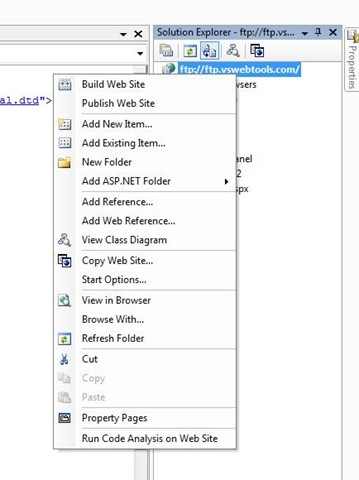
    WDP is not designed to work on a remote web site so it you are using FTP to connect to a remote location and are trying to use WDP for pre-compiling your web site then you will realize that you will see no WDP command in either the build or the solution explorer.   Some times users are confused whether their WDP installation or Visual Studio installation has some issues hence thought it would be worth clarifying...

    The work around for the same is to copy the web site locally pre-compile it using WDP and then publish it using "Copy Web Site" to the remote location.

    Fig1. WDP available on local web site in both solution explorer and Build command

    WDP-SolutionExplorer WDP-BuildMenu

    Fig 2. WDP not  available on remote web site in both solution explorer and Build command

    FTP-WebSite-noWDP FTP-WebSite-Build-noWDP

    Friday, October 05, 2007

    .Net Framework Libraries Source Code will be released...


    .Net Framework libraries source will be released along with .Net 3.5 and VS 2008... It will supported to be debugged with VS 2008 as well which will take Debugging your application to entirely new level...

    You should check out Scott Guthrie's blog for the complete story... Click here

    Wednesday, October 03, 2007

    Go Daddy customer service


    Thought this would be interesting... I opened up a new hosting account on GoDaddy.com last week and this week I received a call (actually voice mail coz I was not in my office) from a REAL HUMAN BEING from godaddy.com thanking me for my business with them and also asking me if they could do anything which could make my experience better... Am I really living in 2007?... Does everyone who opens an account with godaddy gets a call like this?

    Hat's Off to their customer service... Now I need to figure out if they will support IIS7, ASP.NET Ajax and .Net 3.5... If they give me that too I will sing praises for them like everywhere... :-)

    My Learning is cool


    Go visit http://learning.microsoft.com/Manager/Catalog.aspx

    Wednesday, September 12, 2007

    Windows Live Writer


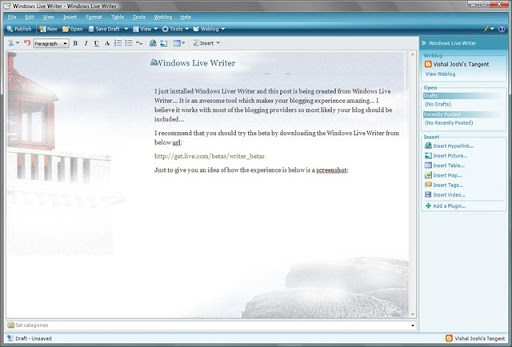
    I just installed Windows Liver Writer and this post is being created from Windows Live Writer... It is an awesome tool which makes your blogging experience amazing... I believe it works with most of the blogging providers so most likely your blog should be included...

    I recommend that you should try the beta by downloading the Windows Live Writer from below url:

    http://get.live.com/betas/writer_betas

    Just to give you an idea of how the experience is below is a screenshot of the screen while I am writing this post:

    WindowsLiveWriter

    Saturday, September 08, 2007

    Joining Visual Studio Web Team

    It has been a while since I wrote and hence it is a little strange to write... It seems like past 1.5 years of my work life has been hidden somewhere and that is kind of true as well... Hopefully I will be able to write about it in next 2-3 months, but anyways the reason for today's post is a little different...

    I wanted to let you folks know that I am joining Visual Studio Web Developer team from Sept 10th 2007 (Monday) onwards... It is an exciting move for me coz I have always loved the web world and working on the team which help shapes the future of the web is super exciting to me... Hopefully in time to come I will be able to write a lot more and provide some useful info to you all...

    Q. So what will I be doing in Visual Studio Web Developer team...?

    A. I will be the Program Manager for Visual Studio Project System for Web... Ofcouse that is very vague right!! So let me give some more details... Visual Studio Project System for Web comprises of creation, compilation and deployment of Web based XXX from Visual Studio...
    The reason I said XXX is coz XXX can include Web Site, Web Applications and any other web properties that you may want to create from Visual Studio...

    Q. So what can you expect from me?
    A. Well, as usual feel free to contact me whenever and however way you want... If you have any thoughts, issues, suggestions, concerns or feedback about Web Development with Visual Studio then do not think twice before writing... I promise I will conciously spend time and energy in taking the feedback in the most positive way in the most positive direction...

    Q. So what kind of things can you reach out to me for?
    A. Practically anything to do with Visual Studio Web Development... If it falls under the area that I am responsible for I will work on it myself, if it is beyond my area then I will send it across to the right people...

    Some Random thoughts:
    I feel, lot of time we take Visual Studio for granted... Many times we think that whatever is available within Visual Studio or via available add-ins is what you can do with the technology !! But Visual Studio is a product for us developers and you can say out loud the things that you love or hate about it... At Microsoft we will love to take your thoughts and suggestions and try to turn them into reality... It does not mean everything that everyone hopes will become Visual Studio feature, honestly not everything that I will hope will also become Visual Studio feature but the laundry list will be something which can become the base for discussion for the Visual Studio team... Your thoughts and suggestions will be something that will be debated and then probably the top requests will be taken up...

    I am intending to talk to as many developers as possible and try to find out what features would they expect in the next version of Visual Studio that would make their life easier, their experience enjoyable and their productivity higher and higher... I will be more than willing to have a phone calls set up with you to talk about your expectations and feedbacks so if you are interested in doing so do not hesitate to let me know... If you think you would like to join the discussion along with your team then that is great too...

    In anycase, to know more about the area that my team is responsible for visit our team blog below... It will provide you a lot of context on the things that we can talk about more...

    http://blogs.msdn.com/webdevtools/

    I will internalize our team motto and end by saying "Your websites will be my passion!!"

    Looking forward to writing more often in the future...

    Friday, July 06, 2007

    Numbers of Bloggers in Microsoft

    From a recent Wired magazine article about Microsoft:"In fact, the 71,000-employee company now has more than 4,800 bloggers posting on every imaginable tech topic, from startups to SQL." http://www.wired.com/wired/archive/15.04/wired40_microsoft_pr.html

    PS: Thanks to my colleague Gus who provided the pointer to this article...


    Disclaimer: This is probably a very conservative estimate coz there might be many many more employees who might have blogs on other private blog site and also on live spaces etc... I guess the above number is TechNet and MSDN blogs (exludes me too :-))...

    Thursday, December 28, 2006

    Upgrade News For MCSD .Net

    MCSD.Nets can upgrade to all three MCPD (i.e. Web Dev, Windows Dev and Enterprise Apps Dev) using only 3 Upgrade Exams instead of 4... So here is the quick FAQ...

    Q: Can exam 554 be taken without 553 having already being taken and passed?
    A: YES, 554 CAN BE TAKEN WITHOUT 553 (BUT ONLY MCSDs WILL GET CREDIT FOR 553 OR 554).
    Q: If so would that mean that an MCSD.NET can obtain all MCTS and MCPD certs by passing just three exams 551, 552 & 554?
    A: YES, AFTER AN MCSD EARNS THE MCPD: WEB AND MCPD: WINDOWS WITH EXAMS 551 AND 552 (AND IN DOING SO, BOTH MCTS WEB AND WINDOWS), HE OR SHE CAN TAKE 554 TO EARN MCPD: ENTERPRISE APPLICATIONS (AND MCTS: DISTRIBUTED).

    You can also see the rationale behind this on one of my previous posts... Click Here

    We will upgrade the microsoft.com pages soon for more updates on this thread check Trika's blog too...

    Tuesday, December 12, 2006

    PDC 2007 Announced

    Professional Developers Conference (PDC) is announced and is planned to be in Los Angeles from Oct 2-5 2007

    Click Here for updates... You can also subscribe to RSS feeds here...

    Registrations will open in first half of 2007...

    Wednesday, November 29, 2006

    News about Vista, Exchange and Office Exams

    With release of Vista, Exchange and Office new certifications associated with them are also announced... Check out few of the press releases for details...

    Vista, Office, Exchange Certs on Track

    Upcoming releases spur new certification exams

    New Exchange exams likely to emphasize roles, security

    Microsoft certification program to get a makeover

    Also I would encourage interested people to attend the live meeting planned on December 6th 2007... To register Click Here

    Microsoft Official Distance Learning (MODL) Announced

    A cool new way of learning Microsoft Technologies has been announced recently... I have personally seen the experience and it is pretty exciting... A real world environment is created remotely and a student is tought as if he/she was working on that problem in his/her office...
    All of this is done remotely so you do not need to travel far away to learn from the best Microsoft Certified Trainers (MCTs) in the world...

    Check out these links

    Lutz Ziob's video on MODL

    Europe Annoucement

    On IT News Online

    On Playful's.com

    On ManufactingTalk.com

    Wednesday, November 15, 2006

    VS 2005 Upgrade Questions V1

    A Colleague sent a few interesting questions on VS 2005 Upgrades am answering them here for everyone...

    Q. Can exam 554 be taken without 553 having already being taken and passed?
    A. Yes, it can be… Order of taking the exam is recommended not enforced... Although you will not get the complete credential till you pass all the required exams...

    Q. After 551 and 552 an MCAD requries the Distributed TS (529) and the Enterprise PRO certification (549) but these two are obtained when passing 554 are they not?
    A.Yes they are covered in 554 but 554 is built considering MCSD curriculum so MCAD will not receive any credit for 554…

    Friday, October 20, 2006

    Microsoft announces certification for Project 2007

    Long awaited certification on "Microsoft Project" is announced... We have heard multiple times from Project Managers using Project as their primary tool that there needs to be a certification on this topic so finally it has been announced...

    Check out some of the press releases when you find time...

    Microsoft to Unveil New Certification Program for Office Project 2007

    Microsoft Adds New Certification for Project Managers


    Microsoft to Release New Certification

    Introducing Howard Dierking's Blog

    Howard Dierking has succeded me as a Technical Product Planner for Database and Developer certifications... He too will be bring Certification News to you along with me... Hope you enjoy his blog too...